zautnerc
Members
-
Joined
-
Last visited
-
Thank you @ich777. I've attempted to join that Discord. I don't see an option to apply a reaction, which seems to be required to join the support channels. But I was able to post in the Lobby, so I will see if anyone is able to help me there. Thank you for all you do! I've used many of your dockers!
-
That didn't seem to fix it. I got the same error. And all of the folders already existed. Here's what I've discovered when it comes to RGW maps. There are 2 folders with the name of your map. In my case, the name of the map is "South Weoca Valley". There is a "South Weoca Valley" folder in both: 7dtd/user/generatedworlds/south weoca valley 7dtd/saves/south weoca valley Based on your response, I copied everything from: 7dtd\User\GeneratedWorlds\South Weoca Valley And I pasted it into: 7dtd\Saves\South Weoca Valley\Area 51 (Area 51 is the name of my save) I even tried pasting it into: 7dtd\Saves\South Weoca Valley I am receiving the same error every time. Thank you for trying though. I do appreciate it.
-
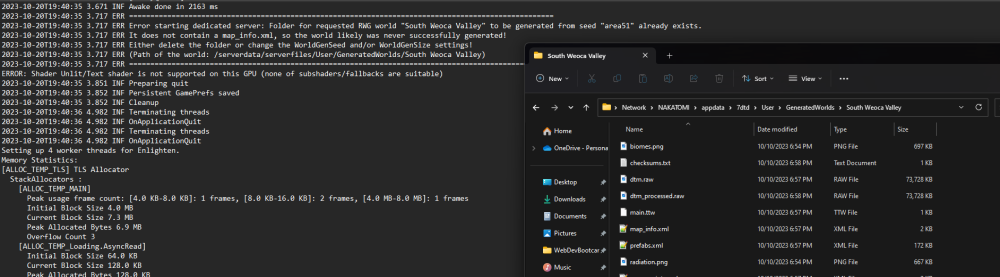
There's an error I keep receiving every time I try to boot up my 7DTD server. 2023-10-20T19:40:35 3.717 ERR It does not contain a map_info.xml, so the world likely was never successfully generated! 2023-10-20T19:40:35 3.717 ERR Either delete the folder or change the WorldGenSeed and/or WorldGenSize settings! 2023-10-20T19:40:35 3.717 ERR (Path of the world: /serverdata/serverfiles/User/GeneratedWorlds/South Weoca Valley) I'll go to that folder on my server, though, and I do see that file. Does anyone know if this is an unraid security issue?