





explosionhole
Members
-
Joined
-
Last visited
Everything posted by explosionhole
-
Apologies and thanks for correcting me. When flashing the new USB2.0 device I bought, I did the folder rename step in the manual install guide. At least Grub does boot. I just cannot get it to boot a downloaded unRAID image... But with you suggesting others run unRAID on this hardware. I know historically, USB flash drives can be picky and without reason. But I feel I am trying different models of very commonly used devices in my testing. I simply do not own another physical computer to perform a similar test. Therefore was looking to be informed by tech gurus from the community, particularly those who have this hardware to follow their lead...
-
I ran out this past couple hours and bought another Sandisk Cruzer USB2.0 32GB flash drive (so I have 2 of them now. 1 to Ubuntu Linux boot, then I can use Linux environment to create the actual unRAID bootable volume on the 2nd drive). I think I recall another comment that HPE Microserver Gen8 can only boot from the USB2.0 ports, and additionally that USB2.0 drives are also needed. With this, I have followed the manual install instructions for a Linux install as above. I have reflashed this image twice, in response to the installer's question of "UEFI (Y/N)", so I have tested both. It results in: I will now reflash the drive with the combined 2 links at the start of this article.
-
I think I described this through this thread, and others I have posted. I have tried 4 different devices to boot from. Starting with the default installer, nothing happens because it is UEFI-based. As soon as I put a different bootloader image on there, it booted first time from all these devices. This was the Ubuntu Live installer, and used Grub. While I have not tried on another computer, as I do not have one except RPi's, I think these tests done are sufficient to prove the devices I have are working and have no issue with this computer to boot from. It is purely down to the configuration of Unraid within a Legacy BIOS config to boot the image properly. I was questioning if UEFI equals Syslinux, or if I could still use Syslinux within the Grub config. By your response, I am expecting UEFI === Syslinux. Legacy = Grub...
-
So no then...
-
I upgraded the BIOS and firmware as 1st activities when I got this computer. I would expect this to be equivalent to resetting the BIOS. I have tried contacting a couple people who publish threads on this forum or elsewhere on the internet, like the 2nd link I provided above, but without any response. So availing myself to the rest of the technical Unraid community... Can I use Syslinux, not Grub, to create a bootable flash drive for Legacy BIOS?
-
I have tried with a Samsung Bar Plus, Sandisk Cruiser and 2 micro-SD cards (embedded on the mobo). I know it will only boot from the USB2.0 ports, and have tried the external and internal ports. The first time I tried a Ubuntu Live boot was for this purpose - does this thing boot from this device? It did. First time. But it used Grub. The Legacy BIOS approach is the only means I have tried that gets past the initial bootloader.
-
I am seriously struggling to boot the first installer of unRAID! This hardware does not have UEFI boot support. It has an internal USB-A port, but it does not boot from the default installer app / imager. Trying a Ubuntu Live instance on the same drive, with their default installer, worked first time. It is not the devices I have at hand. It is this device's config for legacy BIOS booting. I have searched "microserver unraid grub" and followed the insights from the top results. Can anyone help with this? I am trying options as far as my historical Linux skills allows. The output of the config described below is attached as a screen grab, because I wasn't sure which line was useful for troubleshooting... I use the early commands from this site, finishing at the command to mount the newly formatted disk to the filesystem. From this guide, for my hardware, I do not bother installing any UEFI-based components or Grub commands, just i386-pc: https://github.com/ndeineko/grub2-bios-uefi-usb Once the drive is mounted, I continue with this UNRAID specific guide for Legacy BIOS: https://github.com/gotvach/unraid-grub The unzipped UNRAID file is at the device root location. So "/bzimage" should exist here. I create "/mnt/boot/grub/" from the relevant mount point of the device. My final /mnt/boot/grub/grub.cfg file is below. The 2nd guide uses the Grub conversion tool, that I have manually edited, as it puts 3 front-slashes into the path. This was before all `/bzimage` references. # UNSUPPORTED command 'menu title Lime Technology, Inc.' set timeout=5 default='menu.c32' menuentry 'Unraid OS' --id 'Unraid OS' { if test x$grub_platform = xpc; then linux_suffix=16; else linux_suffix= ; fi linux$linux_suffix '/bzimage' initrd=/bzroot initrd$linux_suffix '/bzroot' } menuentry 'Unraid OS GUI Mode' --id 'Unraid OS GUI Mode' { if test x$grub_platform = xpc; then linux_suffix=16; else linux_suffix= ; fi linux$linux_suffix '/bzimage' initrd=/bzroot,/bzroot-gui initrd$linux_suffix '/bzroot,/bzroot-gui' } menuentry 'Unraid OS Safe Mode (no plugins, no GUI)' --id 'Unraid OS Safe Mode (no plugins, no GUI)' { if test x$grub_platform = xpc; then linux_suffix=16; else linux_suffix= ; fi linux$linux_suffix '/bzimage' initrd=/bzroot unraidsafemode initrd$linux_suffix '/bzroot' } menuentry 'Unraid OS GUI Safe Mode (no plugins)' --id 'Unraid OS GUI Safe Mode (no plugins)' { if test x$grub_platform = xpc; then linux_suffix=16; else linux_suffix= ; fi linux$linux_suffix '/bzimage' initrd=/bzroot,/bzroot-gui unraidsafemode initrd$linux_suffix '/bzroot,/bzroot-gui' } menuentry 'Memtest86+' --id 'Memtest86+' { if test x$grub_platform = xpc; then linux_suffix=16; else linux_suffix= ; fi linux$linux_suffix '/'/'/memtest' }
-
The HP Microserver Gen8 only has Legacy BIOS boot options, not UEFI. I tried many ways to deploy the standard UNRAID image, none worked. The only thing that did was when I put Ubuntu Live onto a stick, which immediately booted, and I saw Grub was the bootloader being used there. This led onto another web search for these 3 items (UNRAID, my Gen8 and Grub), which someone else had published a Git repo for how he accomplished it. I have followed it as best I can, but still cannot get this to fully boot. The latest error message (after applying the `fatlabel` command) is: I am checking the boot and grub.cfg paths, but without any technical authority for how it works...
-
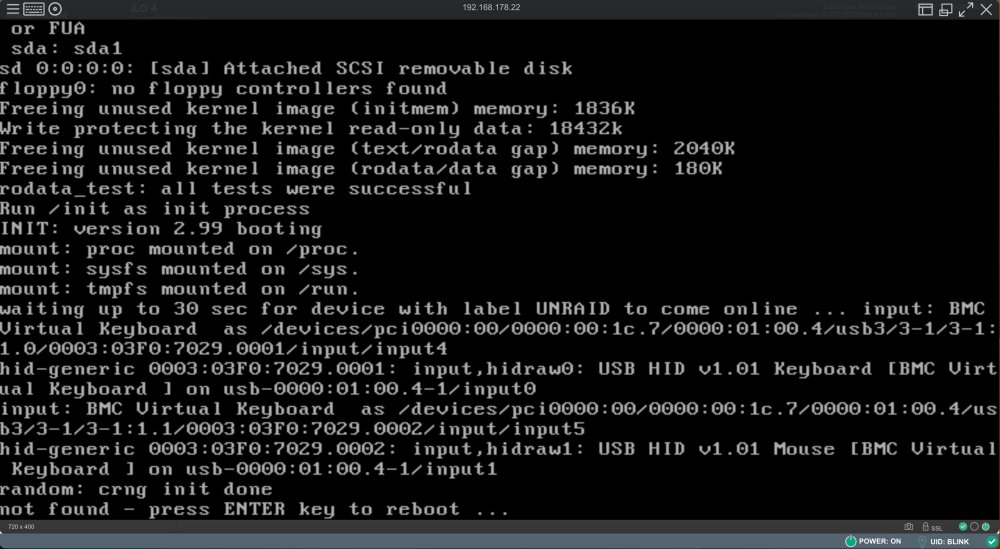
Newcomer to unRAID, cutting my teeth on a HPE Microserver Gen8. Proving harder than hoped with the actual boot, as it is "Legacy", i.e. not UEFI. I have created a custom Grub bootloader, which I have to to the point of auto-booting into unRAID 6.11.5. It takes 7.5 mins, as running from an internal USB2.0 drive. Once it finally does, I now get this error: `waiting up to 30 sec for device with label UNRAID to come online ... ` I have not labelled it correctly, it would seem. I am so close to getting this booting! I think! I hope! How do I change the drive's "Label" of a FAT-based partition/volume so that it is recognised by unRAID?
-
there are some equivalent USB boot issues with this specific model. Some mention the make & model of the device, but I had just proved with a different bootable image, this system could use the devices I had to hand. So I am continuing. On a separate TrueNAS forum thread, the OP points to this source to create a custom Grub USB boot loader: https://github.com/ndeineko/grub2-bios-uefi-usb This has worked in so much it just booted into Grub and my menu entry was listed. However it errors with: error: unknown filesystem. error: you need to load the kernel first. Press any key to continue... My `/boot/grub/grub.cfg` file is: menuentry 'unRAID 6.11.5'{ set isofile="/isos/unRAIDServer-6.11.5-x86_64.iso" #search --set=root --file $isofile #rmmod tpm #uncomment if grub version is 2.04 in UEFI mode (see https://bugs.launchpad.net/ubuntu/+source/grub2/+bug/1851311) loopback isoloop $isofile linux (isoloop)/casper/vmlinuz locale=en_GB boot=casper iso-scan/filename=$isofile quiet -- initrd (isoloop)/casper/initrd } Not sure if it is progress, or simply another or different error (and associated rabbit hole!). Is there a change to this issued command(s) that would fix within this setup?
-
Trying to recreate what @MauriceK did by creating a smaller partition on this disk using GParted on this Ubuntu Live. Then I returned this disk to my M1 Mac and redid the Unraid Creator. After completing, I put it back into the Ubuntu Live and re-checked it with GParted. This has replaced what was on the disk with a single FAT32 partition, that has the "boot" and "lba" flags on the partition. However, it does not boot when put back into the Microserver. The Ubuntu Live CD created a Grub bootloader when it was loading from the BIOS. Are there manual steps to replicate creating this config on the USB flash drive? And then I might be able to copy the Unraid ISO onto a partition?
-
interesting idea, @itimpi interestingly, the first burning of the Ubuntu installer ISO onto the original Samsung 32GB USB drive, put it in 1 of the external USB2.0 slots and it booted immediately! Now within this "live" system, how do I create the Unraid installer USB drive? There is no Linux disk creator app. I have no write permissions on the local disk. Supporting components aren't installed.
-
I have this same issue, but I only have a M1 Mac to create the bootable USB drive. There is no equivalent way for me to create a smaller FAT or FAT32 volume or partition than the entire disk using macOS Disk Utility. I have tried some different image writing utilities, including Balena Etcher, unetbootin, `dd` from the terminal, manually copying the Unraid internal folder structure and running the `make_bootable_mac` (but this fails, likely due to the M1 CPU). Any help / guidance?
-
I am trying to deploy this to a HPE Microserver Gen8. I have upgraded the CPU, and tried to use Corsair RAM but seemed to be incompatible (ordering some from MrMemory.co.uk that state compatability with my hardware). In the meantime, I have moved on to creating the bootable USB drive. I have the Samsung Bar Plus 32GB (recommended from a Youtube video of fastest performing USB flash disks and using Unraid). But whenever I put this in the internal USB slot, after the BIOS/POST screens, I get a couple of beeps and an error message of "non system disk" or similar. I have creating this using Unraid USB creator tool Balena Etcher tried following the manual install guide though some issues with this process and using either / both macOS Ventura or the M1 (needs `syslinux`, unetbootin also doesn't seem to run properly from Ventura copying files and executing the `make_bootable_mac` script, but this also requires `syslinux` The only other device I have is a RPi, but also being ARM-based, I would expect the same issues? Can I ask for any assistance please? This is usually the easiest part of these installs these days...
-
Ahead of my first deployment, and to see & read opinions, best practices for Unraid, advice and certainly gotcha's. I would like the community guidance for a more segregated disk layout and management. I have an HP Microserver Gen8, which I also upgrading itself to higher specs. Typical home server usage, emphasis on using Docker containers to run many functions for me and the obvious media server duties. I expect to (in time) use the 4x drive slots to cover both, but there is a common use to add an SSD to the internal cabling available for the DVD drive. I will certainly buy a largest disk I can extend to that covers the parity (largest capacity in the array) drive, likely 10TB. I doubt being able to fully populate the whole server, and equally not sure what it should or could be either. Can I start with just 1 drive? Or 1 drive per disk-performance grouping? My existing approach is to use SSD for higher performance needs, then media storage onto more durable and lower cost storage. Then there is a hybrid need between the 2, where use-case judgements need to be made or if possible split across a container or VM (i.e. MySQL binaries split from the data files). I would want to replicate this on Unraid, and would like insights in how Unraid does this compared to a typical Linux O/S use-case? I might expect SSDs to be needed to run the containers from? Or is that in-memory too? The data mapped / mounted into a container I would expect to run from either the "fast" or "large" data partitions, depending upon need? If I started with 1x HDD (if not from day 1, as soon as a 2nd disk is added, this would become the Parity drive). I need some input about the Microserver's ability to add a 5th drive, which is typically for a boot device SSD (what I currently do, too). But should I simply consider JUST the 4x bays for the data storage in this unit, and using/relying upon the file system tech of BTRFS? - 1x Parity 10TB - 1x SSD 1TB or 2TB for the FAST disk needs, - 2x HDDs, for the LARGE mass storage, match up to the parity as prices / value dictates and over time Or should I equally expect 2x SSDs in order to retain resiliency? Would the SSD need its own 2nd pair? Or would both disk "partitions" (driven from the disk type) be contained under a single Parity disk? I would base my needs around a single disk loss strategy, supported with an off-site backup with BackBlaze too. The available guides focus in one very similar use-case. Absolute newbie, so just trying to figure things out, while components are being shipped...
-
I have little interest in building my own PC anymore, however I am very opinionated about the software that it runs upon, which is why I am looking towards Unraid (so long as the base H/W is capable, of course - but is less of a modern-day concern I hope). A number of threads exist for QNAP devices, mostly from those who extend the life of an existing system. I don't see many choosing QNAP as a new device with the sole intention to run Unraid from it. However, it ticks many boxes for me in particular. Are there other options? I currently have an old HP Microserver (gen 2 I think?) running Ubuntu Server and I have been maintaining it. Hoping to fall back upon admin GUIs and stuff though, rather than being a home Linux Admin... The latest HP model looks great but too expensive and high-end for my needs I think though... Use case: Home server - backups, media, file storage Min 2 bay drives of high storage, with redundancy, probably 4 bay RAM for O/S operations & performance Full Docker experience - Synology uses it's own packaging and isn't the default install or latest version Intel/AMD64 processor, for simplicity with Docker usage Possibly run couple VMs 16GB RAM would be my minimum - hell I have that much in my laptop! Some SSD or caching for improved performance Remote access and usage - Nextcloud, Bitwarden, etc Power usage - I had been looking at a M1 Mac Mini, it just seems to have enough drawbacks to research other H/W units. Appreciate any inputs...
