WarlockSyno
Members
-
Joined
-
Last visited
Everything posted by WarlockSyno
-
Yeah I have the other share mounted in a VM on Proxmox, that one has had 0 issues.
-
I also checked and my backups/snapshots haven't had an issue with cache turned off. As stated before, I have another share with cache enabled that is working fine. In fact, I moved 500GB to it yesterday without an issue.
-
That is the exact issue I'm having with NFS. Like I said, I haven't tried it since then without the cache. I am using another SMB share with a cached drive no problem mounted in an Ubuntu VM. So not sure what the hang up is with Proxmox.
-
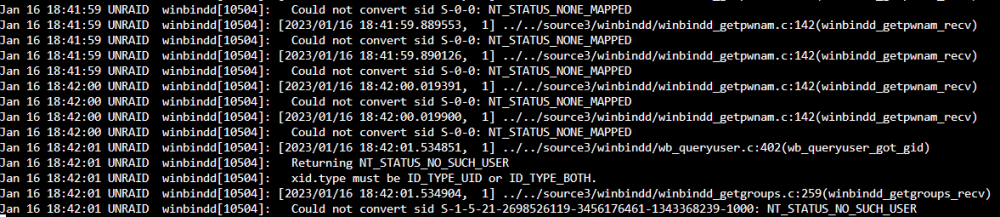
Hello, I'm trying to use an Unraid SMB share as a storage for ISOs, backups, etc. The issue is I cannot set a cache drive to the share. It will immediately kick an error out in Proxmox saying it cannot find the SMB share, even though it can list it. Here is a view of Proxmox showing details about the SMB share but unable to write to it INFO: starting new backup job: vzdump 100 --prune-backups 'keep-last=2,keep-weekly=1' --all 0 --node PVE-SOL --storage UNRAID-SMB --mailnotification always --notes-template '{{guestname}}' --mode snapshot --compress zstd ERROR: Backup of VM 100 failed - unable to create temporary directory '/mnt/pve/UNRAID-SMB/dump/vzdump-qemu-100-2023_01_16-18_19_28.tmp' at /usr/share/perl5/PVE/VZDump.pm line 930. INFO: Failed at 2023-01-16 18:19:28 INFO: Backup job finished with errors TASK ERROR: job errors If I remove the cache drive from the share it works perfectly fine. This may be related, but I tried to use NFS instead and ran into similar results, I didn't try it without the cache drive though. This may also not be related, but I turned on SMB log level to 1 and the console is being spammed with this error:

-
Hello! What about a Lenovo ThinkServer RD440?