





MisterB
Members
-
Joined
-
Last visited
Everything posted by MisterB
-
No adblockers or similar on my Unraid server... And no I didn't do multiple restart of the container, Should I?
-
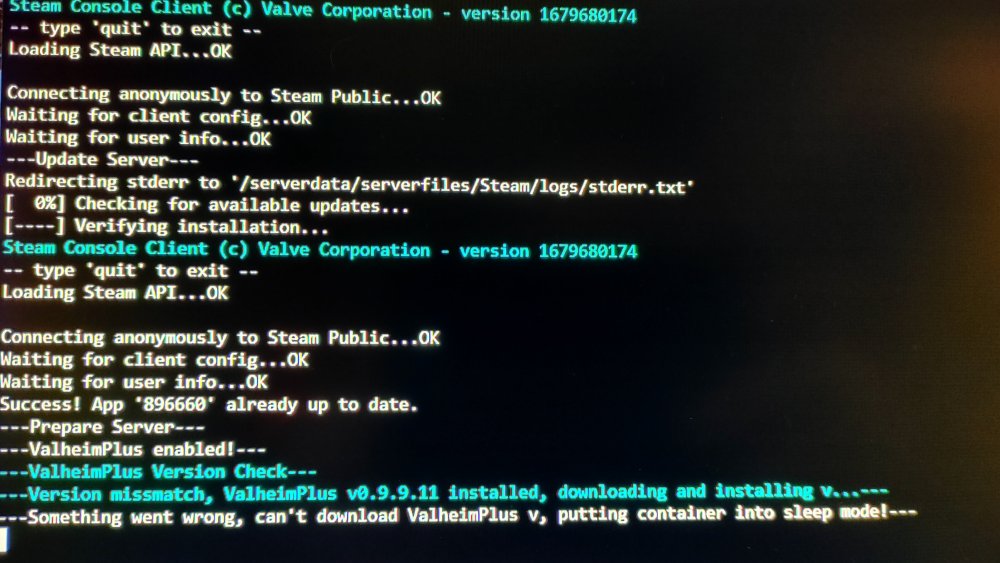
Hello, since today I just can't connect to my Valheim servers. Everything seems good and the server is running... So i went in the logs and got a missmatch problem in the Valheim+ version. And the result is that the container is put into sleep mode. Any idea anyone what's going on here? 🤔
-
It didn't worked... i simply kept a copy of my maps, deleted everything and started everything over... It's working now. Thanks for the help
-
6.11.5
-
Here's what i get as LOG after restarting the container: /serverdata/steamcmd/steamcmd.sh: line 39: 33 Segmentation fault $DEBUGGER "$STEAMEXE" "$@" /serverdata/steamcmd/steamcmd.sh: line 39: 39 Segmentation fault $DEBUGGER "$STEAMEXE" "$@" [S_API] SteamAPI_Init(): Loaded local 'steamclient.so' OK. CAppInfoCacheReadFromDiskThread took 1 milliseconds to initialize Setting breakpad minidump AppID = 892970 [S_API FAIL] Tried to access Steam interface SteamNetworkingUtils003 before SteamAPI_Init succeeded. ---Ensuring UID: 99 matches user--- ---Ensuring GID: 100 matches user--- ---Setting umask to 000--- ---Checking for optional scripts--- ---No optional script found, continuing--- ---Taking ownership of data...--- ---Starting...--- ---Update SteamCMD--- ---Update Server--- ---Validating installation--- ---Prepare Server--- ---Server ready--- ---Starting Backup daemon--- ---Update check deprecated!--- ---Start Server---
-
It was running fine for more than a month now. Problems started with the new patch 🤷♂️. Else than that i do not know what to say...
-
Tried that and still says "incompatible version". I have no adblock also... V+ is removed on server and client (my pc) and still mention it 😔🤷♂️
-
I did disabled both and did restarted the container and still get the "incompatible version" when connecting 🤷♂️
-
Ok i don't understand... I've removed every mods, even V+... I then removed the V+ option on the server. So basically, everything should work, but i still get the "incompatible version" message
-
Awesome! Thanks i'll try that 👌
-
Hello, same question about the Valheim docker. I cannot access my server from the game as it mention "incompatible version". Is it me who needs to do something to the server? 🤔 Thanks in advance ✌️
-
Thanks a lot! And keep doing an excellent job man 😁👌
-
Thanks a lot for the answers. That's sad, i was so much expecting to find an app or a plugin to be able to do that inside the unraid environment 😔🤷♂️. For the restart part, i was told that it is a good thing to restart the server on a normal basis. Was I being misinformed?
-
I am a brand new user of Unraid and really enjoy it so far. I builded my server mostly to host games and these dockers does make our lives SO much easier. Great job, really appreciated. There's two things i can't find anywhere and I hope someone would be able to help me 🙏. First, Is there a way from the dashboard, dockers dashboard, plugins or settings to know how many players are connected to my game servers or a specific server? Second, is there a way to schedule reboots of the Unraid server somewhere? 🤔 Thanks so much in advance to anyone who could provide support, it will be much appreciated. Best regards

