





SomeUNRAIDguy
Members
-
Joined
-
Last visited
-
diagnostics attached, thanks edit: I have a static IPv6 on my interfaces. When checking the "ps aux | grep nginx" there was no process started. When I tried to start nginx, I received an error about assigning the ipv6 address to the interface: "nginx: 2025/05/21 08:43:39 [emerg] 28849#28849: bind() to [my IPv6 address]:80 failed (99: Cannot assign requested address)" Removed the ipv6 config via "/boot/config/network.cfg" and then tried to start the nginx process. it worked. webUI back to normal. edit2: Specifically, I have two network adapters. Both were running dual-stack. I never cabled the second network bc it is an isolated network and Im not using it right now. This second network that was unplugged is the interface that stopped nginx from starting. Looks like a bug.
-
Moved my server to another place on my LAN. I can ping the server, SSH to the server, hit the docker containers on the server (that have a bridged adapter, so same IP but different port - not 443), but I cannot hit the webUI of the server. I have tried http://IP and https://IP. When I try it in Chrome I receive "refused to connect." Any ideas? If a diagnostics is needed I'll have to do some digging on how to do it via ssh... Thanks
-
Thats what it looked like to me, too. Yes, I have a spare disk. Honestly, my delay in replying was the new disk preclearing. The new disk has taken its place in the array and there appears to be no problems with it over the past 2ish hours. Safe to assume this other disk is trash? I appreciate your help.
-
Sorry for the delay. Thanks for your help. New diagnostics attached w disk not assigned and array started in normal mode.
-
Diagnostics attached. Thanks!!
-
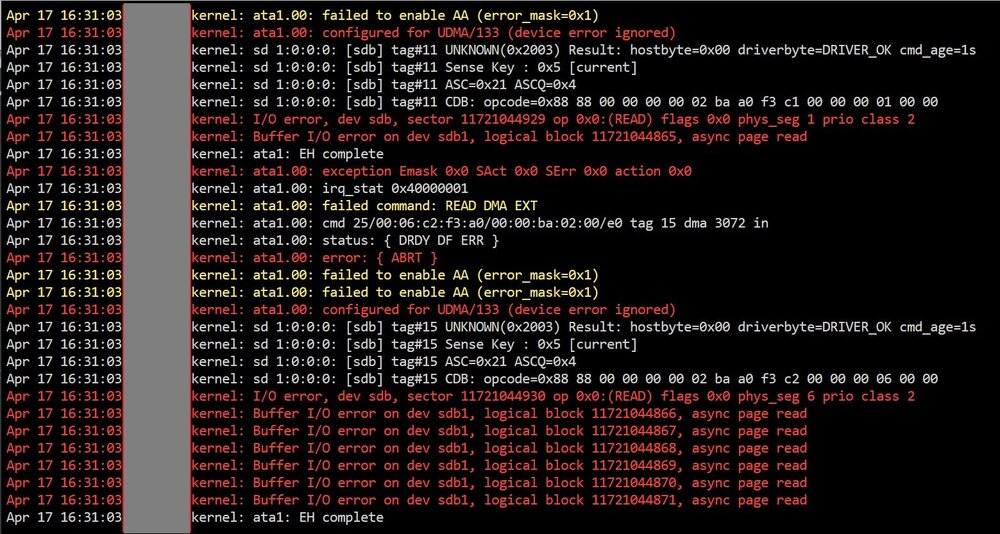
Gotcha. Actually, I'm guessing this disk is hosed. Here's the disk log when its not assigned & the array is in Maint Mode. Can you confirm, or is a full diagnostics needed? Thanks again!!
-
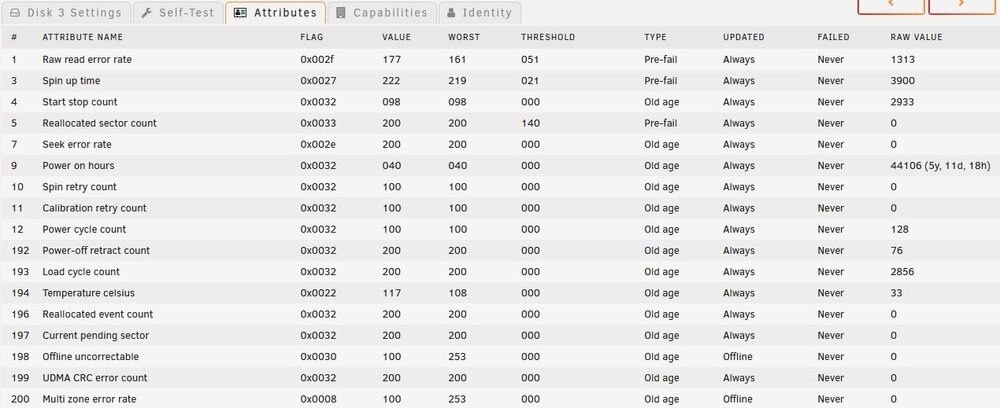
Hi, Sorry to ask. I promised I've researched and tried stuff. Have a failed data disk. SMART checked out, but as we all know this isn't definitive. When I pulled the cover off the tower I noticed a SATA cable unplugged. Might be the problem... Plugged back in & powered on the box. Disk still showing the same error (I think this is expected). Followed the directions on "Rebuilding a drive onto itself" and after re-assigning the disabled disk (step 6) and powering on the array, I still see the disk as disabled. I don't see where to fix this at. Can you help? Screenshot of disk attributes attached. Link to what I followed: https://docs.unraid.net/unraid-os/manual/storage-management/#rebuilding-a-drive-onto-itself Thanks!!
-
I’m a bit surprised I can’t find anything with unraid and nautobot. It’s not on the Community Applications but I can pull it from dockerhub. Anybody have this working on unraid, or are most of you all netbox users? thx
-
Hello, I'm creating a Linux VM appliance. The appliance installer needs 500GB of disk to install. In UnRaid I gave it a 500GB disk but when the ISO boots it says the disk is only 34.25GB. Is there something I need to do here? I've tried both 'raw' and 'qcow2' images. Thanks!
-
Older thread, but: After upgrading my MSI board to the latest firmware (July 2023) I had an "MSI quick boot" option and a "quick boot" option. Disabling both fixed this nagging problem for me.
-
OMG yes. Thank you


