





malaki86
Members
-
Joined
-
Last visited
Everything posted by malaki86
-
Exactly what I was getting at. The file transfer method in File Manager definitely needs a rework.
-
But, how to solve the issue, allowing both split level AND allocation methods to be fully utilized short of moving a single folder at a time? Yes, Sonarr is doing it in a way that works correctly, but the File Manager should also be able to deal with bulk moves, queues per file/folder, etc.
-
You understand what I'm saying about the entire "all at once vs one at a time thing", though? That's what is causing the issue. Rsync creates the folders on a specific drive and at that time, hell or high water, it's going to try to shove everything in it. Some sort of file transfer queue would alleviate the issue. Instead of an all at once, it would do file by file.
-
Ok - I know exactly what was causing the issue: When using File Manager and selecting a large group of items to move, it's moving everything to one drive. If you only more one or two things at a time, you can see that it's using the allocation method to decide where to put those files. Assuming that File Manager uses rsync for the actual file operations, I'm guessing that File Manager dumps an entire list to rsync, which just sends it to the location that File Manager says to, without checking the allocation method once the operation has started. I've been using Sonarr to move the TV series to the new location vs File Manager. Sonarr is spreading them out perfect because it's doing it file by file, versus one huge group to move at once. When I move a large group of movies in File Manager, I can see that entire group being moved to a single drive.
-
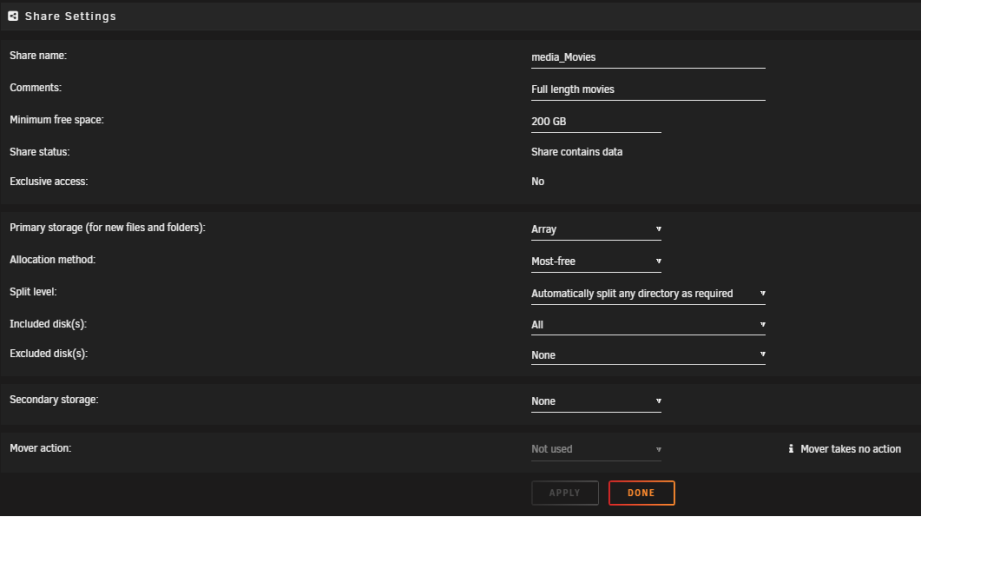
Just wanted to post a follow-up I've been moving both TV shows (split level of top 2) and movies (split the top level) and haven't had another issue. I have the array set to 200Gb free space, and allocation set to "Most Free". It's spreading everything out across the different drives, but it's also keeping the TV series season and Movies in the correct folders. I have no clue why it was all messed up before, but it seems to have sorted itself.
-
It is definitely behaving itself with moving the TV shows. It's sending the files to the drives with the most free space, while still keeping the episodes for each season in its own folder like it's supposed to.
-
Trying a different share to move stuff to - TV shows, with a split level of top two, 200Gb minimum free and allocated by Most Free. It seems to be working for the most part, but I do see it sending stuff to Drive 10 once in awhile, which has 300Gb free, instead of the drives with 1.25Tb+ free.
-
Disk 10 - the 8Tb drive
-
I meant fullest drive. I don't have any empty drives. I posted a SS of my array showing the drives
-
screenshot & diagnostics attached neo-diagnostics-20240211-1416.zip
-
BTW - I just stopped the Mover, changed EVERY share to "split any", started the Mover. Guess what? It's ALL going to the empty drive, not to the one with the most free space as it's configured.
-
It's not working because it's not using any logic prior to moving pre-existing files. That's easy to see. If it was only brand new files that were growing as it's downloaded, I could see why it would be a problem. NOT for files that are already 100% existing on the server.
-
Well, being that split level doesn't work the way it's supposed to, I guess I don't have much choice, do I?
-
that is nothing more than a temporary fix. Exclude one drive, it overfills the next, exclude that drive, it overfills the next. That's not a fix
-
These aren't NEW files - they're files sitting on the array on different drives. It knows how big they are, otherwise the File Manager wouldn't be able to calculate any kind of time estimate, could it?
-
I have a minimum free space of 200Gb. The largest file I've moved is 75Gb. Yesterday, it had the free space down to 85Kb, but was trying to put 10Gb files on it.
-
Like the issue I'm having - the drive is well below the allocated space, regardless of the split level, it's STILL trying to put the files there, even though there are 10 more drives with MORE than enough space. It needs to look at EVERYTHING before moving - not just one item
-
How could it be otherwise? By using a little logic prior to moving anything. Will it fit PROPERLY on this drive with all of the files? No? Ok, let's check the next drive.
-
Did they think that no one would EVER fill up a hard drive when they did the whole split level thing? It also makes me wonder why I have the same new destination folder on every single drive in the array. By the whole "split level has precedence" thing, shouldn't that folder only exist on one physical drive?
-
I said that it STARTED to move the files to the drive with the most space, which is where they should be, not on the drive that is full beyond it's allocated space. There is ZERO reason that a 5Gb file, plus 2 32kb files can't be automatically be stored on a drive with 1.72Tb of space available, instead of "NO - PUT IT ON THE DRIVE WITH 50Mb FREE"
-
And, again, there are literally thousands of file to move. I *thought* that a built-in feature of the operating system I purchased would actually work correctly.
-
Then why is there even a split level option, being that is is meaningless? Serious question. It's easy to look and see "hmmm - there are 10.25Gb of files to move, but this drive only has 8Gb free. Let's look on the next drive."
-
Okay - I thought I would try something. I have had the new share set to write directly to the array because of the volume of files that I have to move. So, for sh*ts & giggles, I changed the share to use the cache again. I selected about 10 movie folders with spread out files to move, which landed them in the cache, as it should. When that finished, I started the mover, and it starts by sending the files to the drive with the most free space. But, for whatever reason, it starts moving them to the empty drive, yet again...
-
I emptied the cache 100%, stopped the array, changed the share from High Water back to Most Free, restarted the array same problem - it's writing to the full disk every time
-
That's what's driving me insane. I just stopped the array. Hoping that spinning it back up might help?
