malaki86
Members
-
Joined
-
Last visited
Everything posted by malaki86
-
Did you find a fix for this? I'm having the exact same problem.
-
I uninstalled MySQL & install MariaDB-Official, instead. I'm not getting a 'Connection refused' error. Instead, I'm getting an 'Access Denied' error. Again, I've verified that the dbname, username & passwords match. Log for Speedtest-Tracker: #36 {main} "} s6-rc: warning: unable to start service laravel-automations: command exited 1 /run/s6/basedir/scripts/rc.init: warning: s6-rc failed to properly bring all the services up! Check your logs (in /run/uncaught-logs/current if you have in-container logging) for more information. prog: fatal: stopping the container. In Connection.php line 822: SQLSTATE[HY000] [1045] Access denied for user 'dbuser'@'172.17.0.1' (using password: YES) (Connection: mysql, SQL: select table_name as `name`, (data_ length + index_length) as `size`, table_comment as `comment`, engine as `en gine`, table_collation as `collation` from information_schema.tables where table_schema = 'mydb' and table_type in ('BASE TABLE', 'SYSTEM VERSIONED') order by table_name) In Connector.php line 65: SQLSTATE[HY000] [1045] Access denied for user 'dbuser'@'172.17.0.1' (using password: YES) Log for MariaDB: 2024-01-28 20:53:46 3 [Warning] Access denied for user 'dbuser'@'172.17.0.1' (using password: YES) 2024-01-28 20:54:31 4 [Warning] Access denied for user 'dbuser'@'172.17.0.1' (using password: YES)
-
I can't get this to run whatsoever. I installed the MySQL-Official addon (Docker), used the same database name, user name & password on both. I tried using the Unraid IP address and the docker container name (mysql), but I can't get anywhere. No matter the DB_HOST, it always fails. It comes up with a "connection refused" error every single time. Hoping someone can help. I can send more info if it's needed, but here's the end of the log, where it errors out and closes. #39 {main} "} s6-rc: warning: unable to start service laravel-automations: command exited 1 /run/s6/basedir/scripts/rc.init: warning: s6-rc failed to properly bring all the services up! Check your logs (in /run/uncaught-logs/current if you have in-container logging) for more information. prog: fatal: stopping the container. In Connection.php line 822: SQLSTATE[HY000] [2002] php_network_getaddresses: getaddrinfo for mysql fail ed: Name or service not known (Connection: mysql, SQL: select table_name as `name`, (data_length + index_length) as `size`, table_comment as `comment` , engine as `engine`, table_collation as `collation` from information_schem a.tables where table_schema = 'db' and table_type in ('BASE TABLE', 'SYSTEM VERSIONED') order by table_name) In Connector.php line 65: SQLSTATE[HY000] [2002] php_network_getaddresses: getaddrinfo for mysql fail ed: Name or service not known In Connector.php line 65: PDO::__construct(): php_network_getaddresses: getaddrinfo for mysql failed: Name or service not known
-
Suggestion for this plugin: Add the ability to create a list that can be copied (tab delimited is fine), or printed (PDF), with selectable columns. Being able to print out the layout would be a huge timesaver. A simple export would be the the "enclosure" name, tray ID, size and serial number (maybe even allow to select to export only the last 4 characters of the serial number). I just added a 15-bay JBOD and had to move 9 drives, plus add 3 more. Being able to do the initial layout in DiskLocation made the job a lot easier, but I had to copy/paste/edit the data to get a list.
-
I turned NUT off and enabled the built-in UPS for Unraid. It works perfect. I'd rather have NUT, though.
-
I added a UPS a couple of days ago, install NUT server, all with zero issues. Starting yesterday, the UPS was offline. I've tried multiple USB ports, all with the same issue. The port keeps disconnecting, then instantly finds it again, but NUT won't start now. Any clues? Below is a part of the log, but it's all I see as far as the USB & UPS. Jan 21 10:22:28 Neo kernel: usb 1-3: USB disconnect, device number 67 Jan 21 10:22:34 Neo kernel: usb 1-3: new low-speed USB device number 68 using xhci_hcd Jan 21 10:22:34 Neo kernel: hid-generic 0003:0764:0501.0042: hiddev96,hidraw0: USB HID v1.10 Device [CPS EC850LCD] on usb-0000:00:14.0-3/input0 Jan 21 10:22:42 Neo kernel: usb 1-3: USB disconnect, device number 68 Jan 21 10:22:48 Neo kernel: usb 1-3: new low-speed USB device number 69 using xhci_hcd Jan 21 10:22:48 Neo kernel: hid-generic 0003:0764:0501.0043: hiddev96,hidraw0: USB HID v1.10 Device [CPS EC850LCD] on usb-0000:00:14.0-3/input0
-
There's a few options available for outlets like that. It's just the first one that I saw.
-
What about something like this? https://www.amazon.com/Automatic-Etoolcity-Technology-Overload-Eliminating/dp/B07YK9VBQK/ref=asc_df_B07YK9VBQK/?tag=hyprod-20&linkCode=df0&hvadid=385124930314&hvpos=&hvnetw=g&hvrand=8408944786519487800&hvpone=&hvptwo=&hvqmt=&hvdev=m&hvdvcmdl=&hvlocint=&hvlocphy=9011240&hvtargid=pla-833075347902&psc=1&mcid=1a583a2b16e63511828047141b0c1af8&tag=&ref=&adgrpid=80210700684&hvpone=&hvptwo=&hvadid=385124930314&hvpos=&hvnetw=g&hvrand=8408944786519487800&hvqmt=&hvdev=m&hvdvcmdl=&hvlocint=&hvlocphy=9011240&hvtargid=pla-833075347902&gclid=Cj0KCQiAnrOtBhDIARIsAFsSe53KznOSWypPEe7G19i5n_r2mN3r9jyKFQ8TvIfJsq2GxWO0wa9d-KEaAu0DEALw_wcB
-
The process was painless. Thank you again.
-
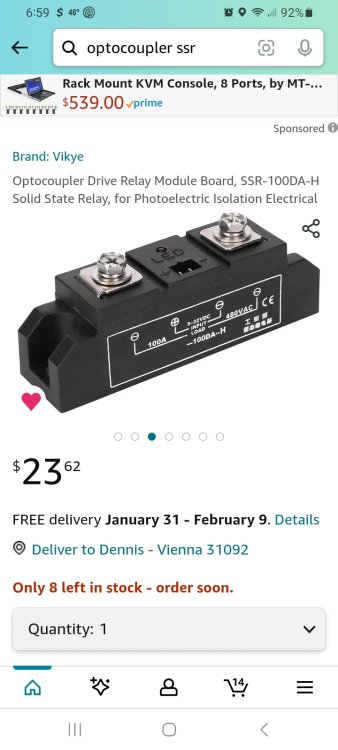
I'm installing a EMC KTN-STL3 JBOD this weekend and have been looking for a solution to automatically power down the drive shelf when the server shuts down. The primary reason for this is that the server & JBOD will be on the UPS. The server will power down prior to the UPS being fully depleted, but the JBOD would continue spinning along. So, what I came up with as a plan is a solid-state relay (SSR), powered by a USB cable from the server into a outdoor rated electric box, controlling the SSR. A power cable & plug will also go into this box. Inside of the box, the hot wire from the power cable will connect to an SSR. The +5v & GND from the server USB will connect to the trigger posts on the SSR. The switched hot will come from the SSR and attach to a standard wall outlet. The GND & neutral from the power cord will also connect to the wall outlet. Add a cover plate, mount it in the rack, plug the 2 power cables from the drive shelf into the new outlet, plug the power cord from the outlet box into the UPS and lastly, plug the USB into the server. Basically, the disk shelf will now power on & off at the same time as the server. I may add an in-line switch on the USB cable to manually power down the shelf.
-
Awesome. TYVM
-
I'm installing a 15-bay JBOD this weekend and will be moving the 8 data & 1 parity drives from the server chassis to the JBOD. I'm planning on doing a New Config so that I can put the drives in the layout that matches the JBOD slot. I also have 3 drives that I'm going to add, but I can do those after it's back up and running. So, in this case I should leave "Parity intact" option, correct? I know that if I had a 2nd parity drive it would rebuild that one.
-
Will it have the same power down options as acting as a server?
-
I don't have a 2nd parity yet, but the 2 New Config settings I mentioned are correct?
-
My Unraid server is running fantastic, with a single parity, 8 array drives and 2 multi-drive caches each. I'm receiving a KTN-STL3 15-bay JBOD today. The plan is to physically move the array & parity drives from the server chassis and run them in the JBOD, plus open up empty drive bays in the JBOD as well. I'll be physically changing the order of the drives, as well, with the older/slower drives at one end & newer towards the end, with the parity using the last 2 bays (1 will be left open until I order a 2nd parity drive, of course. Now, in the "New Config", I would leave the "Parity is valid" checked, while leaving "drive assignments" unchecked? This would let me change the physical order so that the drive number in Unraid matches the bay I physically insert it into, correct? Yeah, OCD is a thing LOL. BTW, I'm terrified to actually move the array drives into the JBOD. While 38Tb isn't a lot to some, it's years of collecting to me. My HBA card has 2 SFF ports, both in use for the current build. Is there a safe way to test the JBOD ahead of time? Maybe stop the array, plug in an old 2Tb drive (unassigned), dump some test data to it, connect the JBOD and see if the JBOD can access the 2Tb drive when it's inserted?
-
So, if I assign Parity 1 to bay 14 & Parity 2 to bay 15, with the data drives placed in "my order", the array will be ok, but need to rebuild Parity 2, correct?
-
I currently have 8 array drives, in slots 1-8. I just ordered a 15-bay JBOD and the parity & array drives will be relocated to the new drive shelf. Because im running different sizes & ages of drives, I want to reassign them to slots according to this age/size, with my parity & newer/larger drives to one side, and older/smaller towards the other side. I also ordered 2 new array drives but I won't install them until the drives have been moved & reassigned. I know how to do the new configuration to let me put the drives in the correct slots in Unraid, but will I have to do a new parity build? I'm not clear on when a new parity build is required. Basically, the drive bays will match the slot assignments, with Parity 1 in bay 1, Parity 2 in bay 2, array 1 in bay 3, etc, but with open slots matching the empty bays.
-
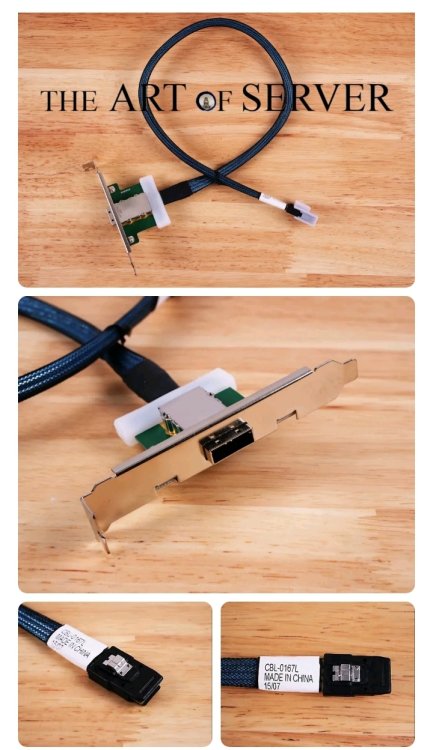
I went ahead and ordered a single-port internal to external adapter. It will work for now. I'll put the parity drives in the shelf, leaving 4 SATA ports from the controller, plus the on-board SATA if I decide to add more cache drives.
-
My current server is all internal, using an LSI HBA IT-mode controller (9207-8i). I just ordered an EMC JBOD shelf, so I need to connect it all. My plan is to leave the 2 parity drives, 4-6 cache drives & *maybe* 2 empty bays for later use. Right now, the HBA card is running the 8 data array drives, which will be relocated to the drive shelf. I *might* install the parity drives in the shelf, as well. 13 data drives should be more than enough for me (just like 640kb of RAM is plenty, right?). For the moment, I'm thinking about just using an SFF-8087->SFF-8088 cable from inside of the server to the rear of the shelf. The 2nd port on the controller can run the cache drives (I currently have two, but plan on adding at least 2 more. I know that I can get an 8087->8088 adapter for ~$25 for a better setup, but what I'm thinking would be the best for my setup would be an HBA card with both internal and external ports, 8i8e, but I can't seem to find them. An expander card would work, but I don't need 24-36 port, plus the expander would cost more than the actual controller. So, any suggestions?
-
ok - that i did not know
-
At some point I had installed nginx, then later removed it. I noticed today that it's apparently still at least partially installed because it has processes listed. How do I completely remove it? nobody 8213 0.0 0.0 7972 1948 ? S 2023 0:04 nginx: worker process nobody 8214 0.0 0.0 7972 1852 ? S 2023 0:04 nginx: worker process nobody 8215 0.0 0.0 7988 1940 ? S 2023 0:05 nginx: worker process nobody 8216 0.0 0.0 7972 1768 ? S 2023 0:04 nginx: worker process nobody 8217 0.0 0.0 7988 1928 ? S 2023 0:05 nginx: worker process nobody 8218 0.0 0.0 7972 1948 ? S 2023 0:05 nginx: worker process nobody 8219 0.0 0.0 7972 1948 ? S 2023 0:04 nginx: worker process nobody 8220 0.0 0.0 7972 1852 ? S 2023 0:05 nginx: worker process
-
I'm 99% sure that the SATA controller card was overheating. It's in a slot next to my HBA SAS controller. I took the side panel off the computer and have a fan blowing directly at the cards. Haven't had any issues yet, with it working pretty hard - parity check, downloading/unpacking & transcoding 4 files at once.
-
This is the beginning of the trouble: Jun 2 17:22:55 Neo kernel: ata8.00: exception Emask 0x10 SAct 0x18000 SErr 0x4010000 action 0xe frozen Jun 2 17:22:55 Neo kernel: ata8.00: irq_stat 0x80400040, connection status changed Jun 2 17:22:55 Neo kernel: ata8: SError: { PHYRdyChg DevExch } Jun 2 17:22:55 Neo kernel: ata8.00: failed command: WRITE FPDMA QUEUED
-
Sorry - totally meant to, but had to get them off my pc. I'm adding them now. neo-diagnostics-20230602-1914.zip
-
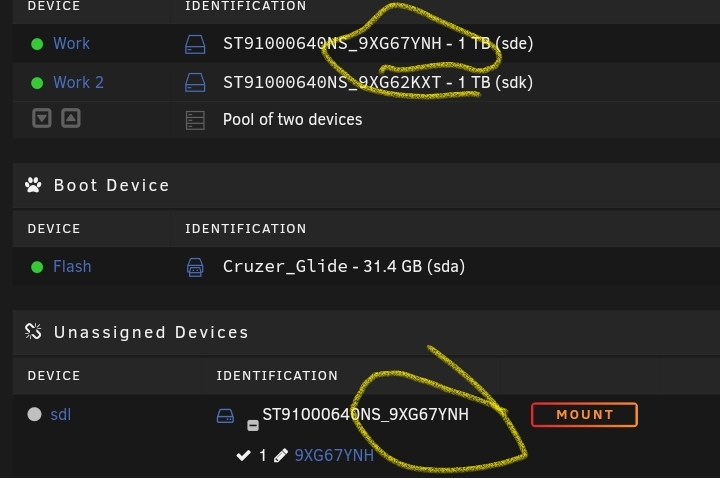
Just had a really weird issue pop up. One of the drives in my Work cache has "duplicated" itself, and now is appearing in the cache (RAID-0) and as an unsupported drive. I'm in the process of running a parity check, but it seems to be frozen. I can hit the button to pause or cancel the check, but it doesn't. According to the read & write speeds it's not doing anything even though it says it is. I did a system reboot and everything seemed to be perfectly fine. Maybe an hour later, both of the drives for that cache "duplicated" and were listed in both the Cache pool and in the Unrecognized drives section. Without rebooting, I can't do anything with those drives. I looked through the logs and am seeing a LOT of errors in it.