




Skip to content
View in the app

A better way to browse. Learn more.

Unraid

A full-screen app on your home screen with push notifications, badges and more.

To install this app on iOS and iPadOS
  1. Tap the Share icon in Safari
  2. Scroll the menu and tap Add to Home Screen.
  3. Tap Add in the top-right corner.
To install this app on Android
  1. Tap the 3-dot menu (⋮) in the top-right corner of the browser.
  2. Tap Add to Home screen or Install app.
  3. Confirm by tapping Install.

zozz

Members
  • Joined

  • Last visited

  1. I didn't bother with the GUI anymore and just went straight to the configs like you mentioned. Saved/Config/WindowsServer/Engine.ini works for ServerName and Saved/Config/WindowsServer/ServerSettings.ini works for serverRegion. I had to wait a little bit for it to show up in the ingame server browser, but all is good now! Thanks.
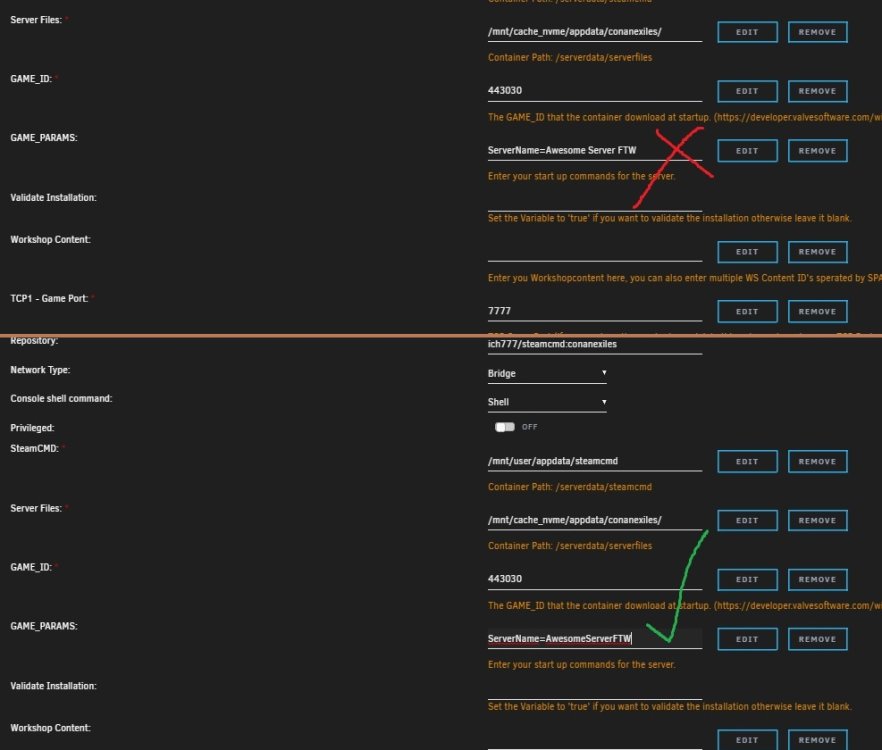
  2. How do I pass additional server specific parameters into the Conan Exiles docker? There is some sort of formatting issue I am running into GAME_PARAMS takes "ServerName=test111" just fine, but not "ServerName=Test TEST". No spaces. Ich , do you know how to pass more than one set of variables to the Conan Exiles docker, which may or may not have spaces? I don't want to have a server without spaces! And I also need to pass other variables like serverRegion=US

Account

Navigation

Search

Search

Configure browser push notifications

Chrome (Android)
  1. Tap the lock icon next to the address bar.
  2. Tap Permissions → Notifications.
  3. Adjust your preference.
Chrome (Desktop)
  1. Click the padlock icon in the address bar.
  2. Select Site settings.
  3. Find Notifications and adjust your preference.