





Jdmar
Members
-
Joined
-
Last visited
-
That's a good point. It was just getting constant SMART errors so he wanted to swap it out. After seeing your reply, would it be better to put 6 back in and put the new disk in 7, wait for it to rebuild. Then put what was in 7, into 6 instead? Just gonna take a long time thats all I'm thinking.
-
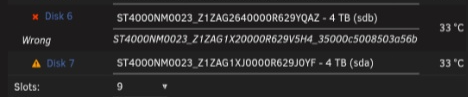
Unraid version - 7.3.2 Good afternoon My friend was changing out a disk in his server that was starting to fail. This disk was in slot 6. He mistakenly put the new disk in slot 7 and started the rebuild. Then noticed, shut it down, took it out of 7 and put it in 6 and then put 7 back in. And here we are... Luckily he managed to grab a screenshot of the disk layout yesterday; Now I've set it to this; But because he's only got 1 parity drive, unraid won't start rebuilding because 7 has changed and 6 has changed. I'm about 90% sure on the answer, but wanted to just check before I commited. Am I correct in saying I need to go to Tools -> New config -> Preserve assignments (all) -> Yes I want to do this -> Main tab -> Tick parity is already valid and then start the array? This should then only rebuild disk 6.

-
Well I'll be replacing disk4 shortly so it won't be an issue. 0 errors in Array Devices so far (6.2% in) but disk 6 (the original one that I was in the process of replacing) raw read error rate is going up intermittently. Thanks for your help, both of you. Greatly appreciated.
-
My apologies, I did mean Disk 4. So I leave "Parity is already valid" unticked and then start it up? I never knew about monitoring 1 + 200. And I have got notifications set up, it notified me that disk 6 was in an error state. I'll keep an eye on the others now I've put 1, 200 in the smart attribute notifications for the WD drives. Thanks both for your help on this.
-
So I just tick "parity is already valid" and then start? I can't add D4 as it's completely dead. It's clicking and I've taken it out and even Windows picks it up as a "Unknown drive"
-
I did yes. I did "New config" then second guessed myself before I commited. Lol
-
Didn't think they'd be helpful as I'd restarted. homebase-diagnostics-20240328-1838.zip
-
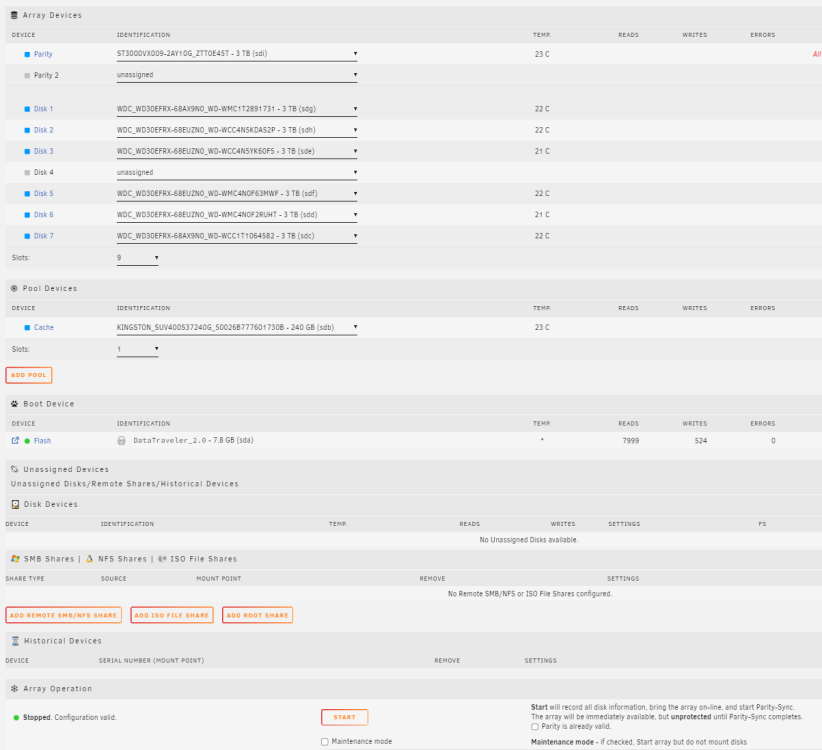
Good evening Unraid V6.12.9 So I have a 7 x 3TB disk array with 1 x 3TB parity and 1 x 250gb cache. One of my drives failed yesterday (D6). So I did an extended smart report (attached) and because it was giving a WRITE FPDMA QUEUED error, I thought I'd try stopping the array, reseating it, un-assigning the failed drive, starting the array, stopping the array again, reassigning the "failed" drive and starting the array again. This failed 49% though, so I was in the process of getting a different drive when another drive completely failed (D3) and with the server being in the cellar and me having to lift a hatch and crawl to the server, I thought the drive must have just been having a paddy so I lazily and stupidly rebooted the server. Now I (expectedly) can't start the array as I have 2 drives and only 1 parity. Am I correct in saying I need to go to Tools -> New Config -> Preserve current assignments -> All -> Done and then un-assigning the failed disks (D4 + D6) and starting the array again, then after the new drives have precleared fine, adding them into the array? I know I'll have lost all the data that was on D4+D6 but c'est la vie, there's nothing I can do about it now. TIA. WDC_WD30EFRX-68EUZN0_WD-WMC4N0F2RUHT-20240328-0847.txt
