





paqman
Members
-
Joined
-
Last visited
-
I don't know why I always figure this stuff out right AFTER posting in the forum about it. I've been troubleshooting this for 2 days, and only just now realized that it may not be unraid at all, but my wifi network having issues. So I tested from my Mac mini that was hard wired to the network, and I could not replicate the issue. Then I put my usb NIC in the laptop where I was experiencing the issues, and could not replicate the issue. Took the NIC out and went back on wifi, issues came back. That pretty much seals the deal, I think it's my local wifi network that is causing these issues. Only thing I haven't done yet is reboot my wifi routers. I have family over and they're all using the wifi right now lol. Anyway, thought I'd report in, this is a non issue folks.
-
I've recently noticed an issue that I can't seem to figure out. I noticed the issue starting after I tried to preclear a Western Digital 14TB Elements external drive. I was trying to preclear it via USB 3.0 still in its enclosure, to verify it is good before shucking it. The preclear kept freezing or crashing. I killed the binhex preclear docker container, figured something might be up with the drive, or it didn't like me doing it over USB. So I figured I would do an extended test from a windows machine. But since that happened, I have been experiencing random freezing on unraid in general. It only happens from network connected services. If I ssh in to the command line, commands will occasionally freeze up on me, then return everything 5 to 10 seconds later. This happens frequently from every 30 seconds to a minute it seems like. The unraid gui would also freeze up occasionally. Then I had a family member tell me that plex was freezing up on them. (I've only been able to catch plex freezing/buffering one time in my testing during this). But if I connect a keyboard and monitor directly to the unraid machine, the command line never freezes up. So it seems that the machine is fine, but there is something wrong with the networking. I was trying to get chatgpt to troubleshoot it with me, and I thought had it narrowed down to the onboard NIC. I ordered a USB 3.0 NIC to see if I could run off of that and see if the freezing still happened. It did. I switched to eth1 on the USB nic, same IP, freezing still happens. So now I'm at a loss as to what could be wrong. It seemed to happen when I tried pre-clearing that USB drive, however that could have been a coincidence. I can't imagine why the issue would keep happening after stopping pre-clear. I've stopped the array and rebooted multiple times. Tested for freezing while docker was down, VMs down, array down, freezing happens regardless of what state unrade is in. if the machine is up, I experience these freezes. The most consistent way I can see it is by running commands repeatedly from the command line and waiting for it to freeze up. The gui and plex are not as reliable to produce the freeze. Any other thoughts or questions before I go nuclear and replace the mobo? Edit: neither dmesg or syslong seem to show anything when these freezes happen. Edit: forgot to mention, 12 core intel cpu, and it is idle when I'm doing this testing. I have 65GB RAM and like 50GB of that is free. So not a resource issue from what I can tell.
-
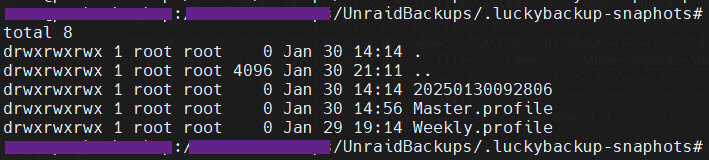
Thanks so much for responding, my bad for not even looking at the link for the support thread. If you're asking why I'm trying to export the profile, it's mainly so that I can back it up in case I need to restore it. It took me a while to build the different remote tasks in my profile and I'd rather not do it again if I lose them. I assumed that's what the export feature is there for. If I just restart the container, or stop it and start it, everything is fine. The profiles and schedule persist no problem. But if say I want to add a path to the container, so I modify the container (in the unraid UI), and add a new path, I have to hit "Apply", which re-builds the container. When I do this, all my profiles are gone. I assumed this was because the /luckybackup directory gets recreated when the container is built, no? Is that not supposed to be happening? This is why I want to back up the profiles, so I can easily import them in the event I have to rebuild the container. I will look through that tutorial thoroughly thanks. But yes, everything is stored in /luckybackup, not in /root. Sorry if I gave that impression somehow. There are links in /root that point to the profiles in /luckybackup, but as you say, everything is stored in /luckybackup. That is good to remember, and honestly I am fine with the way it is working, I am able to back up my profiles and schedule manually from the console to a share on my array, so i'm not worried, just figured I was doing something wrong as I'm unable to use the export and import feature properly. What I'm referring to is when I'm backing up the directory "/pictures", and I have snapshots set to 10. If I delete a file on my source directory, on the next backup, Luckybackup creates a directory called ".luckybackup-snapshots" where it puts snapshots of the deleted file for a while until the snapshot time has passed. But it also looks like it creates directories for the backup profiles in there as well. It creates the directories for each profile, but there is nothing in them. Again, this isn't something that I need, just a symptom I thought was related to the issue. Thanks again for responding, I will check out that documentation, and you could be right, this could just be quirks of it running in a container. Was just hoping to verify if this was normal or if I had something configured wrong. Thanks! Edit: here is a screenshot of the .luckybackup-snapshots directory that gets created, and the profile directories.
-
Hey everyone, I hope replying in this thread for new LB questions is the way to go, otherwise, I could create a new post on the forum, but seeing as this is a LB specific thread I thought I'd try here first. I have LB installed on Unraid, and backups configured to a remote host via tailscale, and it's working great. However I'm having trouble exporting the profiles, and incidentally, other weird issues I think having to do with hidden directories (starting with a dot) like /luckybackup/.luckyBackup, where the profiles are stored. If I try to use the export feature to export a profile, It either fails (if I try to export it to an unraid share (mapped in the container to a local directory), or if I export it to the /luckybackup directory right in the container, it says it is successful, but then I will end up with an empty profile directory there with no actual profile backed up. I know the profiles are being saved, because I can see them in /luckybackup/.LuckyBackup/profiles if I browse there in the console. Those files are all owned by the luckybackup user, but I am running the container with the "Run as root user" set to true. I am able to manually copy those profiles into my unraid shares from the console. But I'd love to have an automated backup task that backs up those profiles. (Because it seems they get deleted if I rebuild the container for any reason). Do I have something set wrong so luckybackup is not able to read those profiles from the gui for some reason? Thanks in advance. Edit: It's also not creating the profile backups in the snapshot directories like it should. It is is creating the profile directory, but not putting anything in there.
-
Thanks a bunch, appreciate the help.
-
Ah, that makes a lot of sense. I think that's exactly what's going on here. I was using the CLI using the mv command to move the files from one share to another. It is definitely just renaming the path, because it is instantaneous, no copying going on. I guess the preferred way to avoid this would be to use a file system explorer like krusader or something? (Or use the copy command, and then delete the file) If I just set all those shares to Cache: Yes, can I just continue doing it the way I have been, and it will clean them up and move them off cache daily? I like that in the moment, the move is quick and easy, with it then moving the files later for me in the middle of the night. Just making sure there aren't any other drawbacks to moving them on the CLI like that.
-
Right, I figured as much, I guess I was just trying to figure out how they got there in the first place. Here's how the flow went: The files were downloaded to a share that is set to Cache: Yes. Then from there on the command line, I did a move command and moved them to the other share that has Cache: No. I'm wondering if that's how why they were in cache. Either way, I'm just going to set those shares to Cache: Yes, because I don't want them sticking around in cache. Seems so backwards lol.
-
I apologize, I know this is an often discussed topic, and I felt like I had a pretty good understanding of how the cache and the mover work. But now I'm a bit confused. I noticed that a few of my shares had the yellow warning "Some or all files not protected." Their cache setting is set to "No", so I assumed that meant that writes to those shares would never go to cache. The mover won't move anything on them. But I drill into my cache drive, and there are a bunch of files from those shares on cache. Most are files that I have added to that share pretty recently. So with it set to "No", they are stuck there until I set cache to "Yes", and run the mover. Any idea how files from those shares got to cache with it set to no? I guess I should just leave them set to Yes anyway, and then it will just use the cache, but they'll get moved to the array every day? Is my assumption about the "no" setting incorrect? It must be because I thought with it set to no, it would just never use cache for those shares. I turn cache to Yes on that share, run the mover, and it moves the files as expected, and the share goes green. Am I misunderstanding the "no" setting on cache?
-
Thanks, you're right, I dug around and found the same thing. Looks like 70C is the max temperature. Maybe I'll set 55C as the warning temp, and 65C as a critical alarm. As for setting temp notifications for different drives, it looks like you can just go to Main, and click on each drive, and set them individually on each one. Not sure though how to set it for drive types. Just each individual drive. Thanks for the help! Not sure why I didn't think to go look for specs on the drive lol.
-
For quite a while now I have been getting alerts saying my cache drive is hot. 2 minutes later, the alert would be cleared. But this would happen constantly. A constant rollercoaster above and below the threshold. Multiple times daily. The warning temp threshold was set at 47C. None of the alerts ever showed it was hotter than 49C that I could see. I have set the threshold to 50C for now to calm the alerts, and see if it ever really hits 50C. But I am curious if there is anything I can do to help this. The cache drive is this Crucial 1TB NVMe drive. Here is the shares using cache and what they are set to: appdata -> prefer (transmission may be the most active app in here, but it is not in use on a daily basis) domains -> prefer handbrake -> Yes (This container is not running, I don't currently use it) isos -> Yes (I only have 1 Ubuntu VM running right now) system -> prefer transmission -> yes Any thoughts on a way to run this better or things I don't really need to use cache for that I could cut down on how busy my cache drive is? Or should it be able to run this busy without getting that hot? Just wondering what is safe to run it at.
-
I was planning on using s3sync to make daily backups to my AWS bucket. But now I'm wondering how it going to handle doing a daily sync of 3-5TB of data daily. Obviously I only want the changed files backed up. Currently I'm using Cloudberry Backup, and it works great, but I don't want to pay for their unlimited tier, and I just was hoping to go with something simple. I can't really tell the difference between s3sync and the s3backup apps. s3sync seems to work, but it does seem to have to scan every file every time it runs. I guess I'm fine with that, it won't take all night or anything, I just want to make sure it's not going to attempt to upload every file every time or anything. Only wanted new or changed files uploaded. I guess without a specialized tool, the AWS CLI is not built to evaluate for changed files, so all it can do is scan every file. But I assume it's going to evaluate timestamp and size, and only upload changed or new files. I guess I'm just curious what the difference is between the two tools, and what you all are using to backup all your files to your S3 bucket on a daily basis?
-
Edit: I figured out my main issue of syncing to a specific folder in my bucket. I had a typo in one of my settings. However, if there are any thoughts about my other two questions, ideas would be appreciated. Mainly if I could set up multiple different sync folders. Now that I've figured out my main issue, I may be able to figure this one out. Maybe it takes spinning up multiple containers, one for each sync. But again, if you have ideas, that would be great. I am almost complete setting up my new unRaid server, which will be taking the place of my current file server, running on Ubuntu. My current server uses Cloudberry backup to backup my files to my AWS S3 bucket. So currently everything is already backed up in a path like, s3://mybucket/CBB_ubuntu-server/CBB_VOLUMES/ As far as I know there isn't a way to relocated the data on my bucket to a different folder (I'm storing it glacier deep archive), otherwise I would try to move the contents up a directory or two so that it would be at the root of my bucket. But I don't think that's possible. So what I'm trying to do is just get the data on my current server backing up to that same location in my bucket. I'm trying to use the s3sync docker app to do this. But docker container aside, I don't even know the right CLI to make s3 sync go to a different subfolder in my bucket. As it is now, if I configure it as default, it will sync everything in /data (container path) to s3://mybucket. But is there way to tell it to sync to s3://mybucket/CBB_ubuntu-server/CBB_VOLUMES/? I've tried just adding that path to the bucket field in the container, but doesn't seem to work. Anyone know how to do that? Also, it seems that this container is just built to sync one folder and it's contents to my bucket. But what if I want to set up different folders to sync? I've obviously had to re-structure my data quite a bit due to the way shares are setup in unRAID. So I'd like to set s3sync to backup on the one share that is already backed up to my bucket (and not have to write much because it's already sync'd), and then set up different syncs for each of my other shares. Maybe to different buckets, but more likely to just different sub folders in the same bucket. Really just trying to avoid re-backing up all the data in my S3 bucket, incurring more transfer charges and just taking a long time lol. Any ideas would be appreciated.
-
Hard drive came and was factory sealed, and everything looks to be brand new to me. SMART data shows no run hours. I looked up the warranty information on Seagate's site, and it does have the original warranty good through Aug. 2026. Pretty sure it is a new drive. I'm cool with it, especially at that price lol. Running it through the binhex-preclear ringer right now. Which means I'll be able to use it next month lol.
-
Yeah I could fill it up with some archive photos and videos we rarely access. (That are also backed up to AWS storage.)
-
Ha wow. Well I don't know that's just what I've read on refurbs. I shucked an old WD 3tb drive I've had forever, and put it in today. It's a green. Not sure I want to keep using it. The spin up time on it says 9 years lol. Then I looked at my order history. I bought it in 2011. It has no errors and says it's healthy. Like, I don't want to throw it away, but I will say that pre-clearing it took forever. Pretty slow speeds. So I wonder if that alone is a sign it's time to let it go.
