





jekupka
Members
-
Joined
-
Last visited
Everything posted by jekupka
-
Issue was the way the router now recognized the system after the new card was installed. Had to reconfigure the port forwarding as the identity changed. All is now good.
-
Sorry about that. Diagnostics attached. unraidinblood-diagnostics-20260311-1114.zip
-
Tried cables and switch port. That didn't resolve. I went out and grabbed a $15 NIC and put it in the system and disabled the onboard card. Since then the system seems to be fully stable with no outages or crashes. However, now none of my apps that are public facing, like Seerr, are no longer accessible to the outside world.
-
I had an issue with network stability so I purchased and installed a new network card. I noticed after the installation that it created a new subnet in the environment and now certain containers (Sonarr, Radarr, Seerr) can't be seen publicly. Nothing changed in my NGINX or CNAME configurations and I can't seem to figure out how to get them seen again. I created a new custom network but that did not resolve the issue. Any help would be appreciated.
-
Drives were read correctly!
-
I've recently constructed a new build, and for the most part everything is running smoothly, until it isn't. At random times I lose any and all connectivity to every GUI in the environment requiring a full reboot of the system. At first I thought it was a memory issue, until I finally added Tdarr back to my running apps and found that it was still running as it should while the system was unreachable. This is leading me to believe it's actually a NIC/network issue, I've been doing some digging and it seems there is an issue with the Intel ICE driver that my system is currently using. Hoping someone has some helpful info. Diagnostics are attached. unraidinblood-diagnostics-20260310-0934.zip
-
My first, and current, build is definitely less than ideal, a DL360 Gen9 with a bunch of external USB HDDs connected. I'm finally at the point where I am able to build a proper system. I have all the pieces needed and am adding two additional drives, one for parity and the other for data. I'm planning on repurposing all the externals as internals to put into the new build. My fear is that after shucking, the HDD ID will change causing the need for a PreClear which will result in data loss. Is this a valid fear and if so, what is the best way to move the data from the old server to the new one? Setup a new server with the new drives, copy over a drive, shuck, install, preclear, add. Rinse and repeat? Will it require another license for the second server even though it will only be temporary? Any and all insight is greatly appreciated.
-
I recently replaced a drive in my array and have the same issue. The s/n of the drive that is sitting on my desk is what matches that in unassigned devices. I've rebooted and it is still there. Did OP ever get this resolved?
-
I've run it ten times in a row with the same error message.
-
I recently replaced a failing 4TB drive with a 14TB drive (14TB is the size of my parity disk and the largest disk size in my array) and after the rebuild completed it stated that the new drive was unmountable. I have followed the steps of running xfs_repair and am receving the following failure message. Is the data lost? root@unRaidInBlood:~# xfs_repair /dev/md9p1 Phase 1 - find and verify superblock... Phase 2 - using internal log - zero log... - scan filesystem freespace and inode maps... clearing needsrepair flag and regenerating metadata sb_icount 6720, counted 32 sb_ifree 270, counted 29 sb_fdblocks 310106776, counted 976277675 - found root inode chunk Phase 3 - for each AG... - scan and clear agi unlinked lists... - process known inodes and perform inode discovery... - agno = 0 - agno = 1 - agno = 2 - agno = 3 - process newly discovered inodes... Phase 4 - check for duplicate blocks... - setting up duplicate extent list... - check for inodes claiming duplicate blocks... - agno = 0 - agno = 1 - agno = 2 - agno = 3 Phase 5 - rebuild AG headers and trees... - reset superblock... Phase 6 - check inode connectivity... - resetting contents of realtime bitmap and summary inodes - traversing filesystem ... - traversal finished ... - moving disconnected inodes to lost+found ... Phase 7 - verify and correct link counts... SB summary counter sanity check failed Metadata corruption detected at 0x47c2cb, xfs_sb block 0x0/0x200 libxfs_bwrite: write verifier failed on xfs_sb bno 0x0/0x1 SB summary counter sanity check failed Metadata corruption detected at 0x47c2cb, xfs_sb block 0x0/0x200 libxfs_bwrite: write verifier failed on xfs_sb bno 0x0/0x1 xfs_repair: Releasing dirty buffer to free list! xfs_repair: Refusing to write a corrupt buffer to the data device! xfs_repair: Lost a write to the data device! fatal error -- File system metadata writeout failed, err=117. Re-run xfs_repair. unraidinblood-diagnostics-20240107-0123.zip
-
I do typically have a browser open and connected to the GUI for lengthy durations. I'll start with that. Thank you.
-
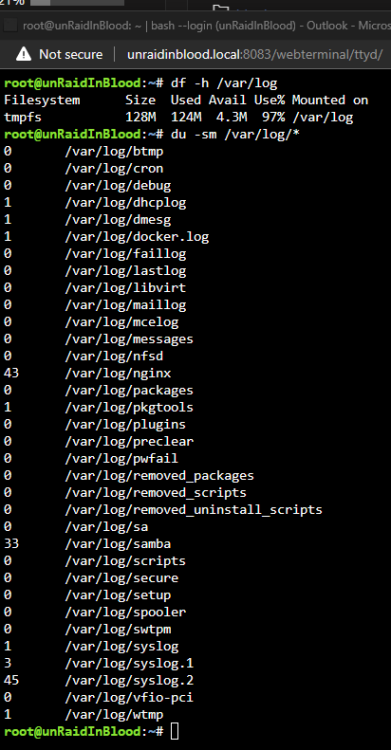
I noticed yesterday that my log had grown to 97% usage in memory. Upon running du -sm /var/log/* I see 3 files that are rather large, the one that is concerning is syslog.2. My system has been up for over 7 months and while I have seen in the forums that a reboot will fix this issue I want to ensure my logs are not being spammed. I have included my diagnostics as well as a screenshot of the command results. Thanks in advance. unraidinblood-diagnostics-20231206-0929.zip
-
Well, it finally happened again, here are the requested logs. Thank you for the assistance. unraidinblood-diagnostics-20230405-1039.zip
-
I woke up this morning to find my system has once again crashed overnight. As of 7 hrs ago my system was up and running, with a move of data from the cache to the array. I woke up this morning to find that nothing was reachable and the system required a restart. I have had issues recently and decided it would be best to blow out my entire docker image and recreate it, which was done about a week ago. I have had zero problems since, that is until sometime over night. I've attached my diagnostics file. I am hoping someone can point me in the right direction on the best way to resolve this. Thank you in advance. unraidinblood-diagnostics-20230320-0801.zip
-
I guess what I'm ultimately trying to figure out is what is still writing there causing them to recreate those folders. I don't want to write there anymore and nothing is in the dir when I look at it to help me figure it out.
-
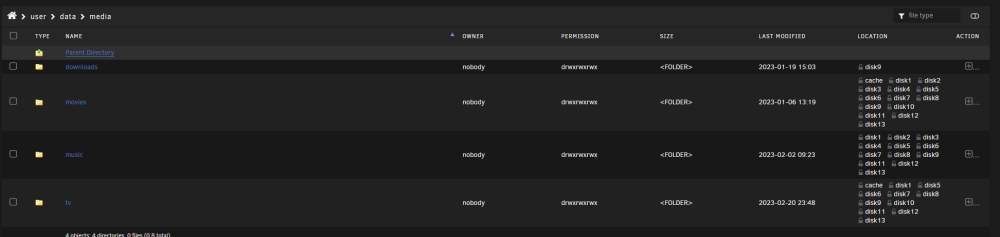
I was told that it was a better idea to put those folders into a different structures so instead of them all being separate at the highest level I created data folder with media within that and then the 3 folders are now all under the media folder. If I remember correctly it was to have the data move less often when being passed between the download, the placing in the proper directory, and the transcoding. Now I'm just trying to remove those original 3 folders.
-
Well, according to this, there is something in those folders. Why isn't anything visible just looking at the share?

-
I'm at a loss for how to proceed with figuring out what's going on in my environment. I currently have 3 shares titled Movies, Music, and Television, that were setup when my unraid server was first built. Shortly after I discovered I should not have those shares configured in the way that I did and proceeded to configure those shares in a better format. After all my data was in the new location I deleted the original 3 shares, as they are visibly empty, however, I lost data each time I deleted those folders. Furthermore, those 3 shares would later repopulate, but again seem to be empty as there was no visible data from the GUI and when a calculation is performed it says 0 bytes. It took deleting these shares twice, and losing data each time, for me to assume there was an issue and so I just left the folders alone and continued to (re)acquire data assuming as long as I didn't delete them again I wouldn't have any other problems. I'm really not sure how to proceed from here without blowing everything away and starting over. Something I REALLY am trying to avoid. Thank you in advance for any assistance. PS I know using usb drives is not recommended, it is a temporary solution while I acquire the proper storage node. unraidinblood-diagnostics-20230224-1341.zip
-
So after leaving the situation for a bit to clear my head I realized two things were happening at the same time one of which I didn't think would be an issue. Issue one was the unexpected restarts due to a self created issue. What was taking place at the same time was the deletion of an old Media folder which I did NOT know was being used by Radarr for "Collections". It seems that by deleting the root folder Collections was using it also deleted the files associated with that collection even though they were located in a different root folder. I'm waiting for the parity check to finish before I reacquire the missing data and verify my hypothesis, but nothing else logically makes sense. Thanks to those that took the time to look and offer input.
-
I'm going through some growing pains learning the ins and outs of the OS and it's applications and unfortunately have had to do a hard shutdown a couple of times recently. Each time the array is brought back up after the shutdown I have lost all data acquired since the last parity check. Since this has happened each time I am now assuming that I risk losing all data obtained between parity checks if a hard shutdown is performed. Is this thinking correct? If not, why would I lose data if the disk is still in the array? unraidinblood-diagnostics-20230119-1532.zip



