





sixkittens
Members
-
Joined
-
Last visited
-
Update: Enabling Tailscale on my computer allowed me access via the WebGUI which makes absolutely no sense since both devices are on the same network and I was able to access the server in the Private Window on this computer without Tailscale Edit: I also confirmed that my phone can still access the WebGUI, again without Tailscale
-
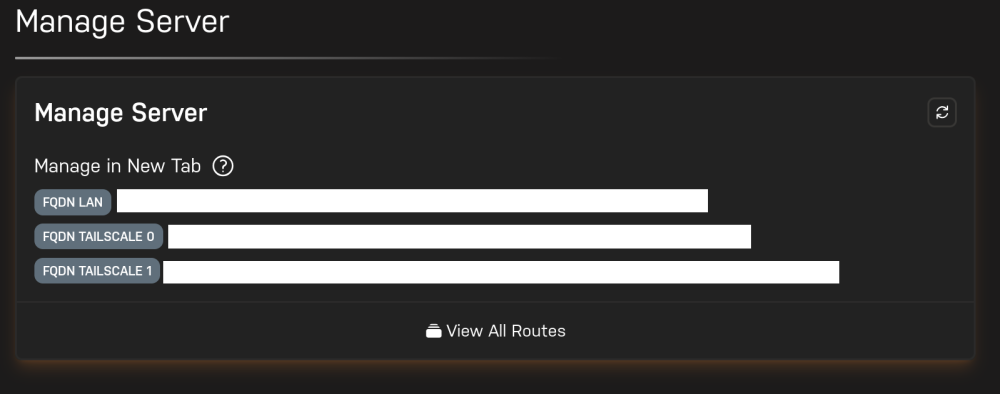
I got hit with an unfortunate series of issues this morning when two of my drives were disabled overnight, and in the process of trying to remedy this I restarted my server and could no longer reach the WebGUI via Unraid Connect. Instead, I am presented with this: I have done the usual fix of clearing site data to no avail. Local addresses are inaccessible thanks to the certificate settings, and none of the links on the Manage Server page connect. I am, however, able to access the WebGUI in a Firefox Private Window with "Enhanced Tracking Protection" disabled. No other method seems to work. This remains the case even when I disable all browser extensions and completely clear all browser data. I also tried removing the GPU Statistics and Intel-GPU-TOP plugins and restarting the WebUI with /etc/rc.d/rc.nginx reloadwhich also had no effect. I also updated the Unraid Connect plugin to the latest version 2026.08.20.1609 which also had no effect. I also experienced this issue a few weeks ago when trying to update from 7.3.0, and had to restore a backup in order to regain access, but there is no apparent cause this time. I would greatly appreciate any suggestions or advice on how to fix this issue. I am currently trying to rebuild the disabled drives which obviously takes precedence, so anything involving a reboot will take more than 24 hours before I can attempt it.
-
Since the 7.3.0 release I have not had any problems, and I am unsure what I am doing differently, so I'll just post everything for people to compare with. Card: Gigabyte 9070 XT PCIe ACS Override: Off VFIO: Unbound (binding the GPU gives no video out and an error in the VM log) GPU ROM: Dumped from GPU-Z XML: <?xml version='1.0' encoding='UTF-8'?> <domain type='kvm'> <name>Fedora</name> <uuid>851b1c62-07b7-c1e4-f711-93edc56634ec</uuid> <description>Q35</description> <metadata> <vmtemplate xmlns="http://unraid" name="Fedora" icon="fedora.png" os="fedora" webui="" storage="default" iconold="fedora.png"/> </metadata> <memory unit='KiB'>33554432</memory> <currentMemory unit='KiB'>33554432</currentMemory> <memoryBacking> <nosharepages/> <source type='memfd'/> <access mode='shared'/> </memoryBacking> <vcpu placement='static'>28</vcpu> <cputune> <vcpupin vcpu='0' cpuset='0'/> <vcpupin vcpu='1' cpuset='1'/> <vcpupin vcpu='2' cpuset='2'/> <vcpupin vcpu='3' cpuset='3'/> <vcpupin vcpu='4' cpuset='4'/> <vcpupin vcpu='5' cpuset='5'/> <vcpupin vcpu='6' cpuset='6'/> <vcpupin vcpu='7' cpuset='7'/> <vcpupin vcpu='8' cpuset='8'/> <vcpupin vcpu='9' cpuset='9'/> <vcpupin vcpu='10' cpuset='10'/> <vcpupin vcpu='11' cpuset='11'/> <vcpupin vcpu='12' cpuset='12'/> <vcpupin vcpu='13' cpuset='13'/> <vcpupin vcpu='14' cpuset='14'/> <vcpupin vcpu='15' cpuset='15'/> <vcpupin vcpu='16' cpuset='16'/> <vcpupin vcpu='17' cpuset='17'/> <vcpupin vcpu='18' cpuset='18'/> <vcpupin vcpu='19' cpuset='19'/> <vcpupin vcpu='20' cpuset='20'/> <vcpupin vcpu='21' cpuset='21'/> <vcpupin vcpu='22' cpuset='22'/> <vcpupin vcpu='23' cpuset='23'/> <vcpupin vcpu='24' cpuset='24'/> <vcpupin vcpu='25' cpuset='25'/> <vcpupin vcpu='26' cpuset='26'/> <vcpupin vcpu='27' cpuset='27'/> </cputune> <os> <type arch='x86_64' machine='pc-q35-9.2'>hvm</type> <loader readonly='yes' type='pflash' format='raw'>/usr/share/qemu/ovmf-x64/OVMF_CODE-pure-efi.fd</loader> <nvram format='raw'>/etc/libvirt/qemu/nvram/851b1c62-07b7-c1e4-f711-93edc56634ec_VARS-pure-efi.fd</nvram> <smbios mode='host'/> </os> <features> <acpi/> <apic/> </features> <cpu mode='host-passthrough' check='none' migratable='on'> <topology sockets='1' dies='1' clusters='1' cores='14' threads='2'/> <cache mode='passthrough'/> <maxphysaddr mode='passthrough' limit='39'/> <feature policy='disable' name='hypervisor'/> </cpu> <clock offset='utc'> <timer name='hpet' present='no'/> <timer name='hypervclock' present='no'/> </clock> <on_poweroff>destroy</on_poweroff> <on_reboot>restart</on_reboot> <on_crash>restart</on_crash> <devices> <emulator>/usr/local/sbin/qemu</emulator> <disk type='file' device='disk'> <driver name='qemu' type='raw' cache='writeback' discard='unmap'/> <source file='/mnt/user/domains/Fedora/vdisk1.img'/> <target dev='hdc' bus='virtio'/> <serial>vdisk1</serial> <boot order='1'/> <address type='pci' domain='0x0000' bus='0x0b' slot='0x00' function='0x0'/> </disk> <controller type='pci' index='0' model='pcie-root'/> <controller type='pci' index='1' model='pcie-root-port'> <model name='pcie-root-port'/> <target chassis='1' port='0x8'/> <address type='pci' domain='0x0000' bus='0x00' slot='0x01' function='0x0' multifunction='on'/> </controller> <controller type='pci' index='2' model='pcie-root-port'> <model name='pcie-root-port'/> <target chassis='2' port='0x9'/> <address type='pci' domain='0x0000' bus='0x00' slot='0x01' function='0x1'/> </controller> <controller type='pci' index='3' model='pcie-root-port'> <model name='pcie-root-port'/> <target chassis='3' port='0xa'/> <address type='pci' domain='0x0000' bus='0x00' slot='0x01' function='0x2'/> </controller> <controller type='pci' index='4' model='pcie-root-port'> <model name='pcie-root-port'/> <target chassis='4' port='0xb'/> <address type='pci' domain='0x0000' bus='0x00' slot='0x01' function='0x3'/> </controller> <controller type='pci' index='5' model='pcie-root-port'> <model name='pcie-root-port'/> <target chassis='5' port='0xc'/> <address type='pci' domain='0x0000' bus='0x00' slot='0x01' function='0x4'/> </controller> <controller type='pci' index='6' model='pcie-root-port'> <model name='pcie-root-port'/> <target chassis='6' port='0xd'/> <address type='pci' domain='0x0000' bus='0x00' slot='0x01' function='0x5'/> </controller> <controller type='pci' index='7' model='pcie-root-port'> <model name='pcie-root-port'/> <target chassis='7' port='0xe'/> <address type='pci' domain='0x0000' bus='0x00' slot='0x01' function='0x6'/> </controller> <controller type='pci' index='8' model='pcie-root-port'> <model name='pcie-root-port'/> <target chassis='8' port='0xf'/> <address type='pci' domain='0x0000' bus='0x00' slot='0x01' function='0x7'/> </controller> <controller type='pci' index='9' model='pcie-root-port'> <model name='pcie-root-port'/> <target chassis='9' port='0x10'/> <address type='pci' domain='0x0000' bus='0x00' slot='0x02' function='0x0' multifunction='on'/> </controller> <controller type='pci' index='10' model='pcie-root-port'> <model name='pcie-root-port'/> <target chassis='10' port='0x11'/> <address type='pci' domain='0x0000' bus='0x00' slot='0x02' function='0x1'/> </controller> <controller type='pci' index='11' model='pcie-root-port'> <model name='pcie-root-port'/> <target chassis='11' port='0x12'/> <address type='pci' domain='0x0000' bus='0x00' slot='0x02' function='0x2'/> </controller> <controller type='pci' index='12' model='pcie-root-port'> <model name='pcie-root-port'/> <target chassis='12' port='0x13'/> <address type='pci' domain='0x0000' bus='0x00' slot='0x02' function='0x3'/> </controller> <controller type='pci' index='13' model='pcie-to-pci-bridge'> <model name='pcie-pci-bridge'/> <address type='pci' domain='0x0000' bus='0x01' slot='0x00' function='0x0'/> </controller> <controller type='pci' index='14' model='pcie-root-port'> <model name='pcie-root-port'/> <target chassis='14' port='0x14'/> <address type='pci' domain='0x0000' bus='0x00' slot='0x02' function='0x4'/> </controller> <controller type='pci' index='15' model='pcie-root-port'> <model name='pcie-root-port'/> <target chassis='15' port='0x15'/> <address type='pci' domain='0x0000' bus='0x00' slot='0x02' function='0x5'/> </controller> <controller type='virtio-serial' index='0'> <address type='pci' domain='0x0000' bus='0x09' slot='0x00' function='0x0'/> </controller> <controller type='sata' index='0'> <address type='pci' domain='0x0000' bus='0x00' slot='0x1f' function='0x2'/> </controller> <controller type='usb' index='0' model='qemu-xhci' ports='15'> <address type='pci' domain='0x0000' bus='0x00' slot='0x07' function='0x0'/> </controller> <controller type='scsi' index='0' model='virtio-scsi'> <address type='pci' domain='0x0000' bus='0x00' slot='0x0c' function='0x0'/> </controller> <filesystem type='mount' accessmode='passthrough'> <driver type='virtiofs' queue='1024'/> <binary path='/usr/libexec/virtiofsd' xattr='on'> <cache mode='always'/> <sandbox mode='chroot'/> </binary> <source dir='/mnt/user/Documents'/> <target dir='Documents'/> <address type='pci' domain='0x0000' bus='0x02' slot='0x00' function='0x0'/> </filesystem> <filesystem type='mount' accessmode='passthrough'> <driver type='virtiofs' queue='1024'/> <binary path='/usr/libexec/virtiofsd' xattr='on'> <cache mode='always'/> <sandbox mode='chroot'/> </binary> <source dir='/mnt/user/Files'/> <target dir='Files'/> <address type='pci' domain='0x0000' bus='0x03' slot='0x00' function='0x0'/> </filesystem> <filesystem type='mount' accessmode='passthrough'> <driver type='virtiofs' queue='1024'/> <binary path='/usr/libexec/virtiofsd' xattr='on'> <cache mode='always'/> <sandbox mode='chroot'/> </binary> <source dir='/mnt/user/Games'/> <target dir='Games'/> <address type='pci' domain='0x0000' bus='0x04' slot='0x00' function='0x0'/> </filesystem> <filesystem type='mount' accessmode='passthrough'> <driver type='virtiofs' queue='1024'/> <binary path='/usr/libexec/virtiofsd' xattr='on'> <cache mode='always'/> <sandbox mode='chroot'/> </binary> <source dir='/mnt/user/GamesFast'/> <target dir='GamesFast'/> <address type='pci' domain='0x0000' bus='0x05' slot='0x00' function='0x0'/> </filesystem> <filesystem type='mount' accessmode='passthrough'> <driver type='virtiofs' queue='1024'/> <binary path='/usr/libexec/virtiofsd' xattr='on'> <cache mode='always'/> <sandbox mode='chroot'/> </binary> <source dir='/mnt/user/isos'/> <target dir='isos'/> <address type='pci' domain='0x0000' bus='0x06' slot='0x00' function='0x0'/> </filesystem> <filesystem type='mount' accessmode='passthrough'> <driver type='virtiofs' queue='1024'/> <binary path='/usr/libexec/virtiofsd' xattr='on'> <cache mode='always'/> <sandbox mode='chroot'/> </binary> <source dir='/mnt/user/Media'/> <target dir='Media'/> <address type='pci' domain='0x0000' bus='0x08' slot='0x00' function='0x0'/> </filesystem> <interface type='bridge'> <mac address='52:54:00:c3:ef:b7'/> <source bridge='br0'/> <model type='virtio-net'/> <address type='pci' domain='0x0000' bus='0x0a' slot='0x00' function='0x0'/> </interface> <serial type='pty'> <target type='isa-serial' port='0'> <model name='isa-serial'/> </target> </serial> <console type='pty'> <target type='serial' port='0'/> </console> <channel type='unix'> <target type='virtio' name='org.qemu.guest_agent.0'/> <address type='virtio-serial' controller='0' bus='0' port='1'/> </channel> <input type='mouse' bus='ps2'/> <input type='keyboard' bus='ps2'/> <audio id='1' type='none'/> <hostdev mode='subsystem' type='pci' managed='yes'> <driver name='vfio'/> <source> <address domain='0x0000' bus='0x03' slot='0x00' function='0x0'/> </source> <rom file='/mnt/user/isos/vbios/Navi 48.rom'/> <address type='pci' domain='0x0000' bus='0x07' slot='0x00' function='0x0' multifunction='on'/> </hostdev> <hostdev mode='subsystem' type='pci' managed='yes'> <driver name='vfio'/> <source> <address domain='0x0000' bus='0x03' slot='0x00' function='0x1'/> </source> <address type='pci' domain='0x0000' bus='0x07' slot='0x00' function='0x1'/> </hostdev> <hostdev mode='subsystem' type='pci' managed='yes'> <driver name='vfio'/> <source> <address domain='0x0000' bus='0x00' slot='0x1f' function='0x3'/> </source> <address type='pci' domain='0x0000' bus='0x0d' slot='0x01' function='0x0'/> </hostdev> <hostdev mode='subsystem' type='pci' managed='yes'> <driver name='vfio'/> <source> <address domain='0x0000' bus='0x00' slot='0x14' function='0x0'/> </source> <address type='pci' domain='0x0000' bus='0x0d' slot='0x02' function='0x0'/> </hostdev> <hostdev mode='subsystem' type='pci' managed='yes'> <driver name='vfio'/> <source> <address domain='0x0000' bus='0x00' slot='0x14' function='0x3'/> </source> <address type='pci' domain='0x0000' bus='0x0c' slot='0x00' function='0x0'/> </hostdev> <hostdev mode='subsystem' type='pci' managed='yes'> <driver name='vfio'/> <source> <address domain='0x0000' bus='0x00' slot='0x1f' function='0x5'/> </source> <address type='pci' domain='0x0000' bus='0x0d' slot='0x03' function='0x0'/> </hostdev> <hostdev mode='subsystem' type='scsi' managed='no'> <source> <adapter name='scsi_host5'/> <address bus='0' target='0' unit='0'/> </source> <readonly/> <address type='drive' controller='0' bus='0' target='0' unit='0'/> </hostdev> <watchdog model='itco' action='reset'/> <memballoon model='none'/> </devices> </domain> Note that for a Linux VM CPU migratable must be turned on for 7.3.0+ as a bug causes the VM to kernel panic if it is turned off. As far as I am aware this issue does not affect Windows VM's. There are a couple of tweaks in there that allow me to play games with EAC, since I don't have a separate gaming PC, and manual passthrough for a BD-RW drive. The EAC tweaks I'm using are Linux-specific, Windows VM's require a different setup thanks to Hyper-V (though admittedly I haven't tested if these changes still work for Windows). To help parse what is what, here are the manual edits I make: <domain type='kvm'> ... <os> ... <!--Passthrough SMBIOS info from motherboard - Required for EAC--> <smbios mode='host'/> <os/> <!--Migratable on is required on some kernels to prevent kernel panic--> <cpu mode='host-passthrough' check='none' migratable='off'> ... <!--Prevent VFIO_MAP_DMA failed error--> <maxphysaddr mode='passthrough' limit='39'/> <!--Hide hypervisor - Required for Marvel Rivals anti-cheat--> <feature policy='disable' name='hypervisor'/> </cpu> ... <devices> ... <!--Optical drive passthrough - set scsi mode to virtio-scsi--> <controller type='scsi' index='0' model='virtio-scsi'> <address type='pci' domain='0x0000' bus='0x00' slot='0x0c' function='0x0'/> </controller> ... <hostdev mode='subsystem' type='scsi' managed='no'> <source> <adapter name='scsi_host5'/> <address bus='0' target='0' unit='0'/> </source> <readonly/> <address type='drive' controller='0' bus='0' target='0' unit='0'/> </hostdev> </devices> ... </domain>I also use a couple of custom scripts to allow the VM to boot from the power button, but those should not affect the GPU reset issue. Given that I am running a Linux VM my experience with the reset bug has been slightly different, I would get the system lockups if I tried to restart the VM, but this would only happen in about one in four attempts, rather than every time. Still, I hope that what I have posted here is able to help someone.
-
Okay then, what version of Unraid are you running? These lockups seem to no longer occur on Unraid 7.3.
-
It sounds like you might be having a different issue to what is discussed here if you are unable to open the VM page in the Unraid UI. Have you tried rebooting your server?
-
Make sure that you do not have the GPU or sound device bound to VFIO at boot, this seems to invariably cause the GPU to lock up (I have no idea why). Then try to boot your VM and if you still get no video, check the VM log by clicking the VM's icon and selecting from the drop-down menu. The log should tell you if there are errors preventing video output.
-
Was this with or without CPU migration enabled? There's a known issue with Linux VM instability that occurs when CPU migration is turned off
-
Meanwhile I have been on 7.3.0 for a few days, shutting my VM down each night without the system hanging once so far. Hopefully the trend continues. I did have to enable CPU migration to prevent instability issues I was having but this seems to be exclusive to Linux VM's.
-
I recommend unbinding the GPU from VFIO, and testing again. Not sure how you got it to work before, but binding to VFIO (for me anyway) causes the GPU to get stuck in the wrong power state and there's no video output as a result. I intend to look further into what might be causing the lockup when bound, but I don't know enough about how these things work to have a good starting point. I have added a ROM that I dumped myself from GPU-Z, and updated to 7.3.0, which has a newer kernel, so it may yet prevent the lockups when restarting the vm.
-
I haven't had an opportunity to test this, but there is a known VM instability for hosts on 6.18 or newer where VM migration is disabled, so enabling migration may fix the issue. https://discussion.fedoraproject.org/t/kvm-guests-become-unstable-on-6-18-kernel/182870/11 Edit: to clarify, that's Linux kernel 6.18, not referring to an Unraid version Edit 2: I can confirm that enabling CPU migration has prevented the kernel panics for me, at least for the trigger that I was able to identify (KDE Discover checking for updates)
-
Similar issue here with 7.3 but uncertain if it's related. My Fedora VM boots fine, but after login I get a kernel panic. It appears to be related to the kernel version of Unraid, because I had the same issue a while back when I was testing a newer kernel to try and fix passthrough issues. Weirdly the kernel panic happens whenever KDE Discover tries to find updates. Does your VM try to call packagekit or something at boot time?
-
Hi Arie, Are you referring to a vbios? Any more information you can provide would be helpful as we have been struggling with this for months now (I had mostly given up and just never shut down my VM). I have a vbios file that I dumped directly from my card but it did not fix anything. So if you can confirm what the romfile is and where you got it, as well as any other steps you took to get things working that would be much appreciated.
-
Nothing definitive that I've been able to find. There's a few recommendations out there that work for some people, but I haven't found anything that makes an actual difference in my testing. I'm hopeful that the 7.3 update might have a positive effect, moving to the 6.18 kernel. In my case, there's about a 20% (guessing) chance of the GPU locking up after VM stop and crashing the server if the VM starts again, but none of the suggested fixes have made an improvement on that for me.
-
In your post you mention the AMD vendor-reset module/plugin which is only compatible with cards up to the Navi 14 architecture, i.e 5000 series cards, newer cards that experience the vendor reset bug when passing through are not supported by the module and, as far as I am aware, require fixes from the in-kernel drivers. Additionally, the issue being discussed in this thread isn't to do with being able to pass the card through as such, it's preventing the hard freeze that occurs once a VM using the card is shut down and a new VM session starts. If you are interested in reading up on what other people have written who have managed to prevent the reset bug on newer cards, I'll link some resources here: https://forum.level1techs.com/t/vfio-pass-through-working-on-9070xt/227194 https://forum.proxmox.com/threads/working-win11-vm-wont-boot-after-passthrough-of-gpu-vendor-reset-not-able-to-set-reset_method-solution-update-kernel-unbind-via-hook-script.166362/ https://forum.proxmox.com/threads/working-amd-rx-9070xt-support.163370/ https://www.reddit.com/r/unRAID/comments/1j52fkc/unable_to_pass_through_amd_rx_9070_xt/ So far I have not had much success following the steps in the threads linked above, but for whatever reason my server doesn't freeze every time, possibly because I am running a Linux VM rather than Windows. Since having a newer host kernel seems to play a role in other users' success, I am hoping for a stable custom kernel for Unraid 7.2 to be released (linked in the reddit thread) before I try anything further, as the unstable one caused my VM to repeatedly kernel panic. In all cases where people have it working, it appears to be necessary to manually unbind and rebind the GPU before starting a new VM session. Unfortunately these issues with 7000 and 9000 series cards don't seem to be well known outside of the hobby virtualization communities, and Limetech don't seem to have any ideas, so a definite fix might not be forthcoming any time soon.
-
Adding this line in the syslinux command line does not seem to prevent the GPU from binding to D3 when the GPU is bound to VFIO at boot (as mentioned before, it does not do it for me when it's unbound), nor do spaceinvaderone's suggestions of disabling the framebuffer and resizeable BAR. I decided to revisit this because despite not having the shutdown issue with my Linux VM, I am on rare occasion seeing the server freeze when I try to start the VM instead. I have not had much luck so far though. Edit: The weird thing is that the VM log says the GPU is stuck in D3 and won't restart if I shut it down, like I would expect if it was stuck in D3, but cat /sys/bus/pci/devices/0000:03:00.0/power_state always reports D0


