






House Of Cards
Members
-
Joined
-
Last visited
Everything posted by House Of Cards
-
I am looking to do some automatic copying and deleting between shares for my media server. Is there any danger just copying using the disk paths directly? Like "cp /mnt/disk1/path/to/source /mnt/disk2/path/to/destination"? The paths would be shares. Or should I use "cp /mnt/user/path/to/source /mnt/user/path/to/destination"? Or does it matter using this plugin? I don't want to mess up permissions or something. Thanks.
-
Hello all, I am trying to implement a more interactive media player experience with Emby. I have two storage locations for content; one has ALL content, and the other is where EMBY reads its content from. I want to move things in and out of where Emby reads from on schedules to enable things like seasonal content (Christmas movies in Emby 12/1, deleted 12/31, etc...). Maybe randomly put various seasons of TV Shows in/out so the content remains fresh and constantly rotates... So for example... On 12/1, copy /mnt/Movies/Yogi's First Christmas.mkv /mnt/Emby/Movies On 12/31, delete /mnt/Emby/Movies/Yogi's First Christmas.mkv Do any of you have any suggestions as to how to go about this? I don't trust my scripting skills (the above is clearly just an example and wrong), so something I could run graphically would be ideal. Any ideas would be appreciated. Thanks!
-
Outstanding! The UID/GID was the culprit. Thank you very much!
-
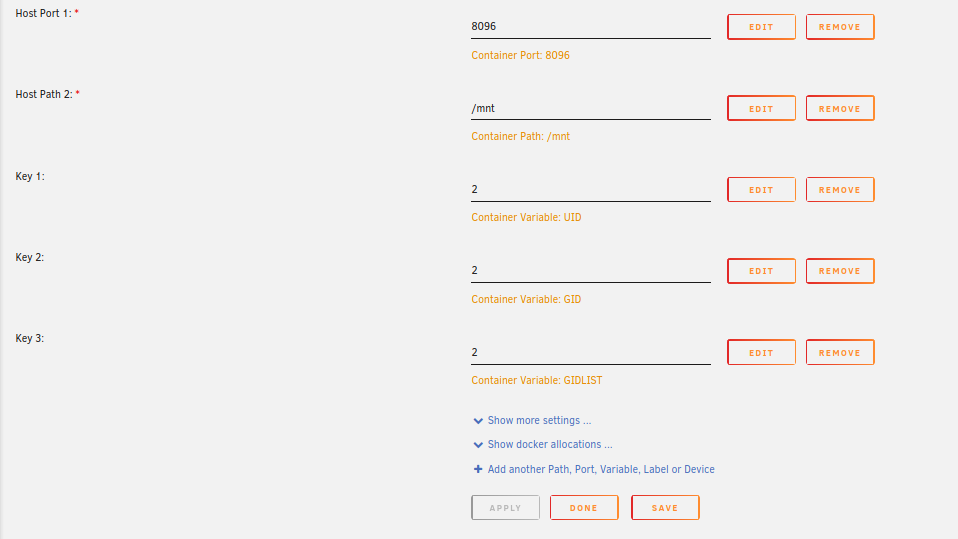
I'm pretty new to Docker, and am confused about how to setup Emby with the right access to view various shares. I ave this right now, from a fresh install... So my different media are all in different shared folders. The container says to choose /mnt as the path, so I left it there. I can select the folders direct through the disks in Emby this way, but it doesn't have permissions to read the files or write the images and info into the folders. I add things, and Emby doesn't pull them in. Is there some user I need to create and grant it access to the share? Like an "Emby" user, and give it read/write to the various shares it needs access to? Also, what are these "UID, GID, etc...? Is that the user to run as? There is very little information I can find in the interface to tell me how to set up/best practices... I'm not concerned with any remote access for the time being, I just want it running inside the house. Any help would be great... Thanks.
-
I feel like this is an issue with the My Servers changes. I say that because when this happens, there are connection errors showing under the plugin when viewing on a secondary machine, although the web shows my server connected, and directly on the UnRAID machine shows it connected. The only thing my laptop should be showing me is my server itself, so why if the server believes it's connected, does my laptop think differently? And maybe somehow, the GUI elements are dependent on the server being connected?
-
No, I'm using firefox and it happens here too. Try clearing the browser cache. I noticed that I had over 1GB of cached elements last time this happened, and after clearing, the problem immediately cleared up. I'm still waiting to see if it happens again.
-
I'm having endless problems as well with GUI things not showing. New user/new installation here. I was tinkering last night and everything was working perfectly. I went back in today and all the GUI elements were not formatting correctly, or unresponsive. I learned that clearing firefox cache fixed it. I'll report back if/when it happens again.
-
Well, I'm working to narrow this down, but it seems to be some networking quirk. I use PFSense, and have a multi-port NIC with WiFi mesh networks in bridge mode for each. In a nutshell, imagine a "LAN" and a "SERVERS" network each with it's own WiFi. In the firewall, I have rules setup, but I do not have any issues connecting to devices in this "SERVERS" network from the "LAN" network in any other situation... but with UnRAID I do. If I connect my "LAN" devices to the "SERVERS" network instead, UnRAID works. It's as though something isn't getting through when on "LAN", and seems specific to UnRAID. Perhaps this is something with the "DNS Rebinding Protection" or the "MyServers" facility? If connecting through my "LAN" (where things don't work right), when I look at the upper right menu for "MyServers" it shows connection errors. If I'm really looking directly at my server, shouldn't this show what my servers sees? On UnRAID forums my server shows it's online, but from one WiFi network to another can't get through? It's confusing, but it seems a lot of UnRAID functionality is dependent on this plug-in phoning home. Any help would be appreciated if you have ideas? Thanks!
-
Chromium and Brave, same exact thing.
-
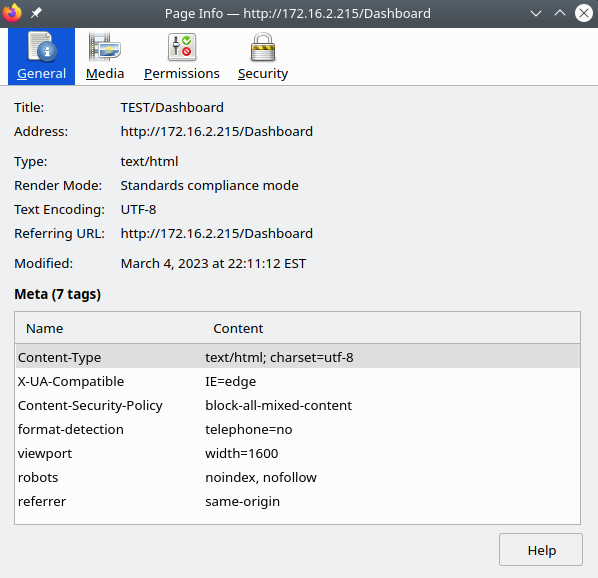
I'm looking, but I've disabled everything I can find... I'm going to try a different browser. I've tried three different PC's and they all do the same thing. Things like the terminal load blank, I don't see the installation text when I install a plug-in, the interactive widgets don't load (processor usage, ram statistics, disks), but I can load shares and other content. Firefox shows a default security policy of "block mixed content" for the address when I click the "address is not secure" icon. I may be chasing my tail though. Let me try another browser.
-
Directly on the server in GUI mode, everything works. Logging in from another PC on the network, and the connections to the resources look broken and much doesn't report correctly.. I'm messing with the firewall, but still having issues.
-
Certain dialogs aren't loading text either, like the diagnostics.
-
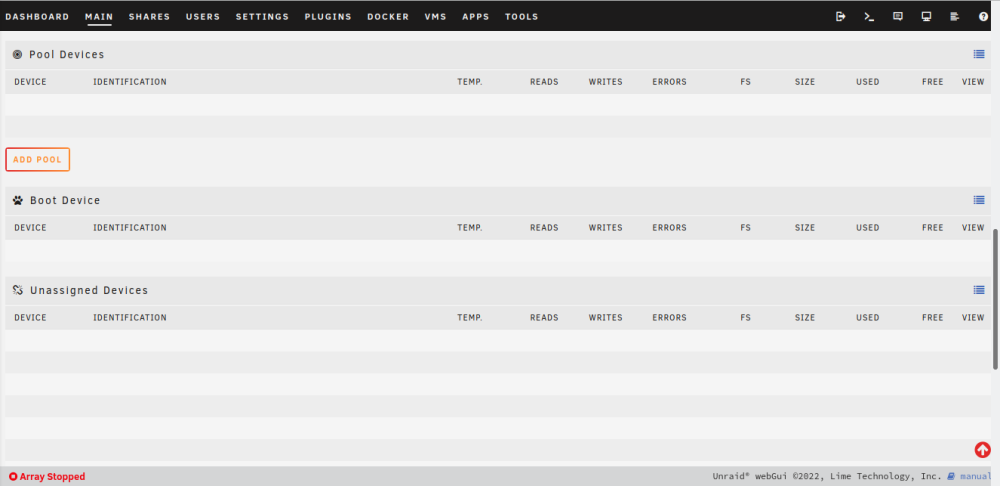
New build, new trial. For some reason in the GUI I cannot see any disks. They are all there. Tried rebooting, etc... Where to start?
-
I don’t care as long as it works. 🤣 But yes, the case has SATA connectors for the swapable trays, so I would think I just put the drives into this card and I’m off…
-
So, about ready to make some purchases... I'm going to go with the SAS solution. Do any of you see any issues going with these two components? SAS Controller... https://www.amazon.com/dp/B07JZ6FYVC/?coliid=I5M8VGAKRI62P&colid=2D3CNHHDTB8MO&psc=1&ref_=lv_ov_lig_dp_it Cables... https://www.amazon.com/dp/B012BPLYJC/?coliid=ICBW56YMIQN5T&colid=2D3CNHHDTB8MO&psc=1&ref_=lv_ov_lig_dp_it Thanks for all the advice...
-
I was wondering about that, BTW... I see a lot of those "renewed" or "refurbished" drives on Amazon. Never gave them a second thought because I assumed they were problematic. Reviews show people getting them with bad sectors, etc... Anybody have any thoughts on those? Do you use them without issues, because they are much cheaper...?
-
See? Who says you can’t get good advice from drunk people. LOL I don’t use the red drives since the SMR thing. And I was planning 8TB drives just because of the price point. Seems a good bang for the buck right now. I could go SAS controller, no concerns there. That card you pointed out is pretty cheap. That and some breakout cables and I’m in business. The only question is my case bays have SATA connections. I think you can use SATA drives on the SAS controller, right? But not the other way around? Thanks!
-
Yup, I get it... It just offers an opportunity to use up something with a useful life remaining rather than tossing them out. On the plus side, rebuilds will be quicker. 👍
-
I'm not familiar with SAS controllers, never used them. Don't they need to be in IT mode or something? And generally more expensive? With the 12 bays, two for parity, I don't know if needing more would be an issue for quite some time. If I went to the latest 20 TB drives, that gives me 200 TB of storage. I don't envision needing more, and by the time I do, I would likely just buy a whole new system. Do you know of a cheap SAS controller that comes ready to go, without flashing or anything? I'm not opposed to it, just don't know if it's necessary.
-
Yeah, I understand that... The drives I'm talking about aren't "failing", they were just retired because they were too small for a particular use, etc...
-
Exactly why I'm here. LOL My current TrueNAS has 5 drives which with Raid Z2 and a spare only gave me 6 TB when I first built this 6 or so years ago. Now I don't have too much stuff, so that worked for a long time. Now I'd like to double that, and I have to go buy 5 drives to upgrade the storage. For the price of those five drives, I could buy mid-range components and use all the spare stuff I've accumulated over the years and build this server. I already had the 12-bay case I planned to switch into to add another pool to TrueNAS, so a motherboard, CPU, RAM and some small miscellaneous parts and I can throw all these "smaller" drives I have which are otherwise unusable into the 12 bays and upgrade them as they fail. Not to preach to the choir in these forums, but that's what the benefit of UnRAID seems to be. I don't have to throw out that 2TB drive. I can just throw it in here and use it until it dies. When it does, just throw a bigger one in to replace it. For me, the storage needs are small. I could buy two 6 TB drives for $200 and have plenty of room for what I have. I've been planning how to do the drive configuration, and I think I have a solution which works... At least on paper. Planning the caches, etc... It's a combination of advice, which hopefully balances use of all 12 drive bays with power efficiency. I've broken out the bundle of 10 disks (2 are parity, so 10 for data) into groups for shares which should allow for future upgrades of space available to each share, while only spinning up certain disks when, for example, watching media. My dockers and VM's will all be running on a mirrored pair of NVME and backed up regularly. One additional small NVME for accelerated writes to the shares. Then, on a schedule which makes sense, I can backup to the TrueNAS machine which will maintain that bulletproof redundant copy of data and backup offsite periodically. I'm still tinkering with components, but really trying to keep this inexpensive. I'm going for 5400 RPM drives, since I don't think streaming a movie needs the extra power consumption of a 7200 RPM drive. I'm trying to avoid watching my electric meter spin while 12 drives spin at 7200 RPM 24/7. 😁 The way I'm planning this, all my services (docker media server, etc...) will be running on the NVME, so under idle time, all the drives should spin down. Drives should only power on when streaming, or when mover runs. Which brings me to a question... As far as using the cache drives. Is there any real benefit to enabling the cache for something like a movie share? Beyond the initial write, what benefit would the cache drive do? Or should I save the cache for better suited uses? Thanks...
-
Yeah, I'm on TrueNAS now, have been for half a decade or more. It's bulletproof file storage, but for the home user, it's just not flexible. I'm planning to keep the TrueNAS server because it's a more than adequate machine for file storage, and use that for backup of the UnRAID machine. This gives me the best of both worlds, like the long-term protection ZFS offers along with snapshots. Just keep a copy offsite and I'm golden. The main reasons for UnRAID are two things... First, flexibility in adding storage. I just can't justify buying five disks to add more storage to TrueNAS. Second, the flexibility of docker being able to directly share storage and interoperate with one another. The logistics of making BSD jails and trying to get them to share data with one another is a complexity beyond the average persons ability to fathom. Try to port all your data into Grafana between multiple jails and you'll know what I mean. LOL I will make two cache pools. One small single NVME drive as a scratch disk for accelerated writes, and one larger NVME pair for redundancy where all the default shares for docker and the like will live. Beyond that, I have a rack case with 12 removable drive trays for plugging in 12 disks, making for easy swaps and upgrades. The needs of this machine are small, and the media server aspect is the most demanding. It will have mild use mainly just with people at home. This machine should outlive me. 😆
-
And I just saw I need an 11th Gen processor for the M.2 slots. 🤑
-
This one is $33... https://www.amazon.com/10Gtek-Profile-Bracket-Controller-Expansion/dp/B09Y577WJS/ref=sr_1_11?crid=9SHSFJS42EY9&keywords=asmedia%2BASM1166&qid=1675551591&s=electronics&sprefix=asmedia%2Basm1166%2Celectronics%2C202&sr=1-11&th=1 Uses the ASM1166.
-
See? That's why it pays to ask. LOL So I updated my expected motherboard to this one, mainly because it has 6 SATA ports, supports 3 M.2 which I will use PCIe M.2 drives in, and it has 2.5GB Intel LAN. https://www.amazon.com/dp/B08SYWZW4S/?coliid=I38PA2BI6OWT7N&colid=2D3CNHHDTB8MO&psc=1&ref_=lv_ov_lig_dp_it This with a 6 core CPU with on-board GPU... https://www.amazon.com/dp/B086MN38Q2/?coliid=I7SLDV069BKG&colid=2D3CNHHDTB8MO&psc=1&ref_=lv_ov_lig_dp_it So I intend to utilize all M.2 slots. It appears as though I can use PCIe M.2 to not disable the onboard SATA ports, although I am admittedly not up on these latest technologies. I'll possibly use a small M.2 for a "scratch" drive for speed in transfers. The other two I envision having a BTRFS mirrored pair for docker and such... This should leave 6 SATA ports on the board, and my case supports 12 swappable drive bays for storage drives. I essentially need to add 6 more SATA ports. The board has 3 PCIe 4.0 x16 slots for expansion cards. So with everyone's collective knowledge, what is the cheapest option to add the 6 additional ports using eaith a single or multiple expansion cards? Maybe this? Or is there a better/cheaper option? https://www.amazon.com/FebSmart-Expansion-System-Marvell-Controller-FS-S4-Pro/dp/B09BMBPZLZ/ref=sr_1_5?crid=1I7LT2KTSY5TF&keywords=asmedia%2BASM1064&qid=1675551200&s=electronics&sprefix=asmedia%2Basm1064%2Celectronics%2C148&sr=1-5&th=1 I appreciate the advice... Steven


