





Jason Berry
Members
-
Joined
-
Last visited
-
Hi hoping for some pointer please to improve my power efficiency, which is currently sitting at around 38w. With all drives and lan disconnected I can reduce to around 28w, can I do anything to reduce this further ? I am wondering whether the power supply is old, or whether the Motherboard is a limiting factor? Running out of ideas... My set up is M/B: Gigabyte Technology Co., Ltd. Z590 GAMING X BIOS: AMI Version F7 Dated 04/14/2022 8ARKL017 CPU: Intel® Core™ i3-10105 CPU @ 3.70GHz Memory: 16 GiB DDR4 Network: Realtek RTL8125 (rev 5) bond0: fault-tolerance (active-backup), mtu 1500 Sata Controller Intel 43d2 PSU Coolermaster RS-460-PCAP-A3 Boot - USB thumb drive HDD 2 x WD RED WD40ERFX-68N I have installed powertop and run autotune, and Tunables are all Good Under Idle stats Core (HW) are all around 93% However Pkg(HW) C3 (pc3) is at 80% and nothing at higher states Also ASPM are all Enabled:- root@Tower:~# lspci -vv | awk '/ASPM/{print $0}' RS= | grep --color -P '(^[a-z0-9:.]+|ASPM )' 00:1b.0 PCI bridge: Intel Corporation Tiger Lake-H PCIe Root Port #17 (rev 11) (prog-if 00 [Normal decode]) LnkCap: Port #17, Speed 8GT/s, Width x1, ASPM L0s L1, Exit Latency L0s <1us, L1 <4us LnkCtl: ASPM L0s L1 Enabled; RCB 64 bytes, Disabled- CommClk- 00:1b.4 PCI bridge: Intel Corporation Device 43c4 (rev 11) (prog-if 00 [Normal decode]) LnkCap: Port #21, Speed 8GT/s, Width x4, ASPM L0s L1, Exit Latency L0s <1us, L1 <4us LnkCtl: ASPM L0s L1 Enabled; RCB 64 bytes, Disabled- CommClk- 00:1c.0 PCI bridge: Intel Corporation Tiger Lake-H PCIe Root Port #1 (rev 11) (prog-if 00 [Normal decode]) LnkCap: Port #1, Speed 8GT/s, Width x1, ASPM L0s L1, Exit Latency L0s <1us, L1 <4us LnkCtl: ASPM L0s L1 Enabled; RCB 64 bytes, Disabled- CommClk- 00:1c.4 PCI bridge: Intel Corporation Tiger Lake-H PCI Express Root Port #5 (rev 11) (prog-if 00 [Normal decode]) LnkCap: Port #5, Speed 8GT/s, Width x1, ASPM L0s L1, Exit Latency L0s <1us, L1 <16us LnkCtl: ASPM L1 Enabled; RCB 64 bytes, Disabled- CommClk+ 00:1d.0 PCI bridge: Intel Corporation Tiger Lake-H PCI Express Root Port #9 (rev 11) (prog-if 00 [Normal decode]) LnkCap: Port #9, Speed 8GT/s, Width x4, ASPM L0s L1, Exit Latency L0s <1us, L1 <4us LnkCtl: ASPM L0s L1 Enabled; RCB 64 bytes, Disabled- CommClk- 00:1d.4 PCI bridge: Intel Corporation Device 43b4 (rev 11) (prog-if 00 [Normal decode]) LnkCap: Port #13, Speed 8GT/s, Width x1, ASPM L0s L1, Exit Latency L0s <1us, L1 <4us LnkCtl: ASPM L0s L1 Enabled; RCB 64 bytes, Disabled- CommClk- pcilib: sysfs_read_vpd: read failed: No such device 04:00.0 Ethernet controller: Realtek Semiconductor Co., Ltd. RTL8125 2.5GbE Controller (rev 05) LnkCap: Port #0, Speed 5GT/s, Width x1, ASPM L0s L1, Exit Latency L0s unlimited, L1 <64us LnkCtl: ASPM L1 Enabled; RCB 64 bytes, Disabled- CommClk+ Your help would be most welcome, thanks
-
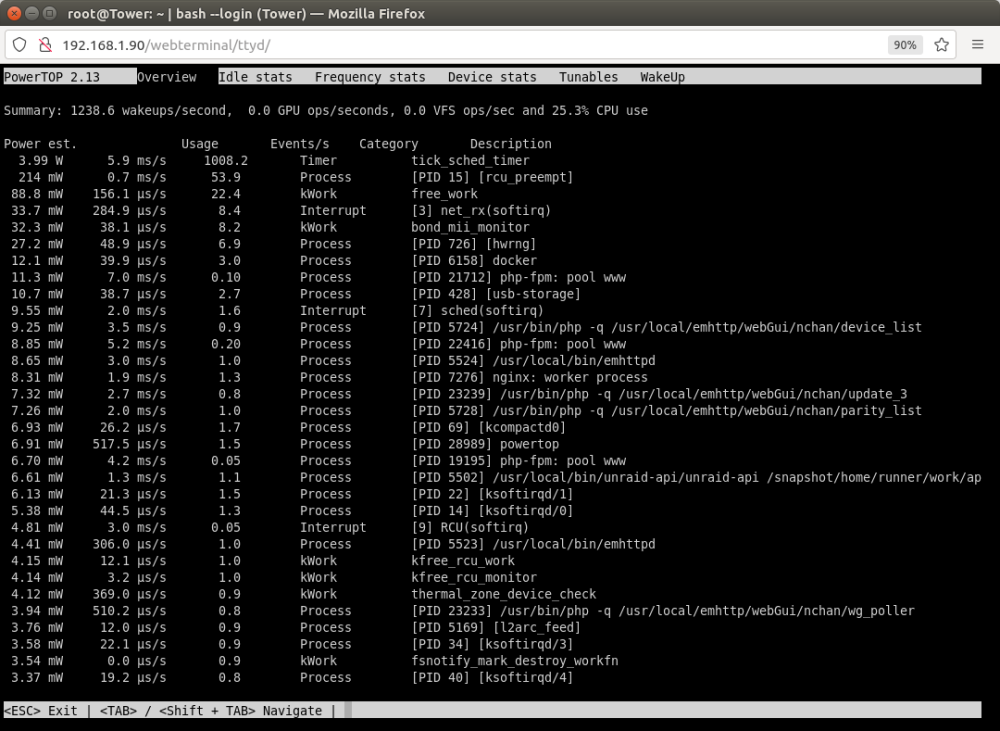
Hi, I've installed Powertop and completed the autotune routine, which is now returning a series of 'good' options on the Tunables page. I think the overview page is showing my power usage as 3.99w ? see screenshot below. However I have a good quality power meter which is showing I am still drawing 45w from the wall. I'm thinking it may be my power supply which was a spare from an older PC build (Cooler Master Rs-460-PCAP-A3). Before I look at buying a new power supply, am I reading things right and what Power supply would you suggest ? I'm running an Intel I3 10105 and 2 x 4tb WD Red drives. Thanks in advance
-
That's great, relieved there no major hardware problems. I turned my attention to cables and think it's the result of a SATA cable issue, swapped it out and my drive has reappeared. Just got data and parity drives back online so going through the parity sync process fingers crossed. thanks for your help
-
Looking for some help please. In the process of setting up a new unraid server (noob here) so please be kind.. I had loaded all my data and got parity set up, but needed to rearrange my data. The data was on a smaller and older drive which was starting to make some strange whinning noises, but passing SMART tests. Having moved all my data, to a newer larger drive, when trying to reconnect my parity drive, my system won't boot. I've tried formatting the parity drive (booting from an ubuntu live usb) but still no luck, as soon as that drive is connected to the system, system just sits at the bios flash screen (and my motherboard boot error led is on) I noticed that Fix Common errors shows "Machine Check Events detected on your server" so wondering whether that may be the cause. I think I've managed to collect download and attach the logs, but don't really know where to start. Hoping someone can help or point me in the right direction please? 1. what do i need to do to get my system bootable with the parity drive connected 2. what is the best way to recalculate parity based on the relocated data/drive Thanks in advance tower-diagnostics-20230226-1052.zip
