





schollingsworth
Members
-
Joined
-
Last visited
-
Was unable to access my docker containers this morning and noticed a disk has been disabled again. Attached is the diag - any assistance in explaining why this keeps happening would be appreciated. tower-diagnostics-20230911-0737.zip
-
Rebuild in process - will know in a 6ish hours if we get back operational. thank you Questions: In the future, when a drive gets disabled or shows failures, the key is to generate a diag before rebooting if we want to know what happened - correct? Is it best practice to start docker containers manually? Are there any other best practices to keep the system healthy? Basically how can I avoid or make tuning configurations to lower the number of times the system disables disks?
-
Hi Jorge - I did select the disk on disk3 just to see what the system would say but never started the array. I have everything back to the original slots, started, and exported new diags. These were the errors flooding the syslogs prior to reboot and trying a different bay in the DAS to rule out connectivity. Jun 15 18:25:38 Tower kernel: BTRFS error (device loop2: state EA): bdev /dev/loop2 errs: wr 13, rd 5825102, flush 0, corrupt 0, gen 0 Jun 15 18:25:38 Tower kernel: I/O error, dev loop2, sector 81472 op 0x0:(READ) flags 0x1000 phys_seg 4 prio class 0 Jun 15 18:25:38 Tower kernel: BTRFS error (device loop2: state EA): bdev /dev/loop2 errs: wr 13, rd 5825103, flush 0, corrupt 0, gen 0 Jun 15 18:25:38 Tower kernel: I/O error, dev loop2, sector 605760 op 0x0:(READ) flags 0x1000 phys_seg 4 prio class 0 Jun 15 18:25:38 Tower kernel: BTRFS error (device loop2: state EA): bdev /dev/loop2 errs: wr 13, rd 5825104, flush 0, corrupt 0, gen 0 tower-diagnostics-20230617-1556.zip
-
Assistance needed and appreciated - not sure how to get this drive back online. Based on reading other posts, I have tried to move this drive to another slot in my DAS enclosure but the result is the same. Starting to believe that Unraid is a little too finicky and sensitive to remain stable. I have spent months trying to get a stable system to support my media and Plex server and yet another disabled disk that is one of three brand new drives. I gave a pass to Unraid for the 5 older working disks being disabled in 2 different enclosures and direct SATA connections. Am I simply wrong with the frustration? tower-diagnostics-20230616-1910.zip
-
Brand new setup for a temp need. Having trouble seeing more than one drive from the external docks. Laptop -> USB docks -> WD drives Error messages over and over May 19 11:23:50 Brazil emhttpd: device /dev/sdc problem getting id Attached is the diag - swift help on this would be much appreciated tower-diagnostics-20230519-1449.zip
-
Progress! Thank you for your confirmation about the New Config retaining the data already written. 3 of the 4 drives given to me have died in the first week of the build. Seemed rare and made me worry the system was causing the failures. All new drives going forward for my own sanity - including replacing the WD once the sync completes.

-
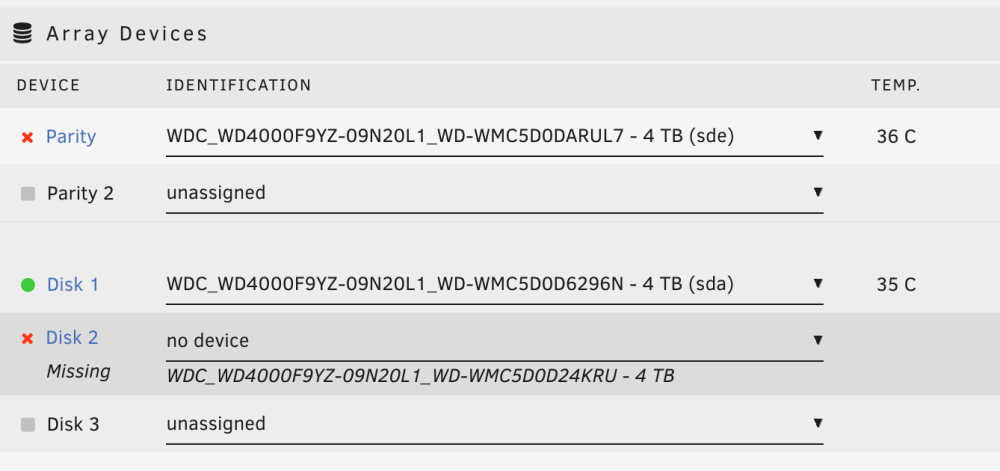
@JorgeB You were right the device must have failed completely. Incidentally now my Parity device is showing disabled. Running a SMART test comes back with Completed: read failure. I purchased 2 new drives but not able to start the array. Trying to follow the procedures on https://wiki.unraid.net/Replacing_a_Data_Drive It is continually saying Missing on slot2 - if I select the new drive it says "Wrong" Am I looking at starting over completely?
-
Any thoughts on why Unraid is not able to present more than 2 disks from my Sabrent DAS when it shows in System Devices / SCSI Devices? System: Version: 6.11.5 Unraid OS Basic USB Devices: Bus 002 Device 003 Port 2-5.1ID 174c:55aa ASMedia Technology Inc. ASM1051E SATA 6Gb/s bridge, ASM1053E SATA 6Gb/s bridge, ASM1153 SATA 3Gb/s bridge, ASM1153E SATA 6Gb/s bridge Bus 002 Device 004 Port 2-5.2ID 174c:55aa ASMedia Technology Inc. ASM1051E SATA 6Gb/s bridge, ASM1053E SATA 6Gb/s bridge, ASM1153 SATA 3Gb/s bridge, ASM1153E SATA 6Gb/s bridge Bus 002 Device 005 Port 2-5.4ID 174c:55aa ASMedia Technology Inc. ASM1051E SATA 6Gb/s bridge, ASM1053E SATA 6Gb/s bridge, ASM1153 SATA 3Gb/s bridge, ASM1153E SATA 6Gb/s bridge SCSI Devices: [0:0:0:0]disk Kingston DataTraveler 2.0 PMAP /dev/sda 15.6GB [1:0:0:0]disk ASMT ASM235CM 0 /dev/sdb 4.00TB [2:0:0:0]disk ASMT ASM235CM 0 /dev/sdc 4.00TB [3:0:0:0]disk ASMT ASM235CM 0 /dev/sdd 4.00TB [7:0:0:0]cd/dvd PLDS DVD+-RW DU-8A5LH 6D11 /dev/sr0 1.07GB Long story short: Parity disk inside the computer chassis is getting too hot so moving it to the DAS. Parity disk in slot 4 shows up but my 2nd disk (sdc) is now missing from the Main / Array Devices. If I move it back, all is good. If I leave the parity disk and add a third data disk to the DAS - no bueno This is a new build that I want to have stable and tested before I decommission my old Linux server. New to Unraid but totally blown away by this setup (visibility, ease of use, large array, Docker for Plex and related apps) and want it to work for me. Any help is appreciated! tower-diagnostics-20230328-1844.zip

