





AgentEccks
Members
-
Joined
-
Last visited
-
Yes, it's been working fine per my update, but I just updated again today. I will post is I have any issues.
-
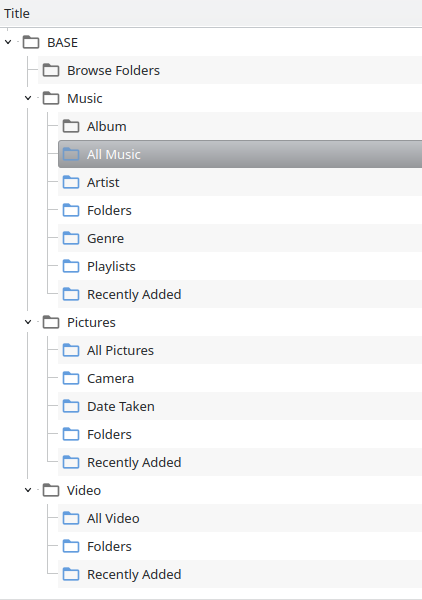
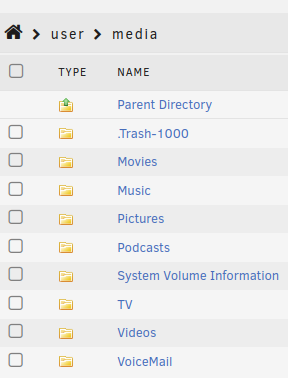
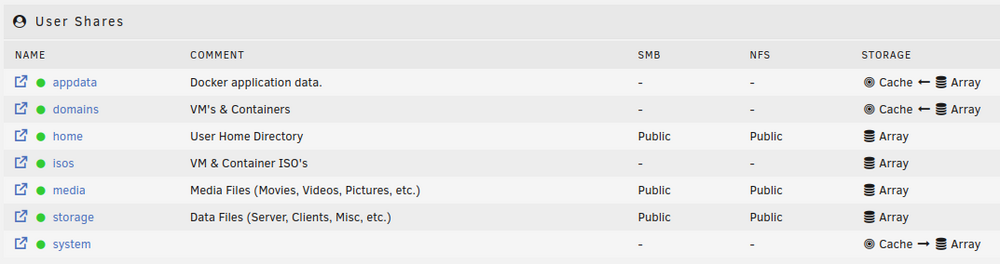
UPDATE: SOLVED (see below): Greetings... I've been using MiniDLNA for a few years now, and specifically in UNRAID since installing in Feb. of 2023 when I first started using UNRAID. It seems to be the only DLNA server that just shows up in everything that I use, Roku Media Player, LG Smart TV's, VLC under Shield, and Linux, etc., without needing configuration. However, something has changed recently and the only thing that I have done is upgrade to the newest version of UNRAID. The MiniDLNA server still shows up on all devices however it is no longer seeing any of my media. The Roku Media Server states that it did not find any compatible media, here is what VLC shows, just no media: I've tried stopping the container and modified the config file; both by changing the `/media` path to `/mnt/user/media` and just setting the paths in the Docker GUI to `/Movies` for example and actually specifying the folder paths in the config file. No matter what I change it to, the Docker Logs give the following error in all cases: >>>>> [2024/08/22 09:02:38] minidlna.c:669: error: Media directory "/media" not accessible [No such file or directory] <<<<< >>>>> [2024/08/22 09:09:20] minidlna.c:669: error: Media directory "V,/mnt/user/media/Movies" not accessible [No such file or directory] [2024/08/22 09:09:20] minidlna.c:669: error: Media directory "V,/mnt/user/media/Videos" not accessible [No such file or directory] [2024/08/22 09:09:20] minidlna.c:669: error: Media directory "A,/mnt/user/media/Music" not accessible [No such file or directory] [2024/08/22 09:09:20] minidlna.c:669: error: Media directory "A,/mnt/user/media/Podcast" not accessible [No such file or directory] [2024/08/22 09:09:20] minidlna.c:669: error: Media directory "P,/mnt/user/media/Pictures" not accessible [No such file or directory] <<<<< >>>>> [2024/08/22 10:17:39] minidlna.c:669: error: Media directory "/mnt/user/media" not accessible [No such file or directory] <<<<< ...see attached file: 2024-08-22_MiniDLNA-Data.txt The location of the share is correct and set to public, so there should not be any permission issues: Any advise appreciated. Also... From the initial install, MiniDLNA has always been set as a `Host` if set to `Bridge` it does not show up in any devices. UPDATE: It seems that I did make a slight change to my system after all. My cache drives were separate, and I had pooled them together for redundancy. I had set the `appdata` folder to be moved/stored on the cache drive pool. While it didn't seem to affect any other containers, MiniDLNA didn't seem to care for it. Once I reversed that and had the `appdata` folder go back to the array, MiniDLNA once again was able to find the media folder and is working just fine now.
-
Once everything was back to normal, the NetData Errors went away also. Also, the server has now gone through the scheduled weekly Parity Check without further issues, so everything seems good now. Thanks for the assistance/guidance!
-
I was simply referring to the errors noted initially by NetData when everything went sideways. As of now the Parity check completed and shows that the "Parity is valid". Everything seems back to normal, just trying to understand why it glitched in the first place. Attaching new diags. base-diagnostics-20240412-0240.zip
-
Thanks for the info., I'll get that going. Do you think the updates I did caused all of this? If not, definitely a strange coincidence! I think at one point I rebooted in safe mode, disconnected the parity drive and rebooted again, and under the `Unassigned Devices` plugin, the parity drive did show as an XFS drive so not sure why I got the NetData Errors regarding BTRFS and then the parity went wonky: any insights regarding the BTRFS errors? As it seems now, aside from the parity drive needing to be synced, there is nothing else wrong and maybe, if I rebooted the server after doing the updates, that would have prevented this whole incident?
-
Yes, it opened on my end after posting.
-
Here's update. I tested on my end, it opened. I'll test again after I post this. base-diagnostics-20240410-1120.zip
-
Here's the updated Diagnostics. base-diagnostics-20240409-2351.zip
-
I rebooted and all the shares are back, but show that they are unprotected: Which, I assume is due to the Parity issue: Docker containers seems to be functioning again. What's the best way to check whether there is actually issues with that disk?
-
Since there is still an ongoing task, will rebooting cause any further issues?
-
UPDATE: Sorry, it seems that the SSD cache drives are formatted under BTRFS.
-
Currently, my server has been up for 3mos 26d and 23min: it was most likely rebooted the last time I did updates. Early Saturday morning (2024-04-06) I updated all docker apps, and plugins, basically anything that needed to be updated. Everything seemed to go fine, and I was away from home the rest of the day. Early Sunday morning (Sunday is when the Parity Drive gets checked), I received an error notice from NetData, and upon checking the server, I have MANY errors and issues now. My Shares have disappeared: From my file manager: I work mainly from this server, so I have no access to my files from my computers at this point. One of the files that I had open in my text editor, states that it couldn't open/find the file, which is expected since the shares are no longer there: but also, I cannot find the file via the UNRAID file manger, which suggests that I may have lost some data also. My Parity Drive seems to have failed, and is still running some kind of check with no end time estimated: Only 3 docker containers are running: however, when I try to access the WebUI for PieHole, I get an "500 Internal Server Error" MiniDLNA seems to be working as I can access from my TV's but no data. In the docker logs, it shows that it also cannot find the media share: 2024-04-06 06:01:55,518 DEBG 'start' stdout output: [2024/04/06 06:01:55] minidlna.c:669: error: Media directory "/media" not accessible [No such file or directory] and NetData is working, which shows the following errors: NOTE: I do not remember setting anything up using BTRFS, I assume that may be what UNRAID uses for the parity drive??? All other drives are XFS. When I attempt to start any of the other docker containers, I just get the following execution error: I'm not sure what to do at this point. as I pretty much "set-it-and-forget-it", I really don't fiddle too much once everything is up and running. Any advice appreciated. base-diagnostics-20240408-0905.zip

