





PartyingChair
Members
-
Joined
-
Last visited
Everything posted by PartyingChair
-
Honestly, pretty sure it's been happening since I started with the UPS, I just never looked deep into it or cared since it seems to work despite the errors, but decided recently I may as well try to fix them if I can. I'll try to find a cable and try that
-
Hello! I was getting this error earlier: Jun 14 21:11:02 Tower usbhid-ups[19788]: nut_libusb_get_report: Input/Output Error Jun 14 21:11:04 Tower usbhid-ups[19788]: #012Reconnecting. If you saw "nut_libusb_get_interrupt: Input/Output Error" or similar message in the log above, try setting "pollonly" flag in "ups.conf" options section for this driver! I added the pollonly flag, and now the error has updated too: Jun 14 21:44:03 Tower usbhid-ups[19503]: nut_libusb_get_report: Input/Output Error Jun 14 21:44:05 Tower usbhid-ups[19503]: nut_libusb_get_string: Pipe error Jun 14 21:44:25 Tower usbhid-ups[19503]: nut_libusb_get_report: Input/Output Error Is this likely a bad usb cable, or is there something else I can try before running out and spending money? If you need any diag or logs, let me know, I am happy to supply them Thanks!
-
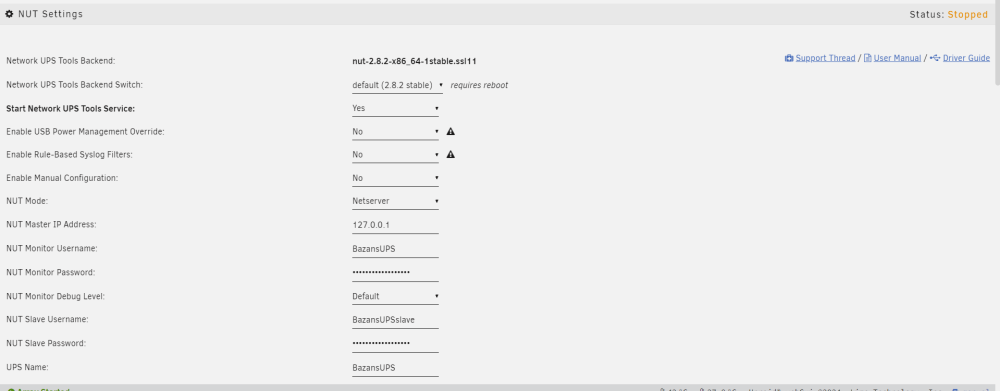
Update: No dice. But even weirder, "Start Network UPS Tools Service" is set to Yes, but the status is "stopped" I have to change it to no, then back to yes for it to start. Update: seems to be working now. Thank you. I'm using the script. At the end of the day, even if it's a workaround, if it's working, I'm happy
-
I've plugged it into a different port, but have not tested yet. I do not have another cable to try at the moment though.
-
The UPS is on the entire time, never turned off, so I worry this won't work all the time. Is there a way to tell NUT to wait longer for the UPS to reply? The fact that it's taking a long time to get ready while it's constantly on is weird. But I must admit, most of the time starting it manually later does work so maybe it will fix it for good. (I have not had a single power outage yet - these are simply reboots on the server I have done for various reasons as I change things around and test different things)
-
NUT keeps failing on startup. I suspect it's due to high CPU load - as home assistant is also failing on startup since I installed NUT. I'd really just like to add a delay to startup, but if anyone can see anything else that could cause it, see the attached debug package. (I dragged the debug folder as 1 folder and it seems to have submitted it as many different files.. sorry about that) BazansUPS.dev.txt nut-dw.cfg.txt nut-dw.plg.txt nut-scanner.txt nut.conf.txt ups.conf.txt upsd.conf.txt upsd.users.txt upsmon.conf.txt upssched.conf.txt xnut-nospam.conf.txt tower-diagnostics-20240423-1343.zip unraid-lsusb.txt unraid-packages.txt unraid-version.txt nut.conf.txt ups.conf.txt upsd.conf.txt upsd.users.txt upsmon.conf.txt upssched.conf.txt xnut-nospam.conf.txt
-
Hello! I am having an issue with the NUT plugin. It fails to start when the server is rebooted. I have to go in and manually start it. I think the CPU load is too high during start up, because it is also causing home assistant to sometimes fail to start. Is there a way I can delay the startup of it so it will start up successfully when the CPU load has dropped? Thanks in advance.
-
Hello! I use my Mac primarily, but have a windows computer backup. I have been trying to configure a YAML file for a dashboard (startpage) and I am running into an issue when my windows machine can edit it, but my Mac can't. My Mac can only duplicate it, edit the duplicate file, and then I have to put the new file back and delete the old one to make changes. This makes it annoyingly difficult to edit, check changes, edit, check changes. I tried the same thing on my windows computer, and it works pretty flawlessly. I can edit the changes directly in the file without duplicating file and so on. I checked the user permission of the file, and they were root root. I ran chmod -R 99:100 which changes them to nobody and user. I disconnected my Mac from the server and then reconnected it. I even restarted my Mac. The issue still exists.
-
Update: New USB drive seems to have fixed it
-
I had to restart my server by pressing and holding the power button, it was not responding. Once back online, a parity check does not appear to have automatically started. When I try to start one in the UI, nothing happens. I'm not sure if it's running in the background, or if it's not running at all, or what. I have configured unraid to send emails when a parity check starts, haven't receeved that email either like I normally do. When I try to run a parity check, only one thing appears in the logs: Apr 9 13:52:56 Tower kernel: mdcmd (44): check correct Unraid 6.12.10 Any help would be appreciated. I have restarted twice to see if I could get it working.
-
Ah interesting. Thank you!
-
Hey, I copy and pasted that, the copy and pasted the directory in that I want to finish with this: #!/bin/bash limit=10M source="/mnt/user/Media/Ingress/Compressed" limit=$(echo $limit | cut -d 'M' -f 1) for dir in "$source"/*/ do size=$(du -sBM "$dir" | cut -d 'M' -f 1) if (( $limit > $size )) then echo remove: $dir rm -rf "$dir" fi done But I get error du: cannot access '/mnt/user/Media/Ingress/Compressed/*/': No such file or directory /tmp/user.scripts/tmpScripts/Delete empty compressed folders/script: line 12: ((: 10000000 > : syntax error: operand expected (error token is "> ") This is what the folder looks like, I am trying to deleted the folder ".ISdr1c" For more info, this is a temporary folder created by handbrake when it is compressing my files. it deletes it on it's own, but I want to automatically turn off handbrake in the morning and when I do that, it DOES leave those folders there. Do you know if I need to mofify something in your script to make it work? Thanks in advance!
-
Hello! Unsure if this is the right place to ask this, but I have connected my shares to my phone, ipad, and mac, but when I search in spotlight for files on unraid, it just won't find them. Does anyone know a way to let my phone, mac and ipad search these shares/folders? Thanks

