





scs3jb
Members
-
Joined
-
Last visited
Everything posted by scs3jb
-
Darn. Holy smokes, broadcom one is 700+ euros 😶 This one looks a bit more economical: https://www.ebay.co.uk/itm/304481053593 but i'm guessing there's a catch (PCIE3.. slow?)?
-
Note: My motherboard does not have bifurcation I wanted to upgrade my flash scratch disks and am becoming weary of commercial M.2. I would like to use datacenter grade U.2 flash drives. I however do not have the appropriate ports on my motherboard. I wanted to use a Gen4 PCI-E fullsize card slot, but I'm unsure if my motherboard would see all 4x devices if I used something like this: amazon link / ebay link / aliexpress link I'm guessing by split they mean 'requires a motherboard with bifurcation'? If they don't work, does anyone know of a device that would work to let me use a PCI-E Gen4 slot for 4x U2 without needing to sell a kidney?
-
I have tried the following: 1. Removing the SAS controller - no luck, so there's no sharing, etc going on. 2. Removing and reseating the m.2 drive 3. Adding some sysconfig boot parameters
-
I've raised a support request with AsRock. Whilst pulling up the details this feels like it might be on the slackware/unraid side, in the BMC it looks fine (I can see both the PCI-E 4 and m.2 slots in use) whilst unraid can't see the drive... very odd.
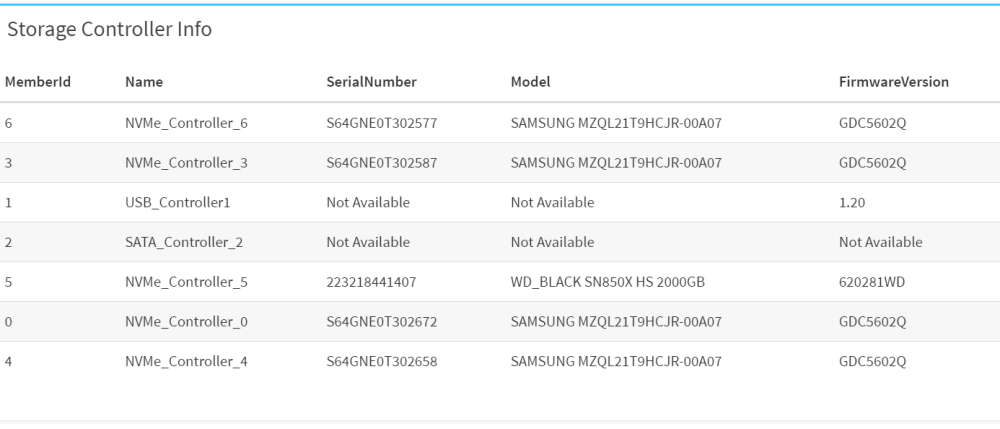
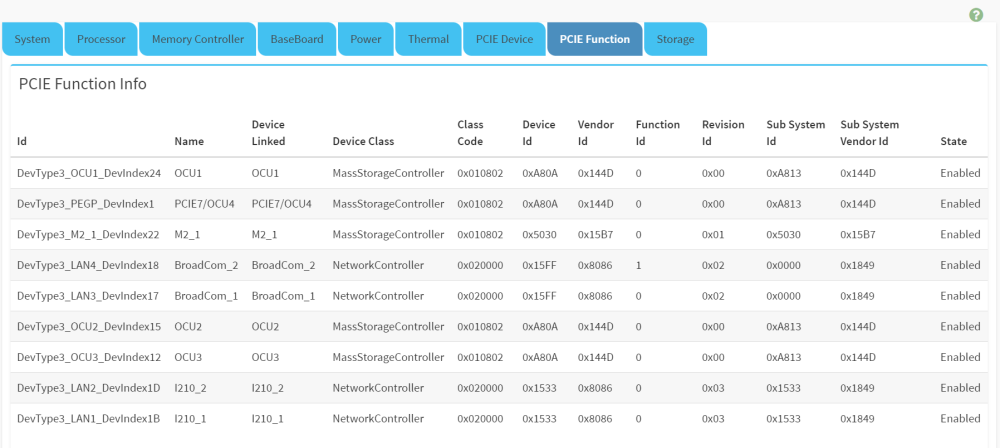
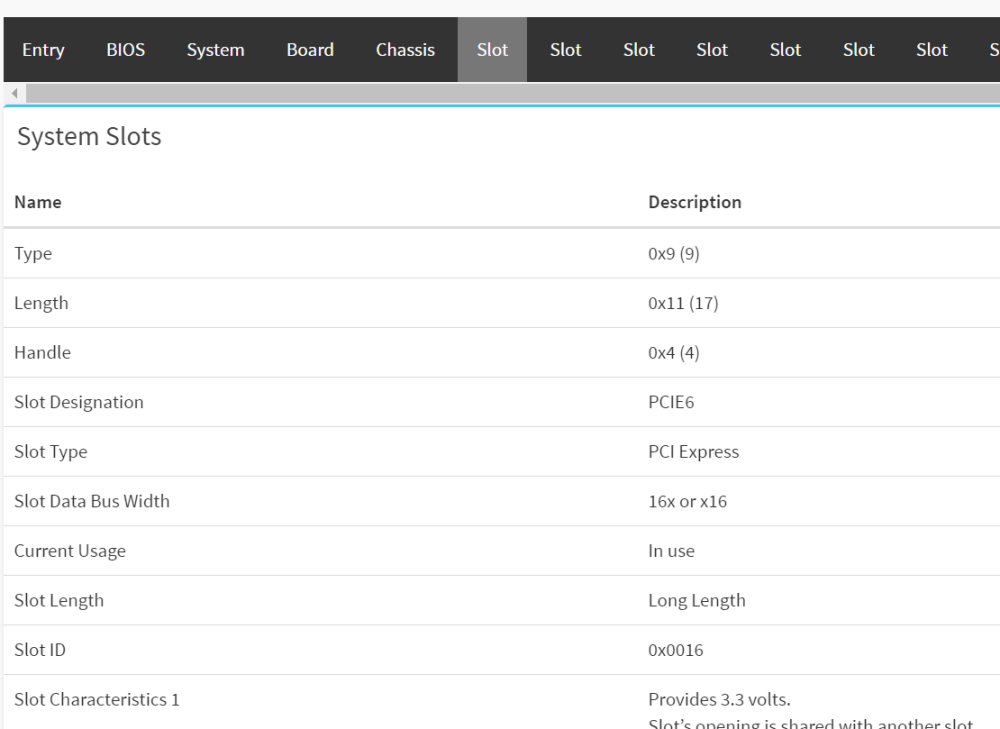
-
No you are on to something, thank you, reading the block diagram its sharing the pci-e 3x and the m.2 and there's: Trying to figure out what BOM option with M2_1 means now!
-
OcuLink for the U.2 SSD Drives, nvme is via the motherboard (PCH). In terms of sharing one PCI-E sharing/collision, one OcuLink (PCI-E7 / CPU), the rest are all PCH and don't share... in theory. I wouldn't expect PCH to collide with anything. The M.2 slot is pci-e 3.0 4x and SLOT4 is empty (only other PCIe lane). I am using the PCIe5.0 for a SAS controller but that's on CPU. PCIe Expansion Slots (SLOT7 close to CPU) SLOT7 PCIe4.0 x4* [CPU] SLOT6 PCIe5.0 x16 [CPU] SLOT4 PCIe3.0 x1 [PCH] Note *SLOT7 share lanes with OCuLink4. OCuLink4 will disable when SLOT7 is populated Other PCIe Expansion Connectors M.2 slot 1 M-key (PCIe3.0x4) [PCH]; support 2280/2260/2242/2230 form factor OCuLink 1 OCuLink (PCIe4.0 x4)* [CPU] 1 OCuLink (PCIe4.0 x4 or 4 SATA 6Gb/s) [PCH] 1 OCuLink (PCIe4.0 x4) [PCH] 1 OCuLink (PCIe3.0 x4) [PCH] Note *SLOT7 share lanes with OCuLink4. OCuLink4 will disable when SLOT7 is populated Thoughts? You think a SAS controller on a CPU port could class with a m.2 slot on PCH? I don't think it can be the OcuLinks since bios is showing Oculinks and m.2 in the bios. I guess i can pull it when the parity rebuild finishes, but it seems a bit odd. Maybe I didn't spot something in hidden in the manual? https://download.asrock.com/Manual/W680D4U-2L2TG5.pdf
-
And I also just built out an AsRock W680D4U-2L2T/G5 with an i9 13900k and 128GB DDR. Runs a bit hotter but ipmi / remote environment is better than supermicro and its got PCI-E 5.0, but less nvme slots and only PCI-e 3x for that. For some reason it lists the base clock at 2970MHZ instead of 3000MHZ Currently battling with the m.2 not being detected, but it seems to be compatible and working fine with unraid apart from that.
-
I used this because my motherboard doesn't support bifrucation: https://www.amazon.co.uk/gp/customer-reviews/RPQHJPZ4LP8L4?ref=pf_ov_at_pdctrvw_srp it supports 3x at gen3 speeds super stable... 4x causes one to drop out though which i discovered after purchase. There's an updated model but i was unable to find it for purchase that supports 4x. Its all transparent. If you don't mind spending a bit more get a u.2 expansion card (or oculink) and use u.2 enterprise ssds. Scan.co.uk has a 1.92TB enterprise samsung which supports 2TB read/write per day for 5 years for ~200 brexit beans which is much better suited to a nas environment.
-
I went with this approach and it was a good call, sacrifice a tiny bit of speed for endurance. Thanks for the suggestion.
-
Any ideas? Its listed fine in the bios, and I can boot from it from there But not seen in unraid: [0:0:0:0] disk USB SanDisk 3.2Gen1 1.00 /dev/sda 30.7GB [1:0:0:0] disk ATA ST4000VN000-1H41 SC46 /dev/sdb 4.00TB [1:0:1:0] disk ATA WDC WD40EFRX-68W 0A80 /dev/sdc 4.00TB [1:0:2:0] disk ATA WDC WD40EFRX-68W 0A82 /dev/sdd 4.00TB [1:0:3:0] disk ATA HGST HDN724040AL A5E0 /dev/sde 4.00TB [1:0:4:0] disk ATA ST8000AS0002-1NA AR15 /dev/sdf 8.00TB [1:0:5:0] disk ATA ST8000AS0002-1NA AR17 /dev/sdg 8.00TB [1:0:6:0] disk ATA ST12000VN0007-2G SC60 /dev/sdh 12.0TB [1:0:7:0] disk ATA ST12000VN0007-2G SC60 /dev/sdi 12.0TB [N:0:6:1] disk SAMSUNG MZQL21T9HCJR-00A07__1 /dev/nvme0n1 1.92TB [N:1:6:1] disk SAMSUNG MZQL21T9HCJR-00A07__1 /dev/nvme1n1 1.92TB [N:2:6:1] disk SAMSUNG MZQL21T9HCJR-00A07__1 /dev/nvme2n1 1.92TB [N:3:6:1] disk SAMSUNG MZQL21T9HCJR-00A07__1 /dev/nvme3n1 1.92TB I might have overlooked something but not sure what it would be? legion-nas-diagnostics-20230319-1339.zip
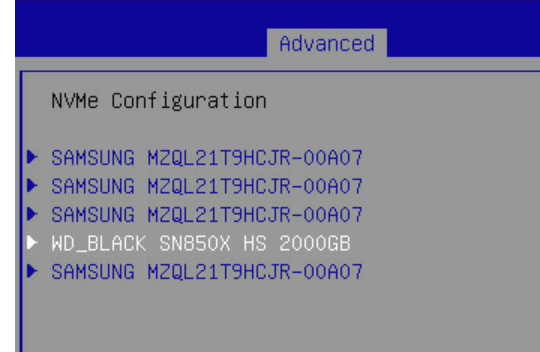
-
This is odd, I already have a setup with an array cache of WD SN850x Gen4 which get close to 7000MB/s in real life workload copying files that fit in DRAM (3x 2TB drives in a RAID), and smaller files were lower but higher than Gen 3 spec, whilst I have WD SN850x Gen4 is a PCI-e 3x expander and they are stuck at around 3500MB/s. On top of the faster speed I've seen, the endurance rating is much higher on the current models so I think buying gen4 nvme only to cap them at lower speed seems awfully wasteful. Endurance/Speed/Price is the balance I went for, which is why I went for the SN850x over the Samsungs (had terrible experience with EVOs). Have you published some results somewhere I could take a look at? Given everything modern is gen4, i wonder what the price/speed/endurance sweet spot is.
-
Can't login with username/password so completely locked out of my old account (spamalam), is there a recovery process? No idea what email i used, i generally use disposable ones to avoid password/email theft.



