





scs3jb
Members
-
Joined
-
Last visited
Everything posted by scs3jb
-
#!/bin/bash # Variables #SOURCE_DIR="/mnt/scratch/completes/transmission/reseeds/ptp" SOURCE_DIR="/mnt/scratch/completes/transmission/reseeds/cg" DESTINATION_DISK="/mnt/disk8/movies" THRESHOLD_MB=20000 # Minimum free space in MB to ensure on the destination disk # Check available space on destination disk available_space=$(df --output=avail -m "$DESTINATION_DISK" | tail -n 1) if [ "$available_space" -lt "$THRESHOLD_MB" ]; then echo "Insufficient space on $DESTINATION_DISK. Available: ${available_space}MB. Required: ${THRESHOLD_MB}MB." exit 1 fi # Traverse the source directory and process symlinks find "$SOURCE_DIR" -type l | while read -r symlink; do # Resolve the real path of the symlink real_path=$(readlink -f "$symlink") # Check if the file exists if [ ! -f "$real_path" ]; then echo "Skipping: Target file for symlink $symlink not found." continue fi # Construct the destination path relative_path=$(realpath --relative-to="/mnt/user/movies" "$real_path") dest_path="$DESTINATION_DISK/$relative_path" # Locate the disk the file is on and set it to src_path for file in /mnt/disk{1..30}/movies/"$relative_path" do [[ -f "$file" ]] && src_path="$file" && break done # If the src_path contains the destinition disk there's nothing to do, continue ALREADY_THERE=`echo "$src_path" | grep "$DESTINATION_DISK"` if [ ! -z "$ALREADY_THERE" ]; then echo "Skipping: Target $src_path is on $DESTINATION_DISK" continue fi # Make sure we are copying from somewhere if [[ -f $src_path ]]; then # Create the destination folder if it doesn't exist dest_dir=$(dirname "$dest_path") mkdir -p "$dest_dir" # Move the file echo "Moving $src_path to $dest_path" mv "$src_path" "$dest_path" || { echo "Failed to move $src_path"; continue; } else # We shouldn't get here, in case there's something weird with greps, etc. echo "Skipping: Something is messed up with $real_path vs disks" continue fi done echo "All files processed." Was what I used in the end and it worked great. Unfortunately $real_path resolves to /mnt/user/movies (share) so the move will fail, so in the above, it looks for the actual file on the physical disk and sets to $src_path. issues: variable names suck, src_path and real_path for example should probably be flipped. /mnt/disk{1..30}/movies/ is hardcoded and would only work for my setup. folders are left behind. Anyway, now i only have one disk spinning for reseeds, so i'm happy
-
hmmm seems the source is a bit wrong: mv '/mnt/user/movies/The Knocking (2022) {imdb-tt12851130}/The.Knocking.2022.1080p.BluRay.Remux.AVC.DTS-HD.MA.5.1-NOGROUP.mkv' '/mnt/disk8/movies/The Knocking (2022) {imdb-tt12851130}/The.Knocking.2022.1080p.BluRay.Remux.AVC.DTS-HD.MA.5.1-NOGROUP.mkv' Should be: mv '/mnt/disk13/movies/The Knocking (2022) {imdb-tt12851130}/The.Knocking.2022.1080p.BluRay.Remux.AVC.DTS-HD.MA.5.1-NOGROUP.mkv' '/mnt/disk8/movies/The Knocking (2022) {imdb-tt12851130}/The.Knocking.2022.1080p.BluRay.Remux.AVC.DTS-HD.MA.5.1-NOGROUP.mkv' Or the copy will fail, as disk8 is in the share for /mnt/user/movies. Is there a quick helper to get from /mnt/user/movies/ -> /mnt/disk13/movies or is the only option testing for the presence of the file on every disk in a loop? I think I'll also want to move the folder so there aren't blank folders left around on the disks.
-
These are great, thanks so much! I'll take the script approach!
-
Yeah, so I think i was screwed. My UPS isnt big enough to keep it above 50% if there's a power outage, the clean shutdown just takes too long. Anyway, luckily after aborting the parity check and running again it went back to normal. I wonder if its worth checking UPS status and delaying starting the array, or is that too big a change? I think the problem is my motherboard is set to restore power state and my networking gear drained the battery completely over time, so this was all 'automated' ps. I just noticed the reply was form back in november, i thought it was a new notification
-
After the first power outage, unraid booted up and started the array, whilst there was low battery. It did not shutdown in time when the power cut happened.
-
afaik it doesn't prevent you powering back on when its low on battery I didn't have problems with the first clean shutdown, it was the second power cut that was the problem. A clean shutdown takes 5-10mins with 18 disks and loads of dockers.
-
I want to consolidate some files on a single disk, these files are currently spread across a huge share and I want to avoid creating another share and pin it to a disk. /mnt/scratch/reseeds/ {lots of symlinks here to /mnt/user/movies/<folder>/<file>} I would like to take all of the folders that have symlinked files and move them all to a single disk, ensuring there is enough space: /mnt/user/movies/Folder_1/file_1 /mnt/user/movies/Folder_2/file_2 /mnt/user/movies/Folder_8/file_8 -> /mnt/disk1/movies/<here> I'm aware of the re-balance plugin and have used before but I'd like to automate this a bit. My other thought was keep a copy of the file on the array and copy the files across to a ssd or m.2 drive, but that would end up being TBs of data duplicated. I also seed and unseed quite a bit. I'm happy to tailor a script a little, I just figured I'd check to see if there's something out there before writing something.
-
Seems fine, so odd. Thanks for the help Parity finished fine this time: Duration: 1 day, 18 hours, 17 minutes, 43 seconds. Average speed: 131.4 MB/s There was something that caused it to hang and then a lockup, but no clues. I guess i'll have to observe and keep an eye of things.
-
Neat, thanks. I've now reached a point past where the parity stalled, the speed has dropped to 100mbps, but its at 61% whilst it had stalled at ~40%. Will look through the other items and see if there's anything there. Settings look fine elsewhere and nothing that could indicate why I needed to force reboot to get parity check killed. Will monitor the parity check and see if the system locks up again. One thing I'm worried about is the USB durability, I saw it took a long time to list it in the bios boot devices: is there any check for usb life issues and could that cause a lock up/kernel panic?
-
Timeline: Power outage put me on ups, which resulted in clean shutdown Power on followed by power outage led to unclean shutdown Power on started Parity, which seemed to hang at < 1kbps speeds that was not progressing after a week. Attempted pause, and cancel from UI, both logged in syslog but didn't respond. Dockers worked fine during this time, just parity was hung. Forced a restart, parity check kicked off but machine hard locked up (powered on but unresponsive to ssh and no video on ipmi) Forced another a restart and now parity is running again (currently ~200mbps) Diagnostics attached, on latest version. beyonder-nas-diagnostics-20241118-2246.zip
-
Looks like this is now official bundled: https://www.tomshardware.com/pc-components/cpus/intel-rolls-out-linux-kernel-microcode-fix-for-affected-13th-14th-generation-processors I have to say props to supermicro for updating their bios for the w680, but AsRockRack are awful. Abandoned their skus... Special place in hell for rotten motherboard manufacturers, particularly the price they charge! Here is the repo: https://github.com/intel/Intel-Linux-Processor-Microcode-Data-Files/tree/microcode-20241029 I would very much appreciate these fixes being rolled into Unraid.
-
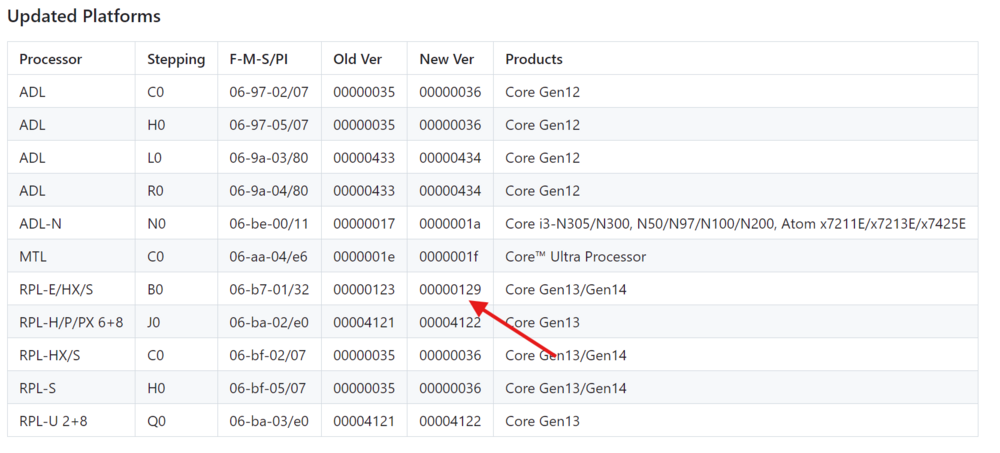
New intel ucode but not clear whats in it https://github.com/intel/Intel-Linux-Processor-Microcode-Data-Files/releases/tag/microcode-20240910 I wonder if this is the patch? That looks like Raptor Lake patched to 129. Only one of my two motherboard manufacturer's has released the 129 bios. Top marks for supermicro, fail for asrock.
-
Rolled back to v24.06.1 but got this same segfault from a shared library. Version v24.09.1 / latest / nightly has the same issue. Going back to v24.03.1 worked, so it looks like its been introduced in some version after this. Updated baseimage to version 4.6.3, which brings the following changes: Is the likely culprit, as it seems to be caused by a shared library brought in by alpine.
-
just started some x265 builds and am suddenly getting: [227844.421542] ghb[28415]: segfault at 0 ip 0000152b32c143a0 sp 0000152b1ea65cf8 error 4 in ld-musl-x86_64.so.1[152b32bce000+54000] likely on CPU 22 (core 38, socket 0) [227844.421556] Code: 48 39 ca 75 f0 c3 48 89 f8 48 83 fa 08 72 14 f7 c7 07 00 00 00 74 0c a4 48 ff ca f7 c7 07 00 00 00 75 f4 48 89 d1 48 c1 e9 03 <f3> 48 a5 83 e2 07 74 05 a4 ff ca 75 fb c3 48 89 f8 48 29 f0 48 39 [228026.215445] ghb[31756]: segfault at 0 ip 00001527519673a0 sp 000015273d590cf8 error 4 in ld-musl-x86_64.so.1[152751921000+54000] likely on CPU 14 (core 28, socket 0) [228026.215457] Code: 48 39 ca 75 f0 c3 48 89 f8 48 83 fa 08 72 14 f7 c7 07 00 00 00 74 0c a4 48 ff ca f7 c7 07 00 00 00 75 f4 48 89 d1 48 c1 e9 03 <f3> 48 a5 83 e2 07 74 05 a4 ff ca 75 fb c3 48 89 f8 48 29 f0 48 39 [228083.419031] ghb[19625]: segfault at 0 ip 000014889122b3a0 sp 000014887ce69cf8 error 4 in ld-musl-x86_64.so.1[1488911e5000+54000] likely on CPU 3 (core 4, socket 0) [228083.419041] Code: 48 39 ca 75 f0 c3 48 89 f8 48 83 fa 08 72 14 f7 c7 07 00 00 00 74 0c a4 48 ff ca f7 c7 07 00 00 00 75 f4 48 89 d1 48 c1 e9 03 <f3> 48 a5 83 e2 07 74 05 a4 ff ca 75 fb c3 48 89 f8 48 29 f0 48 39 Get a repro every time I hit start from the queue. Any idea what's causing this?
-
There seems to have been an update this week but pretty cryptic and undocumented: https://github.com/intel/Intel-Linux-Processor-Microcode-Data-Files . Not convinced the voltage caps are included in this ucode release yet.
-
With most distros it's a package you install afaik, slackware is a bit different and you have to manually add it to initrd https://www.bernieland.com/share/howto-microcode_early_loading.html Or is it intel dragging it's knuckles again and not releasing it? I couldn't find the actual microcode yet come to think of it.
-
I'm not sure it will get logged. If you log into the management console when your system is locked up, you will see it dumped to stdout and it whql / hardware failure. I read you can go into your bios and disable all p-cores and only run on e-cores. If you system is stable your CPU needs RMAing, its toast and has been destroyed by the defect where too much voltage is set to the P cores. When this Intel catastrophe came to light i stopped all encoding and pinned things down to minimal CPU usage to avoid the system being fully loaded. It would be great i we could get the microcode bundled with unraid as I'm not optimistic motherboard manufacturers will be releasing bios updates with any sense of urgency:
-
My understanding is that despite intel playing things down, a critical defect has been identified with Intel 13th and 14th generate that needs to be mitigated with a microcode update. This is currently very slowly being rolled out by motherboard manufacturers, but I'm a bit worried that Supermicro and Asrock bioses won't arrive for quite some time. Is it possible to update/bundle the updated microcode with unraid?
-
I went through so many iterations of head scratching with the two cards, seems that I forgot that the X13SAE-F only supports single cards in slot 7 (CPU) because of some crazy switching (Slot 4 and Slot 7 both need to be occupied for 8x, or a single 8x must be in slot 7). Thanks as always!
-
A bit of a botched upgrade, I was replacing a PLX M.2 card as my board doesn't support bifrucation but a new HBA card had the wrong cables. When I tried to reinstall the PLX card again my system just refused to boot. Tried bios upgrades, etc but its stuck. Now I've decided to temporarily run on a SATA SSD for cache but disaster... unraid can no longer see my drives! The drives are all listed in my bios (22 + 1 SSD + 3x M.2), but I've had no luck trying to get UNRAID to see them. The controller in question is seen but throwing errors: Any suggestions? beyonder-nas-diagnostics-20240320-0255.zip
-
Hello, So I wanted to talk about this. For the life in me I can not POST with the SAS3224 and QUAD M.2 anymore. Can not explain how it booted before and not now. The M.2 drops one by one, and when I tried to switch out the M.2 for another HBA, the motherboard won't POST. Tried upgrading firmware and playing with the bios but nothing, as soon as I put another card in SLOT7 it seems to have given up on having a PCI-e 3.0 8x and a PCI-e 3.0 8x (over 16x). I haven't gone all the way back to 2.0 yet. I had tried a HBA 9600-24i but it couldn't see any drives. I think its cabling, I thought I'd bought 2x 05-60005-00 cables for 4x U.2, but they seem to be non-Broadcom knock-offs. I can only see 05-60005-00 working with HBA 95xx, guess i'll email broadcom
-
Oh crikey! This if going to be fun. I just had 9600 arrive today and I'm waiting on the cables. I guess I'm going to be playing with the firmware tool and hoping everything works. Thanks for the reply.
-
Sorry to bump, are you running the Broadcom BCM HBA 9600 in IT mode? I was looking at purchasing but couldn't it pre-flashed to IT mode or much documentation. Wanting to split a pci-e 4.0 16x port for 4x U.2 drives and the HBA 9xxx looks like the best way to do it with my board (intel, you suck... all this money and no bifurcation!?!?). Looks like its working but wondering if you bought it in IT mode, flashed yourself, or running with raid?
-
I looked but I need four devices unfortunately 😔. I could go down pci-e splitter but would still need bifurcation
-
I have a spare PCI-e 4.0 16x slot I'd like to use to put some U.2 drives in. My motherboard does not support bifurcation. I'm currently using commercial M2 drives for scratch disks, but I'm killing those pretty fast and have had to RMA them several times. My aim is to have some high speed cache for downloads and temporary / scratch but with some good endurance rating behind it, then stick these in a ZFS/btrfs array. I've only managed to find a PCI-e 3.0 PEX controllers that will let me get 4x U.2 drives (PCI-e 4.0 bifrucation cards seem to be 10x the price, around 1.3k GBP!): https://www.aliexpress.com/item/1005005671021299.html?spm=a2g0o.productlist.0.0.16b5a873zNdaEl&mp=1 https://www.aliexpress.com/item/4000029811733.html?spm=2114.12010612.8148356.16.20ee71776HmCGk I was looking at Samsung PM9A3 2.5" U.2 Enterprise SSD/Solid State Drives, but I understand these would run well under the 6GB/s read speeds they should provide, as at PCI-E 3.0 it would be limited to 3.9 GB/s (985MB/s*4) which is nearly 2/3rds the performance. My questions: Am I overstating the performance drop for PM9A3 if i put them in PCI-e 3.0? If no, is there a high endurance/performance U.2 drive that would be cheaper and better than the PM9A3 (4tb ~ 500 GBP, 2TB ~ 200 GBP) if i'm limited to PCI-e 3.0 speed. Am I doing something stupid and there's a better way to get 4x enterprise flash drives into that PCI-e 4.0 port? Thanks in advance
