




Skip to content
View in the app

A better way to browse. Learn more.

Unraid

A full-screen app on your home screen with push notifications, badges and more.

To install this app on iOS and iPadOS
  1. Tap the Share icon in Safari
  2. Scroll the menu and tap Add to Home Screen.
  3. Tap Add in the top-right corner.
To install this app on Android
  1. Tap the 3-dot menu (⋮) in the top-right corner of the browser.
  2. Tap Add to Home screen or Install app.
  3. Confirm by tapping Install.

LadyHaley

Members
  • Joined

  • Last visited

  1. Yeah I have tried different file paths and creating them manually beforehand, I dont know what im doing wrong, none of my docker containers seem have trouble using the same directory
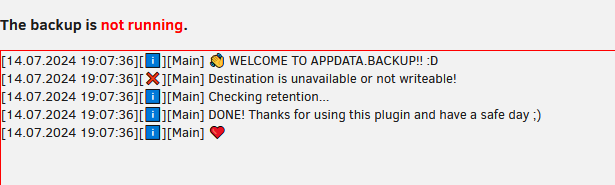
  2. Hello, I am having issues getting the backups to actually run, they dont seem to be running with the schedule I have set, and manual backups are not working. My debug ID is 1687cfe1-8348-4322-8c64-a736e3eeee46
  3. That did the job, thank you for your help
  4. Hello, I am unable to get my HHD 8TB Seagate Barracuda to format on a fresh install/configuration. my cache SSD formatted but my HHD refused to. I have tried turning the server off, changing the file system of the drive and starting the server, but that didnt help tower-diagnostics-20230309-2247.zip

Account

Navigation

Search

Search

Configure browser push notifications

Chrome (Android)
  1. Tap the lock icon next to the address bar.
  2. Tap Permissions → Notifications.
  3. Adjust your preference.
Chrome (Desktop)
  1. Click the padlock icon in the address bar.
  2. Select Site settings.
  3. Find Notifications and adjust your preference.