





codexus
Members
-
Joined
-
Last visited
-
GUI has started to become unresponsive again. It has something to do with docker, as it started misbehaving a couple hours after starting it. Now I can't even get into the settings to disable docker and the GUI is starting to load slow.
-
Tried Extended SMART test again after setting spin-down delay to 9 hours. Once again got Interrupted (host reset)
-
Let me preface with I am a network guy; I know enough about OS / NAS / Servers to be dangerous. Had my server for a few years. In that time I have gone through about 4 different hard drives due to SMART errors. Recently back in November I replaced the Parity drive with a Seagate Iron Wolf. Its now throwing SMART errors too. Tried to run SMART extended diagnostics but its hanging on Last SMART test result, just a spinning circle and the button is greyed out. Eventually it errored with "Interrupted (host reset)". Set my spin down to never will try again. Keep getting "READ FPDMA QUEUED" in the error log. I have replaced the SATA cables three separate times. Chronic lock ups. The UI will stop responding, or I get a 500 error. Ignores reboot commands from CLI. Went down that rabbit hole searching how to fix it. Nothing works, I just have to go hit the power button and force it off then it behaves for a while. Disabling Docker seemed to help, recently re-enabled it but we will see how long it goes. I got a drive disabled, tried reformatting but the rebuild takes forever, like 160+ days. Stopped that, and have quit trying to get it to work. Motherboard doesn't always remember the boot drive. Sometimes on a reboot/power off it will "forget" the boot drive is there until I reseat then boot into BIOS and put it back into the top of the stack. Also the mobo has started to hang on boot, it takes up to 2 minutes for it to finally display the splash screen to boot Unraid. I cant get into BIOS until that time either. 100% CPU, 3/4 cores will show pegged out but when I get into the shell with top it shows the system is idle. I don't even know where to begin with this mess, I am tempted to just replace the mobo/cpu/RAM and start over. Can someone tell me what I am doing wrong here? I am at my wits end. tower-diagnostics-20260627-1750.zip
-
I ordered a new set and will swap them out and see if that 6tb comes back online, thanks!
-
Found the below procedure, following it. Wish me luck! https://docs.unraid.net/unraid-os/using-unraid-to/manage-storage/array/replacing-disks-in-array/
-
I dun goofed. Five drive array, 6tb drives, 1x parity, 4x data. Drive 2 errored out, high CRT count. Bought a replacement, slotted it in, brought the array up, didn't stop to think I got an 8tb drive. So now the array cant start as parity is not the largest, but now I am down a disk so I cant swap the new drive to parity. Other than buying a 6tb drive, replacing failed then swapping 8tb with parity what are my options?
-
Update: I ended up doing another MEMTEST and it failed so the RAM must have gone bad from the first test, should have checked that first. Replaced the two sticks, they passed MEMTEST (so did the first set...) and its ran a couple days now and some parity checks without crashing. Let's hope that's all there is to it, thanks to everyone for helping me fumble through this. Time will tell if it was just RAM or RAM + something else like the PSU but right now were stable.
-
What pulls from the 12v? Is just the mobo pulling from 3.3v and 5v rails? I am trying to figure out how big of a PSU to get or maybe just hitting the easy button and getting a 850 though the math I am working (which may be wrong) my drives should never be pulling 35amps/420 watts with just a CPU and five drives. I don't understand power supplies well, if it isnt obvious. Just get the 850 and call it a day? 750? Is it not possible for the CPU to be at fault here?
-
PSU says 35 amps on the 12v rail... maddeningly I cant find startup amperage on the drives, but the spec sheet says 11.3 watts for read/write and dividing that by the voltage gives me about 1amp per drive reading/writing. That could be wildly off vs startup, but I cant find anything about amperage let alone startup amps. Presuming read/write is max-ish usage were looking at 5 out of 35 amps running the drives. No GPU, just the fans, mobo, processor and drives sucking up power. Nothing particularly power hungry to my knowledge, old tech. Processor: Intel Pentium Gold G-6400 4ghz. Motherboard: ASROCK Z590 PRO4 Memory: G.Skill Aegis 2x8GB
-
First parity check went fine, the second one overnight caused a crash. So... power supply it looks like. Would a 700w be good to go, or should I go to 800 or more?
-
Thats a great idea... parity is currently running and has five hours left. Tonight I will run it again and see if it crashes overnight, that may just give my answer if it does. Unfortunately I dont have spare CPU or PSU so it will be buy one then the other if the problem isn't resolved. Sucks, but if the Parity Check(s) don't crash then I have to start replacing hardware, which ever is cheapest first then work my way out. Was hoping the logs would be definitive about the problem. Edit: I have in the past replaced the Unraid OS USB stick too just in case that was the issue.
-
I have not, recently I replaced the array with new drives as the previous ones were giving SMART errors and I had thought that was contributing to the crashes, but they were replaced with a like number and the hard crashes have not changed one way or the other. I have a 500w thermaltake PSU currently, I am not sure if that is considered insufficient for five drives. No other add-on hardware just my mobo, processor, ram, and five drives and of course system fans.
-
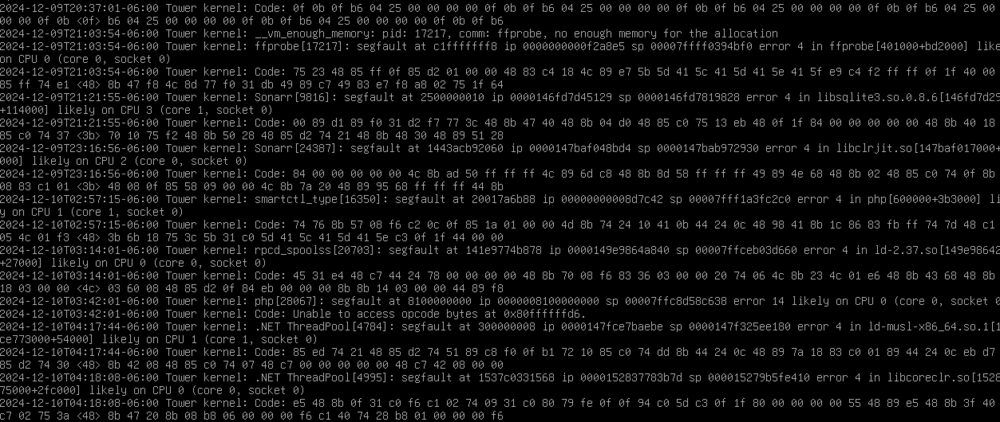
I have had trouble with my server staying stable; it randomly hard crashes and I set up a syslog server to try and capture the reason as diagnostics can't be taken until after a hard reboot; they are full of segfault 'likely on CPU'. Upon researching the segfault error others have reported it is their CPU. Memory tests have passed before, but I will launch another one. Not going to provide the other logs as their last entries was last night, but the kernel.log has entries from today and its all segfaults. I can provide any other logs if wanted; I just don't want to replace a CPU for no reason. I presume CPU would be replaced first before mobo or at least I hope so. As for the other weirdness ive had a lot of problems with Docker image becoming constantly corrupt/failing to stop when told to, or the *arr databases corrupting as well. Anything else I should do to troubleshoot? tower-diagnostics-20241210-1031.zip
-
I am just blowing out the array and rebuilding from backups.
-
Dumb question, can I set up the new disk to be a second parity then replace the drive I suspect is causing the problem (tons of errors on it) then switch the second parity back to a data drive when all the disks are replaced?

