





frosty_hedgehog
Members
-
Joined
-
Last visited
-
This worked for me, thank you
-
Yes, the controller has a Noctua fan ziptied to it and has been that way for a few years now. I have checked in the past to make sure it doesn't get too hot when running and it seemed fine (just by feeling the heatsink during operations, didn't feel too hot to touch) After reseating the cables, the drive shows up as "not installed" but is now in unassigned disks. I'm assuming I can simply reassign it and it'll rebuild? For some reason, I had a second 4TB unassigned drive (ST4000LM024-2AN17V) suddenly become unavailable as well, no prior errors, separate SATA controller (connected to the MB) and separate SATA power line to the PSU. I'm quite confused on what happened there. Reconnecting the drive doesn't bring it back up. I'm going to try connecting externally to see if it shows up on my PC prodesk-diagnostics-20250331-0939.zip
-
Thanks for taking a look! Based on what you've suggested I'll double check the cable connection and also reseat the HBA adapter. There are a few drives connected to it so I'm not sure if that'll be the root cause, no harm tyring I also just noticed my mover tuner is stuck on 2023.12.19, updating it doesn't work, will reinstall the masterwishx version per FCP recommendation I don't believe I have notifications setup right now, I'll look into that immediately. I only have this for backups failing Not sure why I ignored that FCP read error message but I'll fix that now. Will report back once this is all done and I recheck the system
-
I woke up today to a disabled unraid disk, however, after running an extended SMART test, I see that it is passed. Can someone help take a look at the Unraid diagnostics report in case I'm missing something? Not sure what to check for and if this is an issue. I assume that if everything is good, then I can rebuild the drive with these steps - https://docs.unraid.net/unraid-os/manual/storage-management/#rebuilding-a-drive-onto-itself prodesk-diagnostics-20250330-1854.zip prodesk-smart-20250330-1734.zip
-
I ended up getting the VM to boot but the error still shows up in logs. I've decided I can live with it as long as it isn't impacting the VMs performance
-
After working for over a week, I had to restart Unraid and now my VM won't boot, simply loads with a blank screen after the unraid logo. The VM is using a PGU passthrough with an RTX 3060. XML file and system diagnostics below <?xml version='1.0' encoding='UTF-8'?> <domain type='kvm' id='1'> <name>gaming</name> <uuid>42432866-ee29-adfb-c810-9124648faedf</uuid> <metadata> <vmtemplate xmlns="unraid" name="Windows 10" icon="windows.png" os="windows10"/> </metadata> <memory unit='KiB'>16777216</memory> <currentMemory unit='KiB'>16777216</currentMemory> <memoryBacking> <nosharepages/> </memoryBacking> <vcpu placement='static'>8</vcpu> <cputune> <vcpupin vcpu='0' cpuset='4'/> <vcpupin vcpu='1' cpuset='5'/> <vcpupin vcpu='2' cpuset='6'/> <vcpupin vcpu='3' cpuset='7'/> <vcpupin vcpu='4' cpuset='8'/> <vcpupin vcpu='5' cpuset='9'/> <vcpupin vcpu='6' cpuset='10'/> <vcpupin vcpu='7' cpuset='11'/> </cputune> <resource> <partition>/machine</partition> </resource> <os> <type arch='x86_64' machine='pc-q35-5.1'>hvm</type> <loader readonly='yes' type='pflash'>/usr/share/qemu/ovmf-x64/OVMF_CODE-pure-efi.fd</loader> <nvram>/etc/libvirt/qemu/nvram/42432866-ee29-adfb-c810-9124648faedf_VARS-pure-efi.fd</nvram> </os> <features> <acpi/> <apic/> <hyperv mode='custom'> <relaxed state='on'/> <vapic state='on'/> <spinlocks state='on' retries='8191'/> <vendor_id state='on' value='none'/> </hyperv> </features> <cpu mode='host-passthrough' check='none' migratable='on'> <topology sockets='1' dies='1' cores='4' threads='2'/> <cache mode='passthrough'/> </cpu> <clock offset='localtime'> <timer name='hypervclock' present='yes'/> <timer name='hpet' present='no'/> </clock> <on_poweroff>destroy</on_poweroff> <on_reboot>restart</on_reboot> <on_crash>restart</on_crash> <devices> <emulator>/usr/local/sbin/qemu</emulator> <disk type='file' device='disk'> <driver name='qemu' type='raw' cache='writeback'/> <source file='/mnt/disks/adata/steam_vdisk/steam/gaming/vdisk1.img' index='3'/> <backingStore/> <target dev='hdc' bus='virtio'/> <serial>vdisk3</serial> <boot order='1'/> <alias name='virtio-disk2'/> <address type='pci' domain='0x0000' bus='0x03' slot='0x00' function='0x0'/> </disk> <disk type='file' device='cdrom'> <driver name='qemu' type='raw'/> <source file='/mnt/user/isos/Windows10.iso' index='2'/> <backingStore/> <target dev='hda' bus='sata'/> <readonly/> <boot order='2'/> <alias name='sata0-0-0'/> <address type='drive' controller='0' bus='0' target='0' unit='0'/> </disk> <disk type='file' device='cdrom'> <driver name='qemu' type='raw'/> <source file='/mnt/user/isos/virtio-win-0.1.240-1.iso' index='1'/> <backingStore/> <target dev='hdb' bus='sata'/> <readonly/> <alias name='sata0-0-1'/> <address type='drive' controller='0' bus='0' target='0' unit='1'/> </disk> <controller type='usb' index='0' model='qemu-xhci' ports='15'> <alias name='usb'/> <address type='pci' domain='0x0000' bus='0x00' slot='0x07' function='0x0'/> </controller> <controller type='pci' index='0' model='pcie-root'> <alias name='pcie.0'/> </controller> <controller type='pci' index='1' model='pcie-root-port'> <model name='pcie-root-port'/> <target chassis='1' port='0x10'/> <alias name='pci.1'/> <address type='pci' domain='0x0000' bus='0x00' slot='0x02' function='0x0' multifunction='on'/> </controller> <controller type='pci' index='2' model='pcie-root-port'> <model name='pcie-root-port'/> <target chassis='2' port='0x11'/> <alias name='pci.2'/> <address type='pci' domain='0x0000' bus='0x00' slot='0x02' function='0x1'/> </controller> <controller type='pci' index='3' model='pcie-root-port'> <model name='pcie-root-port'/> <target chassis='3' port='0x12'/> <alias name='pci.3'/> <address type='pci' domain='0x0000' bus='0x00' slot='0x02' function='0x2'/> </controller> <controller type='pci' index='4' model='pcie-root-port'> <model name='pcie-root-port'/> <target chassis='4' port='0x13'/> <alias name='pci.4'/> <address type='pci' domain='0x0000' bus='0x00' slot='0x02' function='0x3'/> </controller> <controller type='pci' index='5' model='pcie-root-port'> <model name='pcie-root-port'/> <target chassis='5' port='0x14'/> <alias name='pci.5'/> <address type='pci' domain='0x0000' bus='0x00' slot='0x02' function='0x4'/> </controller> <controller type='pci' index='6' model='pcie-root-port'> <model name='pcie-root-port'/> <target chassis='6' port='0x15'/> <alias name='pci.6'/> <address type='pci' domain='0x0000' bus='0x00' slot='0x02' function='0x5'/> </controller> <controller type='virtio-serial' index='0'> <alias name='virtio-serial0'/> <address type='pci' domain='0x0000' bus='0x02' slot='0x00' function='0x0'/> </controller> <controller type='sata' index='0'> <alias name='ide'/> <address type='pci' domain='0x0000' bus='0x00' slot='0x1f' function='0x2'/> </controller> <interface type='bridge'> <mac address='52:54:00:c8:32:00'/> <source bridge='br0'/> <target dev='vnet0'/> <model type='virtio-net'/> <alias name='net0'/> <address type='pci' domain='0x0000' bus='0x01' slot='0x00' function='0x0'/> </interface> <serial type='pty'> <source path='/dev/pts/0'/> <target type='isa-serial' port='0'> <model name='isa-serial'/> </target> <alias name='serial0'/> </serial> <console type='pty' tty='/dev/pts/0'> <source path='/dev/pts/0'/> <target type='serial' port='0'/> <alias name='serial0'/> </console> <channel type='unix'> <source mode='bind' path='/var/lib/libvirt/qemu/channel/target/domain-1-gaming/org.qemu.guest_agent.0'/> <target type='virtio' name='org.qemu.guest_agent.0' state='disconnected'/> <alias name='channel0'/> <address type='virtio-serial' controller='0' bus='0' port='1'/> </channel> <channel type='qemu-vdagent'> <source> <clipboard copypaste='yes'/> <mouse mode='client'/> </source> <target type='virtio' name='com.redhat.spice.0' state='disconnected'/> <alias name='channel1'/> <address type='virtio-serial' controller='0' bus='0' port='2'/> </channel> <input type='tablet' bus='usb'> <alias name='input0'/> <address type='usb' bus='0' port='1'/> </input> <input type='mouse' bus='ps2'> <alias name='input1'/> </input> <input type='keyboard' bus='ps2'> <alias name='input2'/> </input> <graphics type='vnc' port='5900' autoport='yes' websocket='5700' listen='0.0.0.0' keymap='en-us'> <listen type='address' address='0.0.0.0'/> </graphics> <audio id='1' type='none'/> <video> <model type='qxl' ram='65536' vram='65536' vgamem='16384' heads='1' primary='yes'/> <alias name='video0'/> <address type='pci' domain='0x0000' bus='0x00' slot='0x01' function='0x0'/> </video> <hostdev mode='subsystem' type='pci' managed='yes'> <driver name='vfio'/> <source> <address domain='0x0000' bus='0x01' slot='0x00' function='0x0'/> </source> <alias name='hostdev0'/> <rom file='/mnt/user/isos/vbios/EVGA 3060 12GB vbios.rom'/> <address type='pci' domain='0x0000' bus='0x04' slot='0x00' function='0x0' multifunction='on'/> </hostdev> <hostdev mode='subsystem' type='pci' managed='yes'> <driver name='vfio'/> <source> <address domain='0x0000' bus='0x01' slot='0x00' function='0x1'/> </source> <alias name='hostdev1'/> <address type='pci' domain='0x0000' bus='0x04' slot='0x00' function='0x1'/> </hostdev> <memballoon model='none'/> </devices> <seclabel type='dynamic' model='dac' relabel='yes'> <label>+0:+100</label> <imagelabel>+0:+100</imagelabel> </seclabel> </domain> This is the error I get -msg timestamp=on char device redirected to /dev/pts/0 (label charserial0) qxl_send_events: spice-server bug: guest stopped, ignoring 2024-01-30T02:24:18.635628Z qemu-system-x86_64: VFIO_MAP_DMA failed: Invalid argument 2024-01-30T02:24:18.635670Z qemu-system-x86_64: vfio_dma_map(0x1498f24eda00, 0x381800000000, 0x10000000, 0x1498d6200000) = -2 (No such file or directory) 2024-01-30T02:24:18.635792Z qemu-system-x86_64: VFIO_MAP_DMA failed: Invalid argument 2024-01-30T02:24:18.635795Z qemu-system-x86_64: vfio_dma_map(0x1498f24eda00, 0x381810000000, 0x2000000, 0x1498d4200000) = -22 (Invalid argument) Not sure what else to do, I've tried restarting the server a couple of times and its still the same. prodesk-diagnostics-20240129-2139.zip
-
Worked after data rebuild was done, thank you!
-
I'm hoping someone can help me understand why my docker service is failing to start. I had a drive fail, replacing it with a larger drive so I've done a parity swap which was successful and unraid is currently rebuilding the data on the replacement drive. I understand that the system should function as normal during this process but the docker service isn't starting. I have attched system diagnostics prodesk-diagnostics-20240102-1953.zip
-
I rebuilt my server on Friday with the same config and this issue hasn't happened since then. I might need to give it a few days to be sure its solved but its possible that whatever power/connection issue I had got corrected.
-
This is great! Somehow never found that link in all my searches for a solution. Thank you
-
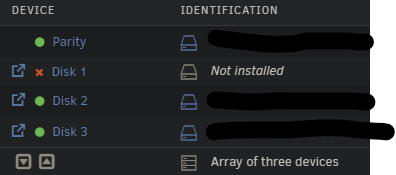
I currently have one disk missing on my array after I dropped it while rebuilding my server. I was already looking to buy more drives so I got two 18TB drives, however, my current parity is 14TB. My setup looks like this Parity - 14TB Array - 3x 8TB (one missing) What I'd like to get to Parity - 18TB Array - 2x 8TB, 1x 14TB, 1x 18TB Trying to figure out how best to go about this since my parity is currently emulating a missing disk. This is what I was thinking Add one 18TB drive as a second parity Allow dual parity build (assuming that's what will happen) After successful parity build, add second 18TB drive to unraid to replace missing drive After data is rebuilt, take out 14TB parity drive and add it back to the array Does this make sense? Or am I missing anything?
-
I'm unable to pass the login page with the credentials I provided. Is this broken at the moment? Only other thing I changed during install was the backend port because it was in use by something else
-
Thanks for the heads up, I'd take a look at this now! Hopefully it solves or at least eases the problem
-
I've been dealing with multiple instances of high IO wait where the GUI freezes and I can't access any files for hours at a time. This happens at random and last night I had to press the power button on the server to send a system shutdown command (not a long press for a hard shutdown) and it took almost an hour for the system to go down Attaching the diagnostics file here prodesk-diagnostics-20231122-2147.zip Any help identifying what the issue might be will be appreciated
-
Thanks for the update and suggestion! Excluding the file from backup helped solve the issue

