





weaselwoop
Members
-
Joined
-
Last visited
Everything posted by weaselwoop
-
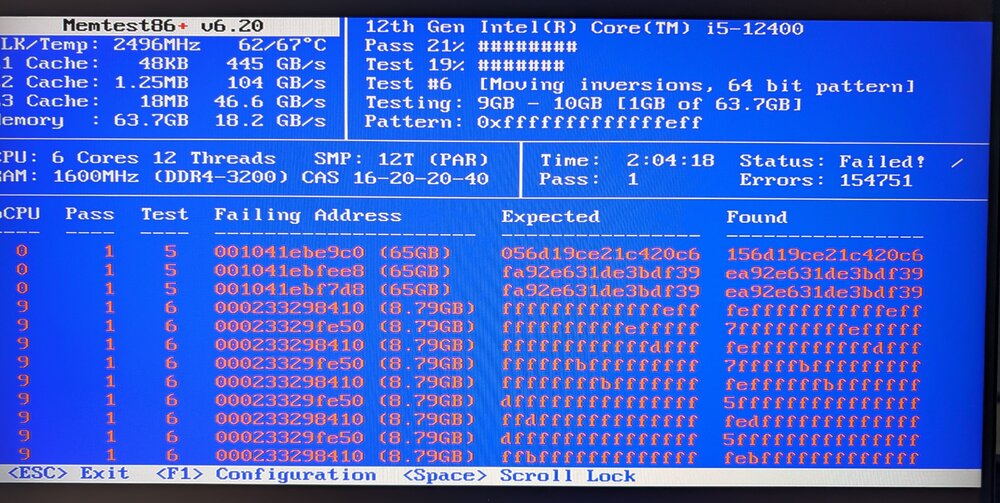
For posterity, it does appear the simple answer was bad RAM. My cache drives showed unmountable again sometime after the memtest. Swapped in some new RAM and things have been working fine.
-
Left memtest going for a couple hours. I'm guessing my RAM is toast, does this indicate anything else?
-
Entered btrfs rescue zero-log /dev/nvme0n1p1, stopped and then restarted my array, then pulled diagnostics. Interestingly my drives came back and appear to be working as expected again. I'd still appreciate any understanding into what might be going on and what I can do to prevent the issue. ollertonserver-diagnostics-20251102-0911.zip
-
A few months back I saw my pool device (a single M.2 drive) was showing as "Unmountable: Unsupported or no file system". After researching as best I could, I figured my drive had simply given up the ghost. It didn't seem absurd since I'd bought the cheapest drive with decent enough reviews I could find and it seemed to have lasted ~2.5 years. I took the opportunity to upgrade and get some parity in my pool by grabbing a couple WD Black SN850X's. Fast forward to today and I notice our Plex was acting weird. I rebooted the Unraid server as one of my first troubleshooting steps and after a bit I noticed my installed-two-weeks-ago pool devices were showing as unmountable. Diagnostics attached, I'd appreciate any help or insight. I am not terribly experienced with servers or unix stuff beyond the basics of navigating and fiddling with files. Thanks ollertonserver-diagnostics-20251101-1748.zip
-
Thanks for the info. I've deleted/reinstalled the server and changed it to be public so it would show in the server browser. I've forwarded ports 2456-2458 on my router and have confirmed my Windows Defender Firewall has inbound rules allowing Valheim ports access. My server does not show up in the community server browser both with and without crossplay enabled. Without crossplay I can still connect via internal and external IP addresses on Steam. Any other ideas? Thanks again for the help! Edit to add: I waited about 30 minutes on the community server browser, refreshing every 10 minutes or so, can't seem to get it to show up in the browser. Last edit: I believe I found the issue. I have pi hole set up on my unraid server with it's own static IP. When I got that configured I think my router got some wires crossed and it somehow messed up my port forwarding. I deleted and redid the port forwards to my unraid server's IP address and I can now access the server from the game pass version.
-
I've set up a Valheim server and have tried adding -crossplay under GAME_PARAMS. When I have -crossplay added, I cannot connect via internal IP from either my Steam version nor Game Pass version of Valheim. When I remove -crossplay, I can connect through Steam and not Game Pass as you'd expect. Am I trying to enable crossplay incorrectly? If not, any ideas on how to fix this crossplay issue?

