zackery.
Members
-
Joined
-
Last visited
Everything posted by zackery.
-
难道license U 盘没有对主板等硬件进行绑定吗,只要把数据盘和 U 盘迁移到到新机器就可以直接运行了?
-
今年计划换一套硬件,保留硬盘和固态,其他全换,我需要做哪些准备工作? license U 盘需要做什么操作?(我能否在新机器上安装硬盘和固态后直接把 U 盘插到新机器上使用?)
-
我一直使用一套性能比较高的配置做all in one使用,近期有将这套配置拆分的打算,机箱、主板、cpu、电源新买一套低功耗的搭配目前的固态和机械重装nas,原来的一套新装一台主机正常使用。 对我目前这套配置来说,除了数据存储几乎全部换新了,据我所知主板cpu等硬件的修改会导致unraid启动盘的认证失败,请问如何携带数据(包含docker)进行更换?
-
浪费一下午的时间,各种回退升级,搞好了
-
真无语了,破逼系统每次升级都会有问题,上次更新个语言包出bug起码docker和虚拟机还能用,这更新系统直接GG。
-
这是日志 zackery-diagnostics-20240225-1400.zip
-
-
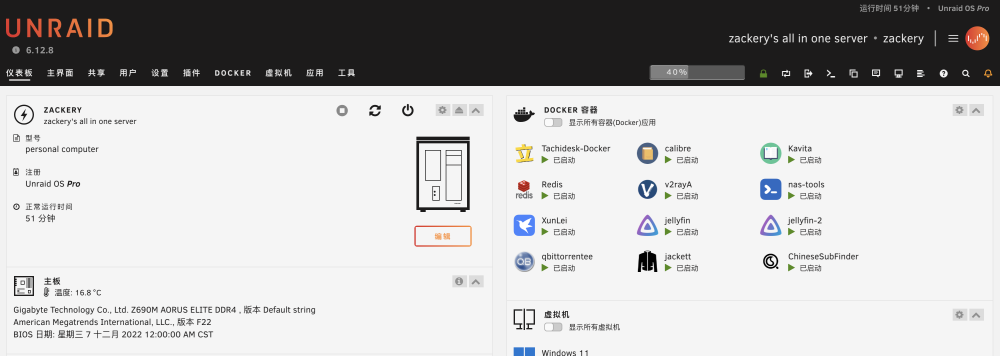
升级系统后,重启进入webui就是下面那种白屏的状态,我不知道什么情况,然后接上显示器看了启动的控制台发现它卡在这个输出上: NET: Registered PF_UNIX/PF_LOCAL protocol family 然后我按照下面这个帖子,找到启动盘的vfio-pci.cfg文件备份并删除,删除后可以正常运行了,但是webui还是这种白屏状态 我尝试直接使用原生webui启动,启动后还是显示这个白屏状态

-
好了,感谢,因为虚拟机我是直通了显卡当主力机用的,这两天虚拟机都没敢关机,真心感谢!
-
经过试验,删除后安装还是会出现这种问题。我升级到6.12.6也没用,还是会出现这种问题 还是想知道在没开ssh的情况下,如何不关机不重启解决这个问题?
-
unraid真的好垃圾啊,还得关机拔U盘删文件? 要是自己瞎折腾出问题就算了,这官方途径更新个语言包都能出问题 这辈子就没用过这么不稳定的nas系统
-
-
我在成功激活windows一段时间后,总会因为修改了一些虚拟机配置项重启导致激活失败,有时候仅仅是因为直通选项增加或删除一个usb口导致激活失效。 怎么才能一劳永逸的解决这个问题? PS:我一开始使用家庭版并没有出现这个问题,当我升级到win11专业版后这个问题开始频繁出现
-
可以了!! 添加这两项配置就可以直接启动LOL而不被检测为虚拟机了 我甚至都没点进详细链接 真的感谢
-
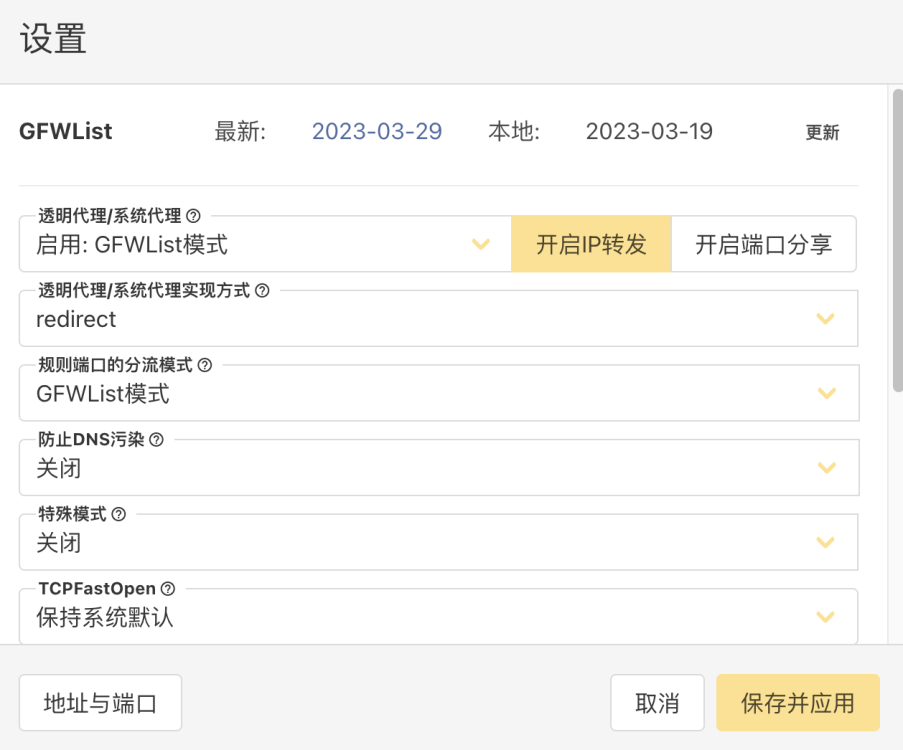
这个问题是由于v2rayA容器的ip转发没有打开导致的,v2rayA在创建的时候需要特权模式,这项授权是可以使得宿主机受到影响的,在v2rayA中开启ip转发即可,如果你没有使用这个容器就挨个检查一下是否是被其它授予了特权模式的容器影响。
-
不知道是不是因为我v2ray开启的是白名单模式,qb一夜跑了节点100多个G流量。 谁来验证一下这个问题?qb怎么才能不走转发?
-
你有配置过docker加速吗? 可以在控制台执行下面这段试一下 # update docker mkdir -p /etc/docker touch /etc/docker/daemon.json echo "{\"registry-mirrors\":[\"https://reg-mirror.qiniu.com/\",\"https://docker.mirrors.ustc.edu.cn/\",\"https://hub-mirror.c.163.com/\"]}" >> /etc/docker/daemon.json 如果可以访问了,就把他写到/boot/config/go里,不然重启会失效
-
-
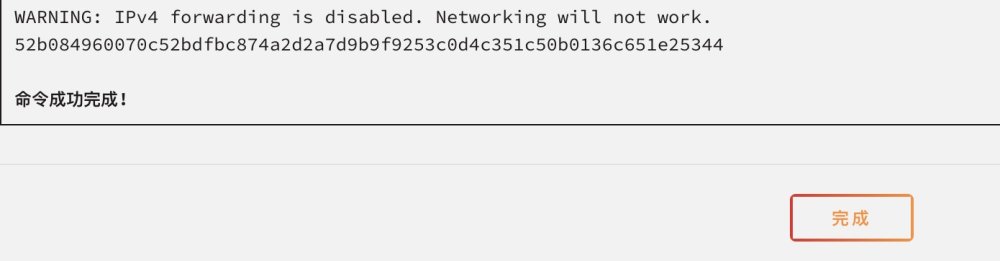
I recently joined Unraid and have been experiencing an issue where Docker is unable to access the Web UI in bridge mode. As the title suggests, I have had to continually run in host mode, but now some containers require the same port, so I still need to resolve this issue. Here are some details: 1. When I start a container in bridge mode, the command line display on the startup page shows WARNING: IPv4 forwarding is disabled. Networking will not work. According to the warning message, I have been searching for solutions and many of them suggest modifying the net.ipv4.ip_forward configuration item in the /etc/sysctl.conf file. However, this configuration item is already correct, and even after modifying it, it has no effect. 2. Using the sysctl net.ipv4.conf.all.forwarding=1 command temporarily solves the problem, but it becomes ineffective after a while, and I have to frequently execute this command in the console. 3. I tried to write this command into the /boot/config/go file for it to execute at startup, but it still did not take effect after rebooting. There is also an ongoing discussion on this issue on Reddit, link
-
我的ssd也是直通给虚拟机的,我主板开启了vt-d,所有的usb设备和显卡都是直通的,我甚至尝试了开机不启动unraid,直接使用直通的硬盘引导启动,win11依旧可以正常运行。但是仍然被检测为虚拟机,我找了一些所谓删除vm相关插件的命名,运行后依然不生效。 我仍旧是希望我在运行unraid的情况下通过虚拟机玩英雄联盟。
-
我装了win11,直通显卡和一些usb,效果蛮好的,(我尝试了steam的一些游戏和wegame上的艾希以及星露谷物语) 但是我是个LOL玩家,我打开游戏就会报不能在虚拟机中运行的弹窗,有没有什么方案可以绕过这个限制?
-
启动docker容器时,会有warning警告 WARNING: IPv4 forwarding is disabled. Networking will not work. 容器启动后无法访问webUI,使用host模式则没有这个问题,请问如何解决?