





tdashnow
Members
-
Joined
-
Last visited
Everything posted by tdashnow
-
I got the usb 3.0 card installed. This appears to be a working answer. While not happy that my new server has a limited set of usb ports at least they're 3.0 and this PC will be used as my backup server so most I/O will be done via the network. Good enough... Thanks again
-
Todays results All 3 boot usbs were created using the unraid tool. The only items plugged in were the usb stick, the mouse and keyboard. After trying all the ports I learned that when booting to Win10, all of my usb ports work. I created another boot usb as Expressomatic suggested, using Zoran. When booting with either Unraid or Zoran I was successful in getting both of them to boot but only on my 2 usb 3.0 ports. However as soon as either of them started to load ALL of my usb 2 ports died. This leaves me without enough ports for the boot stick, mouse and keyboard. I ordered a usb 3.0 card which will hopefully allow me to get by with this less than ideal situation until a better solution is found or I get a different motherboard. Some searching did show that this m/b did suffer from problems concerning it's usb ports so JorgeB may be correct. My m/b doesn't appear to have a secure boot mode and my results were the same in UEFI or Legacy. Thank you both for your input.
-
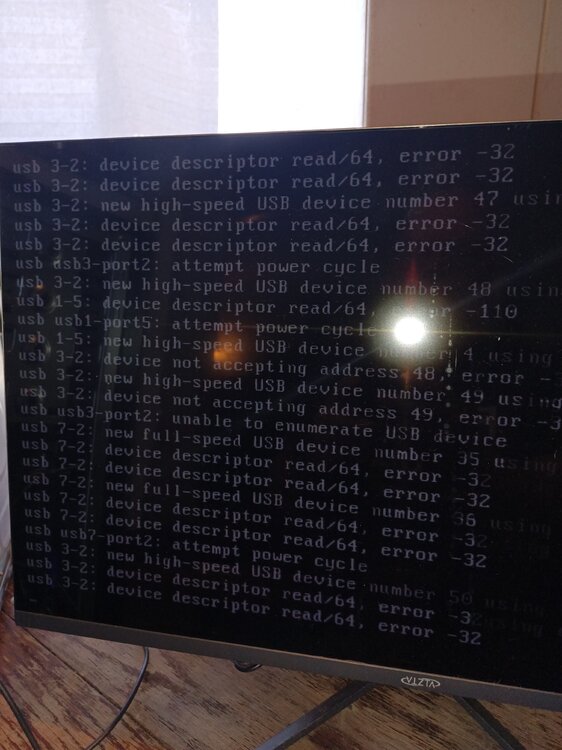
I created a new flash drive and get the same result. I've also tried using the usb stick from my other Unraid server. In all three cases when the machine starts I get the boot menu as to which Unraid I want to boot to (I.e.. w/gui, w/o gui, safe mode. etc.) Regardless of which choice I make you see the scrolling command lines of unraid trying to boot but after a few seconds most of the scrolling lines are referring to usb errors as in my photo. This scrolling continues without end until I force a shutdown. As I previously said, booting with a Win 10 install flash drive works normally so I don't think it's a problem with the actual flash drives. I checked on updating my BIOS but there isn't an update available. My BIOS is currently set to support both UEFI and Legacy. I forgot to mention I'm using Unraid 6.12.13
-
I I recently tore down my working Unraid Plex server due to motherboard problems. I transferred my drives to a new PC built from new old stock components. However when I try to boot from my existing unraid usb stick it goes into a unending loop of usb errors. I did try booting it to a windows install usb and that appears to work normally and wants to install windows but I prefer Unraid. My screen scrolls by too quickly to make much sense of the errors but attached is a photo of part of the looping screen. I'm currently using a Gigabyte 970A-DS3P motherboard with a AMD FX-6300 and 32 MB of Ram
-
P/W was not overly complex, 8 character, uppercase, lowercase and numbers. However changing password worked. P/W accepted, LuckyBackup set up and first backup is underway. Doesn't make a lot of sense to me as to the why but I'm very grateful. This is the second time you've bailed me out recently. Thank you
-
it just repeatedly asks for the password. No other reaction
-
root@Intrepid:~# ssh -v 192.168.1.241 OpenSSH_9.8p1, OpenSSL 1.1.1v 1 Aug 2023 debug1: Reading configuration data /etc/ssh/ssh_config debug1: Authenticator provider $SSH_SK_PROVIDER did not resolve; disabling debug1: Connecting to 192.168.1.241 [192.168.1.241] port 22. debug1: Connection established. debug1: identity file /root/.ssh/id_rsa type -1 debug1: identity file /root/.ssh/id_rsa-cert type -1 debug1: identity file /root/.ssh/id_ecdsa type -1 debug1: identity file /root/.ssh/id_ecdsa-cert type -1 debug1: identity file /root/.ssh/id_ecdsa_sk type -1 debug1: identity file /root/.ssh/id_ecdsa_sk-cert type -1 debug1: identity file /root/.ssh/id_ed25519 type -1 debug1: identity file /root/.ssh/id_ed25519-cert type -1 debug1: identity file /root/.ssh/id_ed25519_sk type -1 debug1: identity file /root/.ssh/id_ed25519_sk-cert type -1 debug1: identity file /root/.ssh/id_xmss type -1 debug1: identity file /root/.ssh/id_xmss-cert type -1 debug1: identity file /root/.ssh/id_dsa type -1 debug1: identity file /root/.ssh/id_dsa-cert type -1 debug1: Local version string SSH-2.0-OpenSSH_9.8 debug1: Remote protocol version 2.0, remote software version OpenSSH_9.8 debug1: compat_banner: match: OpenSSH_9.8 pat OpenSSH* compat 0x04000000 debug1: Authenticating to 192.168.1.241:22 as 'root' debug1: load_hostkeys: fopen /root/.ssh/known_hosts2: No such file or directory debug1: load_hostkeys: fopen /etc/ssh/ssh_known_hosts: No such file or directory debug1: load_hostkeys: fopen /etc/ssh/ssh_known_hosts2: No such file or directory debug1: SSH2_MSG_KEXINIT sent debug1: SSH2_MSG_KEXINIT received debug1: kex: algorithm: [email protected] debug1: kex: host key algorithm: ssh-ed25519 debug1: kex: server->client cipher: [email protected] MAC: <implicit> compression: none debug1: kex: client->server cipher: [email protected] MAC: <implicit> compression: none debug1: expecting SSH2_MSG_KEX_ECDH_REPLY debug1: SSH2_MSG_KEX_ECDH_REPLY received debug1: Server host key: ssh-ed25519 SHA256:Rk9hBEtCeYjFFYGkSxAyxl9iyHyLzSnBsCyFWeJhuDY debug1: load_hostkeys: fopen /root/.ssh/known_hosts2: No such file or directory debug1: load_hostkeys: fopen /etc/ssh/ssh_known_hosts: No such file or directory debug1: load_hostkeys: fopen /etc/ssh/ssh_known_hosts2: No such file or directory debug1: Host '192.168.1.241' is known and matches the ED25519 host key. debug1: Found key in /root/.ssh/known_hosts:1 debug1: ssh_packet_send2_wrapped: resetting send seqnr 3 debug1: rekey out after 134217728 blocks debug1: SSH2_MSG_NEWKEYS sent debug1: Sending SSH2_MSG_EXT_INFO debug1: expecting SSH2_MSG_NEWKEYS debug1: ssh_packet_read_poll2: resetting read seqnr 3 debug1: SSH2_MSG_NEWKEYS received debug1: rekey in after 134217728 blocks debug1: SSH2_MSG_EXT_INFO received debug1: kex_ext_info_client_parse: server-sig-algs=<ssh-ed25519,ecdsa-sha2-nistp256,ecdsa-sha2-nistp384,ecdsa-sha2-nistp521,[email protected],[email protected],rsa-sha2-512,rsa-sha2-256> debug1: kex_ext_info_check_ver: [email protected]=<0> debug1: kex_ext_info_check_ver: [email protected]=<0> debug1: SSH2_MSG_SERVICE_ACCEPT received debug1: SSH2_MSG_EXT_INFO received debug1: kex_ext_info_client_parse: server-sig-algs=<ssh-ed25519,ecdsa-sha2-nistp256,ecdsa-sha2-nistp384,ecdsa-sha2-nistp521,[email protected],[email protected],rsa-sha2-512,rsa-sha2-256> debug1: Authentications that can continue: publickey,password,keyboard-interactive debug1: Next authentication method: publickey debug1: Will attempt key: /root/.ssh/id_rsa debug1: Will attempt key: /root/.ssh/id_ecdsa debug1: Will attempt key: /root/.ssh/id_ecdsa_sk debug1: Will attempt key: /root/.ssh/id_ed25519 debug1: Will attempt key: /root/.ssh/id_ed25519_sk debug1: Will attempt key: /root/.ssh/id_xmss debug1: Will attempt key: /root/.ssh/id_dsa debug1: Trying private key: /root/.ssh/id_rsa debug1: Trying private key: /root/.ssh/id_ecdsa debug1: Trying private key: /root/.ssh/id_ecdsa_sk debug1: Trying private key: /root/.ssh/id_ed25519 debug1: Trying private key: /root/.ssh/id_ed25519_sk debug1: Trying private key: /root/.ssh/id_xmss debug1: Trying private key: /root/.ssh/id_dsa debug1: Next authentication method: keyboard-interactive ([email protected]) Password:
-
Additional info, I've just noticed that while SSH is active in Settings/Management Access, I do not have a SSH icon in Network Services on my destination server although there is one on my source server. I've been unable to find how to install it on the destination. Attached is my current Diagnostics file.defiant-diagnostics-20240908-1840.zip
-
I'm a noob at using the command line but I'm trying to setup LuckyBackup to connect my two Unraid servers (6.12.13) using the article from SPX Labs. I get to the point of transferring my SSH public key to the destination server, which it accepts as a new known host but then it won't accept the password. I've also tried using rsync in it's normal commands but likewise it seems to accept the IP of the destination machine but repeatedly asks for the password. While I've primarily been using the destination root password I've tried all others on the off chance that I was mistaken on what p/w it's looking for. Password does work logging into the destination server but I can't get there by command line. Any suggestions?
-
I thought I had formatted them but what I'm probably thinking about was that I had done a format in Windows before I shucked the drives. Sucks getting old and being a noob at the same time... Thanks for the help
-
Here's my diagnostics defiant-diagnostics-20240901-1406.zip
-
I'm building a new backup server Unraid 6.12.13. Installed drives, created array, Parity has been created. Went to install plex in a docker and found that docker won't work due to missing path. There are no default shares, i.e. appdata. I thought the default shares were automatically set up with the creation of the array?
-
We have a 98% solution. While checking network connections I found that I had a second (unused) router connected to the Server. After removing it and rebooting, I got a local IP address. I couldn't log in under "Tower", but I was successful using the IP. Although now it appears that either one works. My only remaining concern may not be germaine to this forum but I'll throw it out there. Formerly I could manipulate my Plex data files thru Windows File Explorer. At this point the Server and data folders show up in Explorer but are not accessible because I don't have "Permission", however Plex is successfully accessing the server and data. Any suggestions? Thanks for the assistance, I was really lost here.
-
I've been using my Server without issue for over 6 months using Unraid 6.10 (.6 I think) and impulsively chose the upgrade to 6.11.5 button the other day without any precautions. Everything appeared fine until rebooting into the new OS. GUI didn't come back and Server is no longer accessible from my network. My Server is a headless SuperMicro X10 SLM-F running a XEON E3 1271 V3 @ 3.6 Ghz with 32 Gb of Ram. I hooked up a monitor and found that server IS booting to the command prompt, although it takes 3 minutes to get to the login prompt. Command line is showing an address of 169.254.134.85 but I can't access this address either. I'm afraid that I have no knowledge of using the command line in any operating system and especially linux. I did figure out how to run the diagnostic and the command line gives a location for the file, but I don't know how to access it. Hopelessly out of my depth and hoping someone here can help.


