





dazedv3
Members
-
Joined
-
Last visited
Everything posted by dazedv3
-
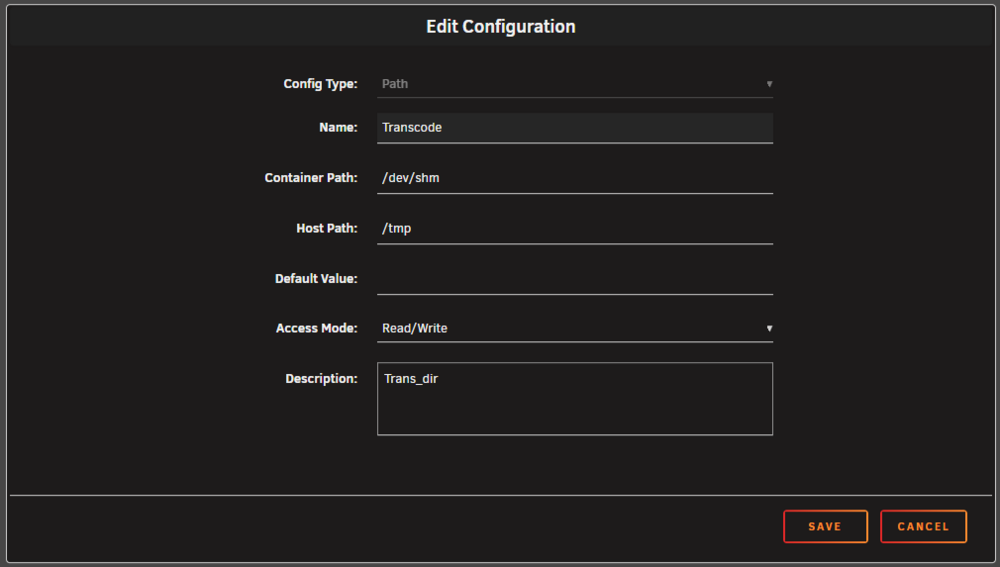
Hi all. Recently my server has developed a problem where it will completely freeze when watching something via plex. All dockers and webui become unresponsive and the only way to "fix" it is to hard reset. I have attached my diagnostic file however it doesn't contain the errors at the time of the crash, I had to mirror my syslogs to the USB to get the errors below. Nov 14 22:54:50 Anfield kernel: i915 0000:00:02.0: [drm] Resetting rcs0 for preemption time out I initially replaced my RAM but the issue persists. I was writing transcode to appdata cache originally but as was suggested elsewhere I wrote to RAM via "/dev/shm" and the issue occurred again. On a side not I've attached the config change I made in binhex-plexpass to transcode to RAM if anyone can confirm this is the correct way to do it. Any help would be greatly appreciated. Thanks. anfield-diagnostics-20251115-1929.zip
-
Anyone shed some light?
-
Hi, I'm using delugevpn to run my "arrs" and firefox through VPN. I'm having an issue where after a day or 2 my web UI's for each docker that is running through the VPN become inaccessible and the web page just times out. As far as i'm aware the dockers are still running but I can't access them through UI to confirm this. LOGS docker run -d --name='binhex-delugevpn' --net='bridge' --privileged=true -e TZ="____________" -e HOST_OS="Unraid" -e HOST_HOSTNAME="____________" -e HOST_CONTAINERNAME="binhex-delugevpn" -e 'VPN_ENABLED'='yes' -e 'VPN_USER'='____________' -e 'VPN_PASS'='____________' -e 'VPN_PROV'='custom' -e 'VPN_CLIENT'='openvpn' -e 'VPN_OPTIONS'='' -e 'STRICT_PORT_FORWARD'='yes' -e 'ENABLE_PRIVOXY'='yes' -e 'LAN_NETWORK'='192.168.55.0/24,192.168.10.0/24,192.168.1.0/24' -e 'NAME_SERVERS'='84.200.69.80,37.235.1.174,1.1.1.1,37.235.1.177,84.200.70.40,1.0.0.1' -e 'DELUGE_DAEMON_LOG_LEVEL'='info' -e 'DELUGE_WEB_LOG_LEVEL'='info' -e 'DELUGE_ENABLE_WEBUI_PASSWORD'='yes' -e 'VPN_INPUT_PORTS'='9696,8989,7878,8686,6767,3000' -e 'VPN_OUTPUT_PORTS'='9696,8989,7878,8686,6767,3000' -e 'DEBUG'='false' -e 'UMASK'='000' -e 'PUID'='99' -e 'PGID'='100' -l net.unraid.docker.managed=dockerman -l net.unraid.docker.webui='http://[IP]:[PORT:8112]/' -l net.unraid.docker.icon='https://raw.githubusercontent.com/binhex/docker-templates/master/binhex/images/deluge-icon.png' -p '8112:8112/tcp' -p '58846:58846/tcp' -p '58946:58946/tcp' -p '58946:58946/udp' -p '8118:8118/tcp' -p '9696:9696/tcp' -p '8686:8686/tcp' -p '7878:7878/tcp' -p '8989:8989/tcp' -p '6767:6767/tcp' -p '3000:3000/tcp' -v '/mnt/user/downloads/':'/data':'rw' -v '/mnt/user/appdata/binhex-delugevpn':'/config':'rw' --sysctl="net.ipv4.conf.all.src_valid_mark=1" 'binhex/arch-delugevpn' 6a7bb54eae1771ce1c53d4ec3e3645838e2842f54c621d4cececf08907646b88 The command finished successfully! supervisord.log
