taprackpew
Members
-
Joined
-
Last visited
Everything posted by taprackpew
-
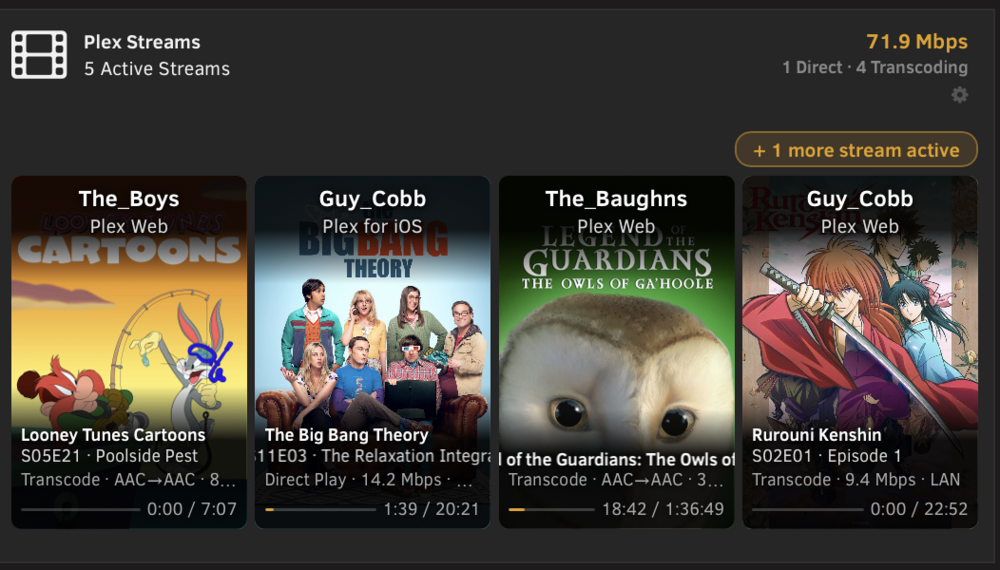
Just to make it known.... I'm not versed in code and this was vibe coded with claude..... so just putting that out there up front. PlexStreams Lite adds a live Plex stream monitor widget directly to your Unraid dashboard — no separate app, no tab-switching. Just open your Unraid UI and see who's watching what, right there on the main page. Features: - Poster-art cards for each active stream - Shows user, device, media title, playback state (playing/paused), direct play vs. transcode, bandwidth, and LAN/remote - Dynamic header: total streams, total bandwidth, direct play vs. transcode breakdown - Overflow indicator when more than 4 streams are active - Auto-scrolling marquee for long titles - Updates every 15 seconds - HTTPS image proxy — artwork loads correctly even on HTTPS Unraid setups - Settings page with Test Connection button - Config persists across reboots Requirements: - Unraid 6.11.9+ - Plex Media Server accessible from your Unraid server - Plex authentication token (X-Plex-Token) Installation: 1. Go to Plugins → Install Plugin 2. Paste the URL below and click Install: https://raw.githubusercontent.com/00-TapRackBang-00/unraid-plexstreams-lite/main/plexstreams-lite.plg Configuration: 1. Go to Settings → Plex Streams 2. Enter your Plex host URL (e.g. http://192.168.1.100:32400) — use http://, not https:// 3. Enter your Plex token 4. Click Test Connection, then Apply How to get your Plex token: Open Plex Web → play any item → ... menu → Get Info → View XML → copy the X-Plex-Token= value from the URL Source: https://github.com/00-TapRackBang-00/unraid-plexstreams-lite
-
im seeing the same issue as kri kri. any ideas on how to fix it?
-
Good deal. I figured I had something screwed up. 👍🏻
-
I ended up buying a hardware controller and removing this from my server. But I’m still curious as to what I may have done wrong. Are you saying I setup the template wrong?
-
they are the default values of 18043 for https and 18088 for http. when I click the webui button it opens https://192.168.10.5:18043/login , which is correct. however, I get a "cannot connect to server" error page. its odd for sure as all of my other apps are perfectly accessible.
-
Ok, gonna show what is quite possibly my stupidity here. I’ve installed the container with default template, I didn’t change anything. When I try to go to the webui, I get a “cannot connect to server”. Did I miss some required change to the template or something else perhaps. Also, after some time the container appears to be stopping itself. I’ve removed and redownloaded once already with no fix. Any ideas? Thanks in advance.