




Skip to content
View in the app

A better way to browse. Learn more.

Unraid

A full-screen app on your home screen with push notifications, badges and more.

To install this app on iOS and iPadOS
  1. Tap the Share icon in Safari
  2. Scroll the menu and tap Add to Home Screen.
  3. Tap Add in the top-right corner.
To install this app on Android
  1. Tap the 3-dot menu (⋮) in the top-right corner of the browser.
  2. Tap Add to Home screen or Install app.
  3. Confirm by tapping Install.

paradiesway

Members
  • Joined

  • Last visited

  1. Well its now working after disabling HDR Tone Mapping which is not ideal. Any seen that before?
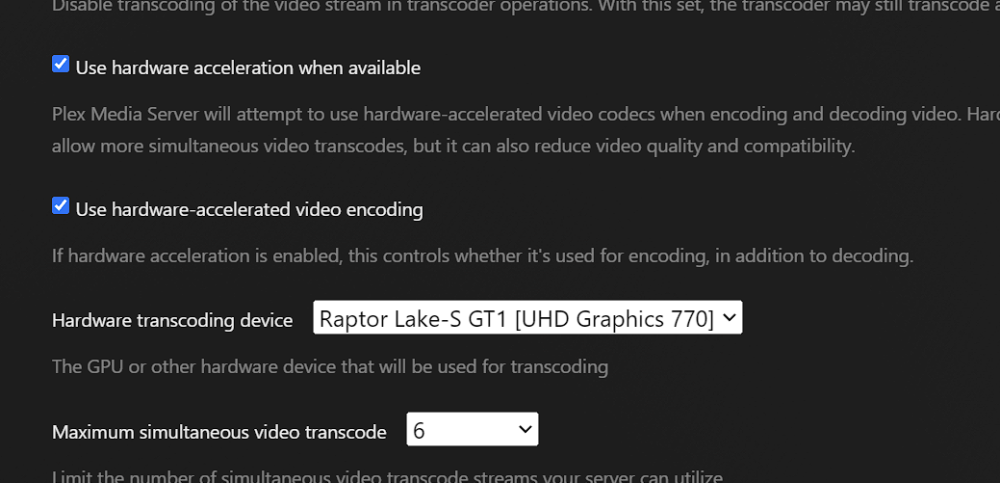
  2. So I have followed this super easy guide and have had no luck getting this to work. I have a intel i5-13600k which should definitely have quicksync. I have no other GPUs installed. Installed the dockers, setup the plex variable container device and setup the plex hardware settings. Plex sees the option and is selected but it never uses the GPU and just pings my CPU. Also tried setting it in the preferences.xml. Are there any logs or other suggestions I can try to troubleshoot this?
Account

Navigation

Search

Search

Configure browser push notifications

Chrome (Android)
  1. Tap the lock icon next to the address bar.
  2. Tap Permissions → Notifications.
  3. Adjust your preference.
Chrome (Desktop)
  1. Click the padlock icon in the address bar.
  2. Select Site settings.
  3. Find Notifications and adjust your preference.