





30zal
Members
-
Joined
-
Last visited
-
Update: Figured out that you need to add a rule in the rule section, so I added 192.168.11.20/24(rw) and now I get a permission denied to access the folder. Update 2: Put in the wrong IP address, consider this case closed.
-
Hello. I can't seem to create new files in my directories via NFS. I tried the New Permissions tool and it didn't seem to have an effect. Here are my diagnostics: weedbox-diagnostics-20230910-1805.zip
-
It just gives me the following error mount: /mnt: wrong fs type, bad option, bad superblock on myfs, missing codepage or helper program, or other error.
-
So, I tried mounting my drives in an Arch VM following this guide https://blog.siglerdev.us/setup-unraidos-virtual-machine-with-virtiofs-share/ . All the mount points that I put in give a "mount point does not exist" error, not sure what to do since little information seems to be available on how to set it up for Linux.
-
Thank you for sharing that script! I'll be able to use it on the Windows VM.
-
Update: Fixed it by going into the specific share and clicking "Browse" while using the Community Application Dynamix File Manager. It's a very good app.
-
Hello, I've been trying to copy a file in my Sharable Folder via my Windows VM to no avail even after using the "Fix Permissions" tool. I also created a new user with the same name as the user on the Windows VM and removed all the existing credentials, also to no avail. weedbox-diagnostics-20230827-1402.zip Thank you.
-
I have now. The only issue I'm encountering still is I can't access to the .local domain. Not sure why, but at least the IP is static now.
-
Hello, The IP address of the server keeps changing when I reboot and I cannot connect to the .local domain either on Linux or Windows even if I used to be able to. Not too sure what to do, I've heard rumblings of it having to do something with my Router but I don't know. weedbox-diagnostics-20230827-1250.zip
-
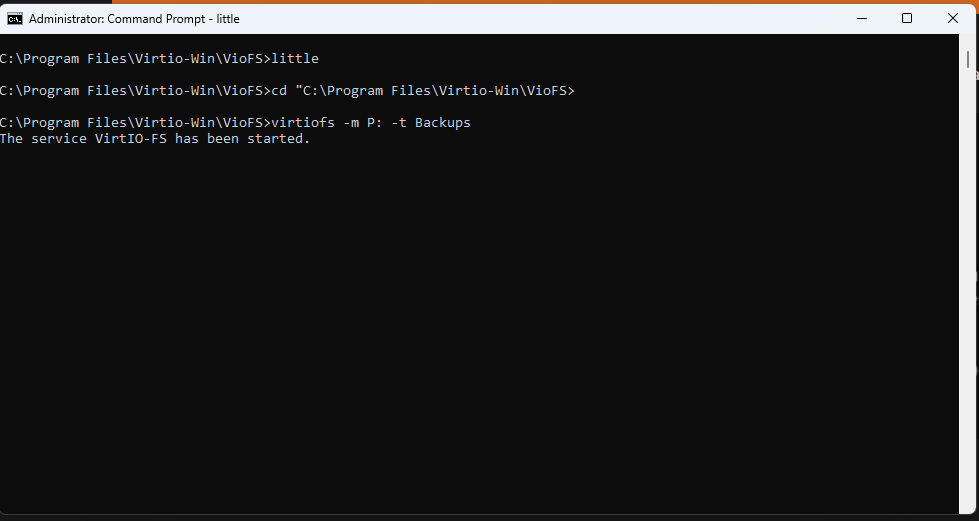
I made a little batch script cd "C:\Program Files\Virtio-Win\VioFS> virtiofs -m P: -t name1 virtiofs -m W: -t name2 virtiofs -m S: -t name3 virtiofs -m Y: -t name4 However, it just hangs at the screen below. This was the guide I was originally following before asking for help here. https://github.com/virtio-win/kvm-guest-drivers-windows/wiki/Virtiofs:-Shared-file-system#multiple-virtiofs-instances
-
Hello, I've been trying to mount multiple shared folders in my Windows 11 VM with no luck. I tried to do the following. C:\Windows\System32>"C:\Program Files (x86)\WinFsp\bin\launchctl-x64.exe" start virtiofs viofsY mount_tag T: KO launcher: error 183
-
How do I do that? I could always have the iGPU output the Unraid terminal. Thanks. :)
-
Hello, I recently (today) changed my current server from an old Dell to my main PC in the hopes of just using VM's instead of installing Windows on bare hardware. Unfortunately, when trying to boot into Unraid (with gui), it just gives me a blinking cursor after having passed the boot menu. I can access the login prompt with the usual key combo. I'm assuming it just doesn't properly utilize the Nvidia card in the machine yet. weedbox-diagnostics-20230824-1916.zip
