





Frozst
Members
-
Joined
-
Last visited
-
Even if it works on port 3001 sometimes the stream stops and you have to restart the container.
-
Hello! I have recently installed this plugin and I wanted to ask if there is a way to exclude certain folders from the mover. From what I'm reading, there should be a way, as a few messages the user has pointed out to the below file. mover_ignore.txt However I can't find any instructions on how to set it up or where that file is, a quick search doesn't reveal anything. Also, on the help section of the plugin I can't see any indication either. Can someone point me in the right direction if this is documented anywhere?
-
I can't delete any data because it's read-only, because it's full but the fact that it says is using less space than it actually has is concerning. I've copied all data already. If I redo and copy the data back, would the dockers appear there? Where is the actual docker configuration stored? I have the app data folder backup from the CA plugin but that won't create the actual dockers if I understand correctly. Right now docker service won't initiate but I've stopped anyway. Thanks
-
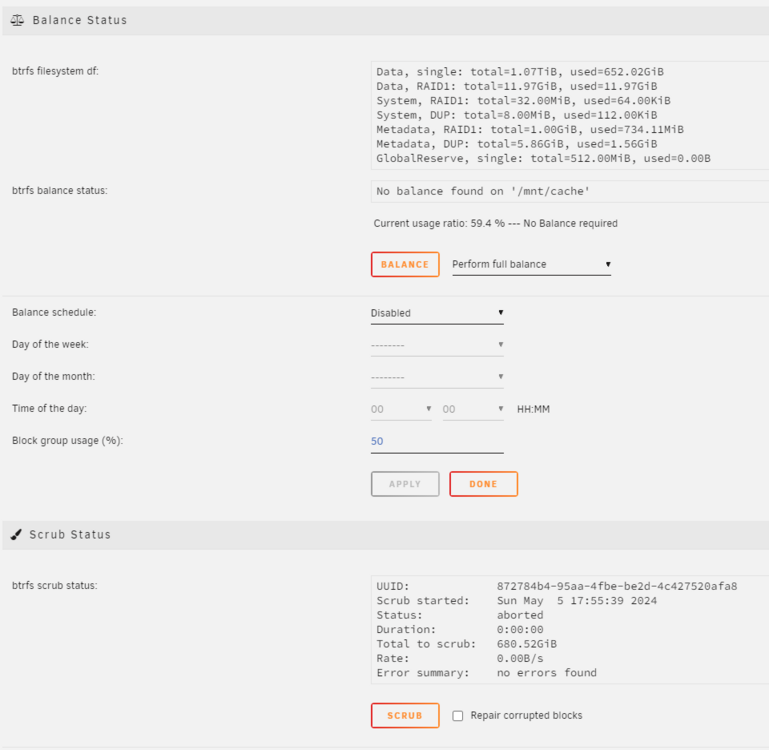
I did a very stupid thing: my cache pool has 1 TB nvme + 500GB SDD, total usable space was 1.5TB because it was on single mode. I had plans on replacing the 500GB SSD by a 1TD SDD - I can't add more disks to the cache as I don't have SATA ports left on the server. The space left on the disk was about 600 GB, meaning I had 900GB being used. When I converted the pool to raid1 the total space became 750GB with full usage, ie, 0% free space, so all dockers have stopped as there is no space. You can't imagine my face... I somehow thought I had two disks of 1TB so my pool would be from 2 TB to 1 TB. Anyway, what's done is done. I have backups of everything of course... except Plex because it's huge, but now I'm thinking I should have done at least a backup a month... as that would be a pain to rebuild. Well the files are still on the I've copied the whole cache disk into the array just to salvage what I can at a later stage, but using MC I get some read errors, I guess from files that are now corrupted and irrecoverable. I can't do anything other than copying from the cache, so what is your suggestion? I've added another disk to the cache to see if that solves anything but actually it didn't increase on size nor changed anything at all. The options to scrub or migrate to single, raid, balance, etc don't do anything at all. Could someone give me some guidance on how to try to solve this mess? Thanks! mynas-diagnostics-20240505-1748.zip

-
After some troublehsooting I followed this video and switched from Gluetun to openvpn https://www.youtube.com/watch?app=desktop&v=dLUkhtXaL88&ab_channel=ShortTechVids It was extremely easy but my error was that the username I was using on the configuration file was a long random string found on my VPN account which actually was only the username for the proxy server and not the VPN, changing that to my email address worked wonders. I will stick to openvpn, it seems it has way less overhead on the CPU and it's way easier to set up.
-
This is my first post 👋. Six months ago I installed Unrain on an old PC mainly for Plex, backups and bitwarden. Anyway, I installed qbittorrent and jackett, but I needed their traffic to go through a VPN. It took me several hours of browsing here, videos, etc, but I finally managed to setup a gluetun container with Private Internet VPN (not PIA), then making the other containers network to "none" and adding the "--net=container:gluetun" flag on the extra parameters. Everything was working fine for a few months, until recently I saw the dreadful "update ready" flag on it, I said dreadful because I spent a lot of hours to get everything working. So I applied the update and boom, no internet connection for those containers going throught "gluetun". This is the log on Gluetun: 023-09-10T14:26:39+01:00 INFO [healthcheck] program has been unhealthy for 31s: restarting VPN (see https://github.com/qdm12/gluetun-wiki/blob/main/faq/healthcheck.md) 2023-09-10T14:26:39+01:00 INFO [vpn] stopping 2023-09-10T14:26:39+01:00 INFO [vpn] starting 2023-09-10T14:26:39+01:00 INFO [firewall] allowing VPN connection... 2023-09-10T14:26:39+01:00 INFO [openvpn] OpenVPN 2.5.8 x86_64-alpine-linux-musl [SSL (OpenSSL)] [LZO] [LZ4] [EPOLL] [MH/PKTINFO] [AEAD] built on Nov 2 2022 2023-09-10T14:26:39+01:00 INFO [openvpn] library versions: OpenSSL 3.1.2 1 Aug 2023, LZO 2.10 2023-09-10T14:26:39+01:00 INFO [openvpn] TCP/UDP: Preserving recently used remote address: [AF_INET]45.130.85.6:1194 2023-09-10T14:26:39+01:00 INFO [openvpn] UDP link local: (not bound) 2023-09-10T14:26:39+01:00 INFO [openvpn] UDP link remote: [AF_INET]45.130.85.6:1194 2023-09-10T14:26:39+01:00 WARN [openvpn] 'link-mtu' is used inconsistently, local='link-mtu 1549', remote='link-mtu 1550' 2023-09-10T14:26:39+01:00 WARN [openvpn] 'comp-lzo' is present in remote config but missing in local config, remote='comp-lzo' 2023-09-10T14:26:39+01:00 INFO [openvpn] [PrivateVPN] Peer Connection Initiated with [AF_INET]45.130.85.6:1194 2023-09-10T14:26:40+01:00 INFO [openvpn] TUN/TAP device tun0 opened 2023-09-10T14:26:40+01:00 INFO [openvpn] /sbin/ip link set dev tun0 up mtu 1500 2023-09-10T14:26:40+01:00 INFO [openvpn] /sbin/ip link set dev tun0 up 2023-09-10T14:26:40+01:00 INFO [openvpn] /sbin/ip addr add dev tun0 10.35.14.59/23 2023-09-10T14:26:40+01:00 INFO [openvpn] UID set to nonrootuser 2023-09-10T14:26:40+01:00 INFO [openvpn] Initialization Sequence Completed Things I've checked: - Everything seems fine with the VPN provider Private VPN. I've tried with the regular app and it does connect fine. - I obviously restarted everything that can be restarded. - I had screesnshots of the gluetun configuration saved so I've double checked that and it all looks fine, there are no obvious differences on the template. I'm not including any screenshots as I don't think they are relevant for now (but let me know!). At this point I wanted to ask two questions: - Is there any obvious way you can find what's wrong with it? - I'm also thinking about totally changing my setup and instead of using an external provider create mine as described on Spaceinvader video: Anyway, if anyone has any other recommendations on how to change my setup I'm all ears. Thanks!
-
Hello! I'm 24 hours old in Unraid and I've already reached a road block. This is my first message so I hope I'm posting all the necessary details for someone to help. Here are the events: - I installed Unraid on a USB, installed it on an old computer to test it and it was working perfectly. I could access it it from my PC using "tower.local" and I mounted a few drives etc. I even registered on unraid.net. - Then I run Unraid on another PC, an old intel NUC I have spared, and same situation, I could access it etc... - Lastly I run it back on the first old computer, as this is the one I will keep now to build the NAS, and to my surprise I can't connect to the webui via tower.local or the address. I even formated the USB and downloaded it again just in case, but no luck. These are the facts: - The unraid server has internet, as I can access youtube, but I must say that in several boots I got an error saying there wasn't device "eth0" which to me points to the ethernet device, but after rebooting it was working fine and I could access youtube. - I can see the unraid server connected to my router, I have tried the local IP address but same result. - Trying to connect it gives me an ERR_CONNECTION_TIMED_OUT error. - Pinging tower.local resolves to the actual IP I can see on the router, but I get a "request time out". I've been reading other threads and I found that other people had issues with ports or binding addresses but I don't think that's my case as it's a new setup and I haven't installed anything on Unraid yet, no dockers or anything. Thanks! tower-diagnostics-20230410-0224.zip

