





sasbro97
Members
-
Joined
-
Last visited
-
While trying everything to stop the array, I found some commands that showed me cache/appdata/cloud is busy. As I said, I have no evidence, but I think this could have been the reason.
-
@john_smith I have no evidence, but I'm pretty sure it had something to do with ZFS datasets/snapshots and, in my case, with the cloud folder within appdata. If you do not depend on these datasets, you could try to delete them and try it again, but I guess this will do nothing. Maybe the dataset itself needs to be wiped and recreated. It's worth a try. After formatting the pool and recreating everything, it works normally again, knocking on wood.
-
@jcofer555 unfortunately, it wasn't.
-
Hello, I had notifications activated for a job, but disabled them again, and I still get these emails and notifications that the VM backup is running. How can I delete it?
-
@MowMdown no way I wanted to blame you. It's just a very complicated topic if you have this issue. Really, finding the problem is not easy.
-
@JorgeB One question regarding the new internal boot. I have it mirrored anyway to my cache SSDs, but let's say we got the worst case and both are broken. I use TPM licensing. Could I have a USB stick ready to boot from again?
-
@MowMdown I know it should be like this, and I have had this very often now, but nothing that was stated in any thread here was correct. I did what you said, and 20 other things, and nothing worked. Because if you get rid of the particular dataset /mnt/cache/appdata, it was saying that the cache pool itself is busy or whatever. I hope this stops now after formatting. It appeared out of nowhere. Fun fact: I'm pretty sure it was this folder that was problematic. As I moved all the files in the process of migrating to an internal boot drive, everything worked fine. appdata was moved, and 150 containers simply work. Just the appdata/cloud folder was not correctly moved, and my config is gone. As I have not moved or replicated the ZFS snapshots, it's lost, but I can live with that.
-
@CasaP that's what I'm doing right now, if mover finally finishes moving my data back. I will be way happier because my biggest problems and culprits with Unraid were always these goddamn USB sticks. You might have a look at my experience with switching to internal boot if you want to use an existing ZFS pool. I was so confused with mover as I never use it and didn't know that snapshots are not moved: https://forums.unraid.net/topic/198907-mover-for-switching-to-internal-boot-for-appdata-not-working/
-
@CasaP wait, which fancy new GUI? Did I miss something? At least you had more luck than me. For me, it seems that it was a really unlucky incident. Unraid was not the reason, very surely.
-
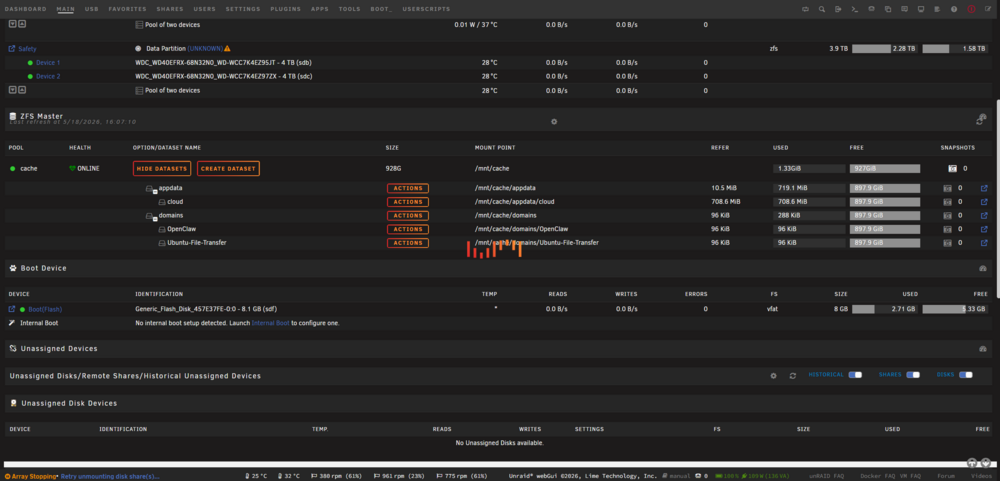
In the process of migrating to an internal boot drive with no VM or Docker service running, I can see that the problem seems to be my ZFS dataset cache/appdata itself, or maybe the underlying cloud folder:
-
@JorgeB then maybe at least this should be documented or noted in my opinion. But it means I can safely delete all snapshots, right? And just wipe the pool?
-
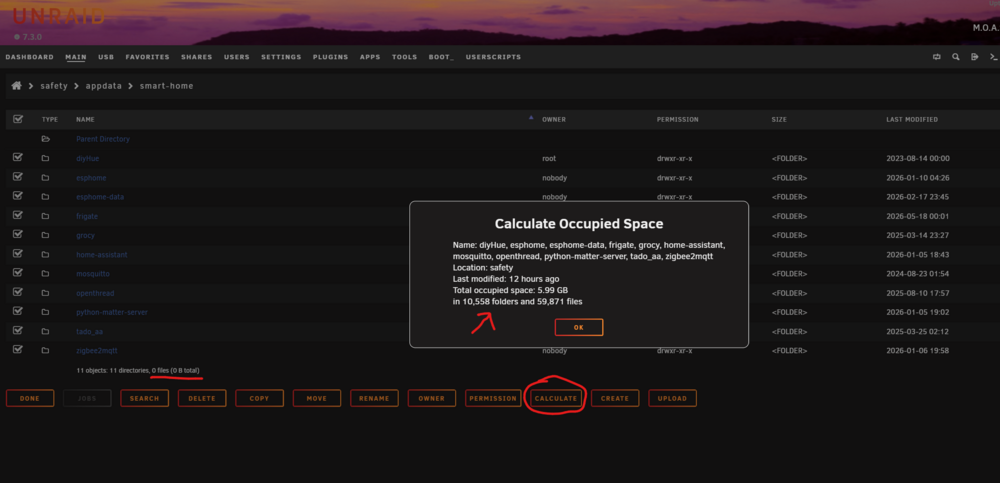
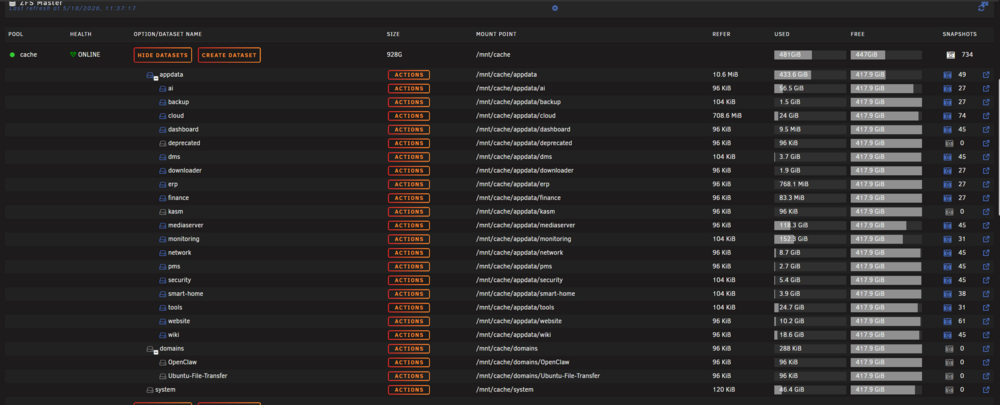
@JorgeB is there documentation for this? Some files were still already moved from appdata (it even seems everything was moved). The whole folder structure is also there. This is very bad now. And what about this behavior with system when I start mover? I would really need some help because the folder/datasets on cache pool are also already empty: But all the folder sizes shown in ZFS master are confusing me completely. And also the UI: My guess what happened/is going on: All files were really moved. Only ZFS datasets were not moved, and they exist for the system folder, for the appdata folder (and all folders beneath because they are all datasets), and for the domains folder. And it seems that I got 120GB just of snapshots for my cache/appdata/mediaserver folder (which I never realized and should really change), and even more for cache/appdata/monitoring. What I think, but I'm scared: It should be safe to delete all datasets and maybe also to wipe the whole pool. If the snapshots are gone, I can live with that.

-
@JorgeB could delete it but it tries to move /mnt/cache/system folder and mover always begins and stops. What should I do? There are no datasets, at least for the folder system. The folder system on the cache pool is empty. There is just the libvirt.img file, which seems to have been moved to the other pool. I'm also confused what ZFS master shows. 120KiB but so much is used? Where? May 18 11:03:10 UNRAID-Server shfs: cache/system/99b22734e0ac6398007e2c311703ce614e5fb9ee9e42ac476b657a7035e9d989@91323475 May 18 11:03:10 UNRAID-Server shfs: cache/system/99b22734e0ac6398007e2c311703ce614e5fb9ee9e42ac476b657a7035e9d989 May 18 11:03:10 UNRAID-Server shfs: cache/system/b472598825a7c8af367b48fd7b6b95ccb1ed54210faca90c1dc4fe157edaade4@395879243 May 18 11:03:10 UNRAID-Server shfs: cache/system/b472598825a7c8af367b48fd7b6b95ccb1ed54210faca90c1dc4fe157edaade4 May 18 11:03:10 UNRAID-Server shfs: cache/system/6a7e868bc0b7b242638f523e2a2905a122ba478127410aaf60ec86b8456f99d4@216035591 May 18 11:03:10 UNRAID-Server shfs: cache/system/6a7e868bc0b7b242638f523e2a2905a122ba478127410aaf60ec86b8456f99d4 May 18 11:03:10 UNRAID-Server shfs: cache/system/1d04cc3d987906d75ba91564350f22ca88ef66a603f9cd390a88694b6f35b722@112252046 May 18 11:03:10 UNRAID-Server shfs: cache/system/1d04cc3d987906d75ba91564350f22ca88ef66a603f9cd390a88694b6f35b722 May 18 11:03:10 UNRAID-Server shfs: cache/system/f8e7b68f9e30468f99514c2acb15804f7e4eaa36e2f66f6df9623ac2b6fcb95c@994039775 May 18 11:03:10 UNRAID-Server shfs: cache/system/f8e7b68f9e30468f99514c2acb15804f7e4eaa36e2f66f6df9623ac2b6fcb95c May 18 11:03:10 UNRAID-Server shfs: cache/system/f1bf3a7294da2973e21304d67c539aa2d4e69007cef7d03cfad250fb1e37d0f6@921952630 May 18 11:03:10 UNRAID-Server shfs: cache/system/f1bf3a7294da2973e21304d67c539aa2d4e69007cef7d03cfad250fb1e37d0f6 May 18 11:03:10 UNRAID-Server shfs: cache/system/cb5ccde455c40c3beac3b7b8018e4448534eec240514bae961addb2f793866ef@798903287 May 18 11:03:10 UNRAID-Server shfs: cache/system/cb5ccde455c40c3beac3b7b8018e4448534eec240514bae961addb2f793866ef May 18 11:03:10 UNRAID-Server shfs: cache/system/5769a7086692bed5aa2248a9eedafab558d8f0bcc175ee8fbaff8ac66938b8b8 May 18 11:03:10 UNRAID-Server shfs: cache/system/5769a7086692bed5aa2248a9eedafab558d8f0bcc175ee8fbaff8ac66938b8b8-init@527953059 May 18 11:03:10 UNRAID-Server shfs: cache/system/5769a7086692bed5aa2248a9eedafab558d8f0bcc175ee8fbaff8ac66938b8b8-init May 18 11:03:10 UNRAID-Server shfs: cache/system/3efb2e2a45479a91bcf76e7a9847b54389f5c066d765ac5ba92eecde3b2f277c@366343194 May 18 11:03:10 UNRAID-Server shfs: cache/system/3efb2e2a45479a91bcf76e7a9847b54389f5c066d765ac5ba92eecde3b2f277c May 18 11:03:10 UNRAID-Server shfs: cache/system/318aafd0d654fe8aeac089c8a8b48ada56cb228508dbb0d673faecbef4d283d9 May 18 11:03:10 UNRAID-Server shfs: cache/system/318aafd0d654fe8aeac089c8a8b48ada56cb228508dbb0d673faecbef4d283d9-init@296909033 May 18 11:03:10 UNRAID-Server shfs: cache/system/318aafd0d654fe8aeac089c8a8b48ada56cb228508dbb0d673faecbef4d283d9-init May 18 11:03:10 UNRAID-Server shfs: cache/system/ddd4e4d803d4384c259d0474254996a000ab2a31241df273b173f7132974231f@162489889 May 18 11:03:10 UNRAID-Server shfs: cache/system/ddd4e4d803d4384c259d0474254996a000ab2a31241df273b173f7132974231f May 18 11:03:10 UNRAID-Server shfs: /usr/sbin/zfs mount 'cache/system' 2>&1 May 18 11:03:10 UNRAID-Server nfsrahead[1827115]: skipping non-NFS device zfs-53 May 18 11:03:10 UNRAID-Server move: mover: finished
-
@JorgeB is it safe to delete now that it is split into two pools? I tried to delete the directory in the Docker settings and it is simply not doing anything... And still I don't get why the other folders like system or appdata are not moved completely. Mover always stops and says finished.
-
@JorgeB I cannot get them. They run infinitely. Maybe they are not complete. I see that some were generated. For your information: I started mover once again and it really stopped. Still, tons of files are in the cache pool. unraid-server-diagnostics-20260518-0838.zip


