





bhiaibogf
Members
-
Joined
-
Last visited
-
可能是分享名大小写的问题,https://forums.unraid.net/bug-reports/prereleases/case-insensitive-share-name-is-not-unique-r4112/
-
-
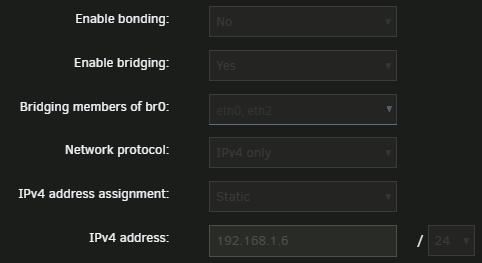
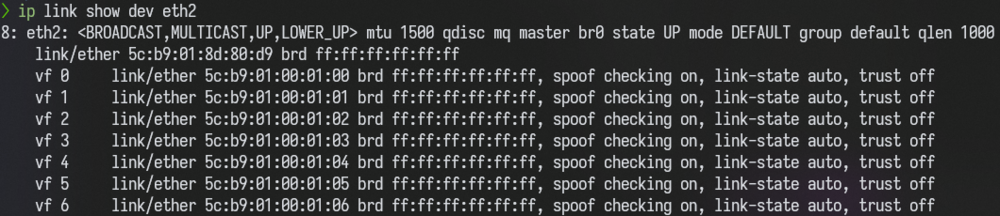
Recently, I bought a Intel T350-t4 NIC and tryed to use SR-IOV on it. I enable SR-IOV on eth2. And I also have a on board NIC(eth0). I bridged eth0 and eth2, and passthrough VF0 to VM. The problem is when the bridge on, unraid cannot communicate to VM. If I cancel the bridge on eth2, everything works fine then. I found many similar issue, it seems like there well be some wrong when enable bridge on PF. https://forum.proxmox.com/threads/communication-issue-between-sriov-vm-vf-and-ct-on-pf-bridge.68638/ I tryed the solution in that links (type 'bridge fdb add 5c:b9:01:00:01:00 dev eth2' on unraid's terminal), but it didn't work for me.
-
I am in 7.0.0-beta.2, and I use tabbed page view. I found it's really annoying when I set my pool device. Everytime after I choose something in Pool Device tab (like add a pool, set a device, etc.), the browser will jump to Array Devices tab, so I have to jump back to Pool Device tab to continue my setting.
-
Same question here. And I found [this](https://www.globefish.jp/wp/2022/06/vi-symbol-lookup-error-vi-undefined-symbol-pl_current_context-slackware64-current.html). Is it a problem caused due to perl is built in Unraid now?
-
bhiaibogf changed their profile photo
-
我也遇到了同样的问题,我这里是绿联的 3.5 寸硬盘盒,也是系统里把硬盘 spin down 后硬盘盒指示灯开始有规律闪烁。


