





Naitor
Members
-
Joined
-
Last visited
-
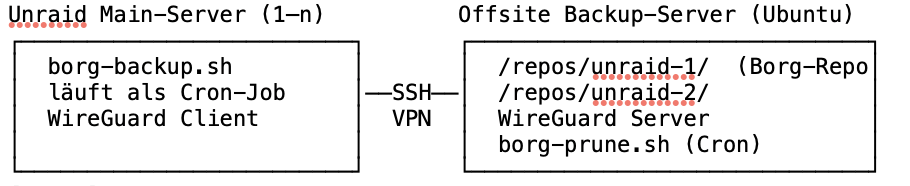
Hallo zusammen, ich habe mein Borg-Backup-Setup für Unraid als Open-Source-Projekt veröffentlicht und wollte es euch nicht vorenthalten. Vielleicht hilft es dem ein oder anderen, der ebenfalls nach einer soliden Offsite-Lösung sucht. Was ist das?Ein Backup-System das Unraid-Server automatisch auf einen entfernten Ubuntu-Server sichert — verschlüsselt, komprimiert und ransomware-resistent. Das SicherheitsmodellDas Entscheidende: Die Unraid-Server können über SSH ausschließlich neue Archive hinzufügen (append-only). Löschen und Prune sind vom Client aus gesperrt. Das bedeutet: selbst wenn ein Unraid-Server durch Ransomware kompromittiert wird, kann der Angreifer die Backup-History auf dem Offsite-Server nicht vernichten. Der Prune (Aufräumen alter Archive) läuft nur direkt auf dem Backup-Server selbst — mit einem separaten Admin-Key, der nie auf den Unraid-Servern liegt. Features auf einen Blick• Append-only Push via SSH — Unraid kann keine Archive löschen • Verschlüsselung mit repokey-blake2 • WireGuard VPN — Backup-Traffic läuft isoliert • Resume bei Abbruch — unterbrochene Backups werden fortgesetzt • Mehrere Jobs pro Server mit individuellen Retention-Regeln • Optionaler Uptime Kuma Healthcheck • Unraid-Benachrichtigungen bei Fehlern • Monatliche automatische Integritätsprüfung Voraussetzungen• Einen zweiten Rechner (Ubuntu) als Backup-Server — kann auch ein alter PC, ein Mini-PC oder ein VPS sein • Unraid mit dem User Scripts Plugin • Etwas Zeit für die Ersteinrichtung (~1–2 Stunden nach Anleitung) Was ist im Repo?• borg-backup.sh — das Script das auf jedem Unraid-Server läuft • borg-prune.sh — Prune & Wartung für den Ubuntu Backup-Server • ANLEITUNG.md — vollständige Schritt-für-Schritt Einrichtung (Backup-Server, Unraid-Server, Disaster Recovery, Wartung) • MIGRATION.md — für alle die von einem bestehenden rsync-Setup umsteigen GitHubhttps://github.com/Naitor-X/unraid-borg-offsite Feedback, Issues und Pull Requests sind willkommen! Clemens
-
Hy friends, I need your help please. I just saw, that my nextcloud Docker Container is not updateable. There is a yellow info 'Version : not available' so what can i do in this case? Thank you Edit: Nevermind - i could set the image to :latest - then i was able to update it again.

-
Hallo, ich brauche bitte dringend eure Hilfe. Ich habe einen Wireguard falsch bei Unraid konfiguriert. Ich schaff es nicht mehr, auf den Server zu kommen. Ich habe schon probiert über die Konsole den Wireguard auszuschalten (/etc/rc.d/rc.wireguard stop) ich habe auch schon probiert, alle Wireguard Konfigurationen vom USB Stick zu löschen. Nichts hilft. Ich kann einfach nicht mehr auf den Server zugreifen. Bitte um eure Hilfe.
-
I want to implement a post consumtion script to my paperless-ngx. But i cannot find the config file to set the script... can somebody tell me where to find this config file?
-
Same problem here - i have a lenovo ThinkCenter M900 SFF running as my Backup Server. Sadly there is no 'fastboot' option i can deactivate. Can somebody help me?
-
Thank you for your help !
-
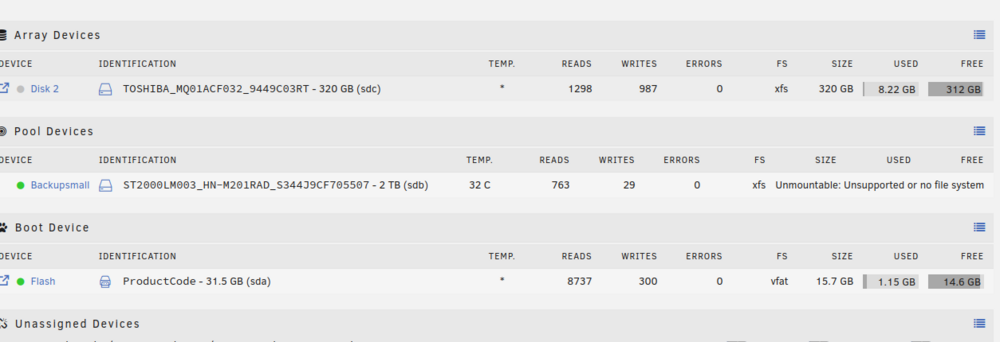
I tried the Update from 6.12.4 to 6.12.10 and after the Update my HDD (Backupsmall) is no longer available for mounting. It also say 'Unsupported or no file system'. Before the Update i could access and mount the hdd without issues. I tried a rollback to 6.12.4 too , but i cannot access it anymore. Is there a way i can rescue it? Thank you for your help
-
Hallo, danke für die Info. Ich werds gern mal durchtesten. Meine bisherige Lösung wäre gewesen: Ich lass die Festplatte automatisch mounten und bevor ich den Strom wegnehme, wird die Festplatte über 'umount /mnt/disks/hdd1' ungemounted. Ist das zu wenig? Bessere Kontrolle und größere Sicherheit habe ich natürlich, wenn ich sie über das Script mounte. Danke und schöne Grüße
-
Um ein 'Offline-Backup' zu erstellen, habe ich mir zwei Festplatten gekauft und diese jeweils an zwei smarte Steckdosen gehängt. Über ein Userscript werden die Steckdosen angesteuert und eingeschalten. Dadurch aktivieren sich die Festplatten. Danach wird das Backup darauf geschrieben. Ich wollte nun diese über unassigned Devices autostarten - geht zwar aber wenn ich ihnen danach den Strom wegnehme, kommt es beim nächsten Start zu einem Fehler (reboot) und ich kann nicht mehr auf die Festplatten schreiben / lesen. Meine Frage wäre jetzt: kann ich über den Terminal diese unassinged devices ein- und aushängen? Ich möchte sie nicht über das normale mount /dev/sdx /mnt/disks/hdd1 und über umount aushängen - da ich mit dem Vorgang schonmal einen Linuxserver geschrottet habe..... Es muss doch irgendeinen Befehl geben, der die unassinged devices über den Terminal ansprechen kann? Danke für eure Hilfe.
-
Hi there, I use the Backup Script by mgutt for all my backups. Now its a little bit anoying to visit every backup folder to check the log file. I want to save all the log files to one share, where i can access them directly. I am not that good at bash scripting so can anybody help me please? I found this in the end of the script and i tried many things to move the file to a share. But it did not work. # move log file to destination log_path=$(rsync --dry-run --itemize-changes --include=".$new_backup/" --include="$new_backup/" --exclude="*" --recursive "$dst_path/" "$empty_dir" | cut -d " " -f 2) [[ $log_path ]] && rsync "${dryrun[@]}" --remove-source-files "$log_file" "$dst_path/$log_path/$new_backup.log" [[ -f "$log_file" ]] && rm "$log_file" done I asked in the Rsync Incremental Thread but no response. I wrote a PN to mgutt but he did not answer to this time. So i try it here again. Thank you for your help!
-
Yes. Try it on a linux vm with any small folder. That is how i test my setzings 🙂
-
Please help 🙂 Can somebody explain please how to change the Path where the logfile is saved after the Backup? I want one Folder outside the destination path with all the log files from all my backups, so i can go through and check if all the backups are made. Would be very kind, im a newbie when it comes to bash! # move log file to destination log_path=$(rsync --dry-run --itemize-changes --include=".$new_backup/" --include="$new_backup/" --exclude="*" --recursive "$dst_path/" "$empty_dir" | cut -d " " -f 2) [[ $log_path ]] && rsync "${dryrun[@]}" --remove-source-files "$log_file" "$dst_path/$log_path/$new_backup.log" [[ -f "$log_file" ]] && rm "$log_file"
-
Naitor changed their profile photo
-
Hi, Thank you for this awesome script! I use it against ransomware - one question: can you use chattr +i after the incrimental Backup on the backup server and the script will add more hardlinks with the next backup? Or are there no more hardlinks possible after chattr+i ? ('i' A file with the 'i' attribute cannot be modified: it cannot be deleted or renamed, no link can be created to this file, most of the file's metadata can not be modified, and the file can not be opened in write mode. Only the superuser or a process possessing the CAP_LINUX_IMMUTABLE capability can set or clear this attribute.) Same in German: Hallo, danke für das tolle Script! Ich benutze das Script bei mir gegen Ransomeware und natürlich für ein Backup. Meine Frage jetzt; kann ich als zusätzlichen Schutz noch chattr+i über die bereits gesicherten Files drüberlaufen lassen? Oder werden dann keine Hardlinks mehr erstellt?
-
-
Der Container wurde von mir gestoppt und gelöscht.... werds mal mit einem Server Neustart probieren.


