jeff_screws
Members
-
Joined
-
Last visited
-
I'm having the same issue as previous post by MatthewD. This has been working for me for over a year. I recently rebuilt some of my dockers from scratch and Unmanic is setup the same as before. The one difference is that there used to be transcode plugins by processor. I used the "Video Encoder H265/HEVC - hevc_vaapi (INTEL/AMD)" plugin before. Now I see that the "Transcode Video Files" can be configured for all the processor types, but it does not get used. Everything is just hitting the cpu. I've watched both intel_gpu_top and the unraid plugin "GPU Statistics" and I never see the video processor used. Not sure how to fix this, so any help would be appreciated.
-
I had the wrong device id. This worked. usb_storage.quirks=2109:0715:u
-
Sorry I didn't try this sooner, but I updated to 7.0.1 this morning and this is still an issue. So I added the quirk and my drives are still not identified with the full names. I've attached my diagnostics. Is there any other course of action? Should I pass the quirk for each drive? tower-diagnostics-20250512-1133.zip lsusb -t output /: Bus 001.Port 001: Dev 001, Class=root_hub, Driver=xhci_hcd/1p, 480M /: Bus 002.Port 001: Dev 001, Class=root_hub, Driver=xhci_hcd/4p, 10000M /: Bus 003.Port 001: Dev 001, Class=root_hub, Driver=xhci_hcd/12p, 480M |__ Port 001: Dev 002, If 0, Class=Mass Storage, Driver=usb-storage, 480M |__ Port 003: Dev 003, If 0, Class=Hub, Driver=hub/4p, 480M |__ Port 001: Dev 005, If 0, Class=Human Interface Device, Driver=usbhid, 12M |__ Port 001: Dev 005, If 1, Class=Human Interface Device, Driver=usbhid, 12M |__ Port 001: Dev 005, If 2, Class=Human Interface Device, Driver=usbhid, 12M |__ Port 001: Dev 005, If 3, Class=Human Interface Device, Driver=usbhid, 12M |__ Port 004: Dev 004, If 0, Class=Human Interface Device, Driver=usbhid, 12M |__ Port 005: Dev 006, If 0, Class=Hub, Driver=hub/5p, 480M |__ Port 005: Dev 010, If 0, Class=[unknown], Driver=[none], 480M |__ Port 010: Dev 008, If 0, Class=Wireless, Driver=btusb, 12M |__ Port 010: Dev 008, If 1, Class=Wireless, Driver=btusb, 12M /: Bus 004.Port 001: Dev 001, Class=root_hub, Driver=xhci_hcd/4p, 10000M |__ Port 003: Dev 002, If 0, Class=Hub, Driver=hub/4p, 10000M |__ Port 001: Dev 003, If 0, Class=Mass Storage, Driver=uas, 10000M |__ Port 002: Dev 004, If 0, Class=Mass Storage, Driver=uas, 10000M |__ Port 003: Dev 005, If 0, Class=Mass Storage, Driver=uas, 10000M |__ Port 004: Dev 006, If 0, Class=Mass Storage, Driver=uas, 10000M
-
Thanks. Just to clarify I add that with the correct id for my USB flash boot device?
-
Here is the output, but it may not show anything now. I reverted back to 6.12.14 and all my drives are recognized correctly.
-
I've attached the diagnostics zip file. tower-diagnostics-20250201-1134.zip
-
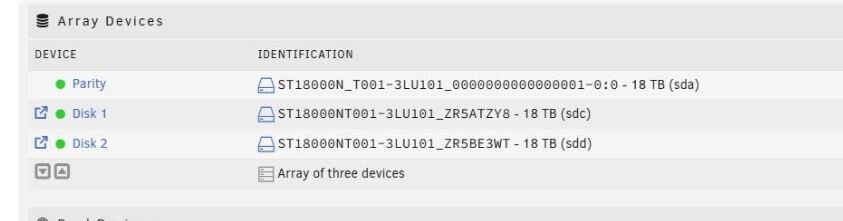
Hello unraiders, I upgraded to 7.0 a few weeks ago and I have found that every time I reboot my drive ids change. The first time it was my parity drive, so I let it rebuild parity, no big deal. The second time it was a data disk, so it had to rebuild. You'll see in the attached screenshot that my parity drive has replaced the drive serial number with: 00000000000000001 and it should be ST18000NT001-3LU101_ZR5A9CP4.. The next boot it might be disk 1 or disk2 that goes wonky. I've shutdown, reset all drive, and connections. I have a very small minimalist type setup, but it has worked for my needs for several years. CPU is a Beelink SEi11 4 slot Probox enclosure connected via USB-C 3 - 18tb Seagate drives 1 - 2tb SSD for cache I did some searches and saw that USB is not recommended, but it has worked flawlessly for me up to unraid 7. I looked for any firmware updates for my beelink usb and didn't find anything. Is there any way to manual update the drive serial numbers that unraid sees so they remain static? Thanks for your help.