sabotoshiboi
Members
-
Joined
-
Last visited
-
Beautiful. Thanks again!
-
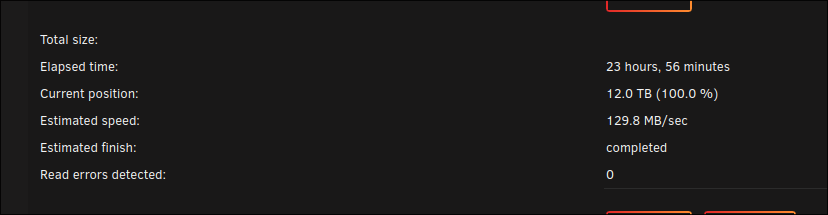
Cool, I'll run a read test. if it completes fine, I'll just mark this as solved. Thank you!
-
I do have a power splitter that splits 1 connector into 4. I removed that splitter and used just the base connectors that came with the power supply (since my parity drive is out there are enough now). I've booted it back up and no errors so far...The SATA cables are in the same spot as before. What would you suggest to know for certain whether the drive is bad? A SMART extended self-scan? A read test? Or any other suggestion you have? toshipoo-diagnostics-20241205-0940.zip
-
I started it back up with them only connected to the motherboard SATA ports and it immediately started having errors again. toshipoo-diagnostics-20241205-0757.zip

-
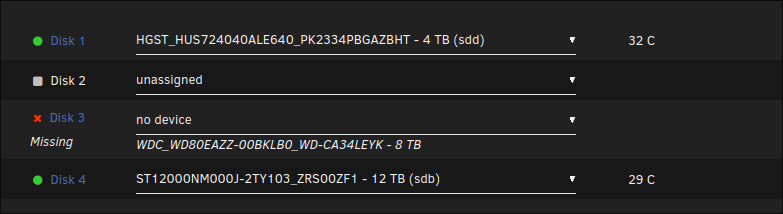
I spoke too soon...I have no notifications of read errors but Disk 3's file system seems to not be present now. From the Dashboard everything appears normal but DIsk 3's files are gone as well as some of my shares. I am so confused, if it actually did disconnect, why did everything appear fine on the dashboard and the SMART status still healthy? And why were there no notifications of this happening? Anyways, disk 3 seems to be the sole issue now but the problem was definitely present with disk 1 at some point so it may very well be where it was plugged in to the motherboard. Going to try again removing all drives from the controller and just use the SATA ports directly on the motherboard. toshipoo-diagnostics-20241205-0734.zip
-
Thank you for your reply! So far, yes it's just those two disks. There was also a time when I removed all my drives from the controller and used just the SATA ports directly on the mother board and I still got the read issues, of course that was before i removed the parity drive that was going haywire. Whenever the read issues seem to happen, the sys log says disk 3 is having read errors but when I take the array offline, it's disk 1 that appears to be missing. As of right now, the disks have appeared to have lasted the night without any read errors, I'll attach an updated diagnostic just in case. toshipoo-diagnostics-20241205-0727.zip
-
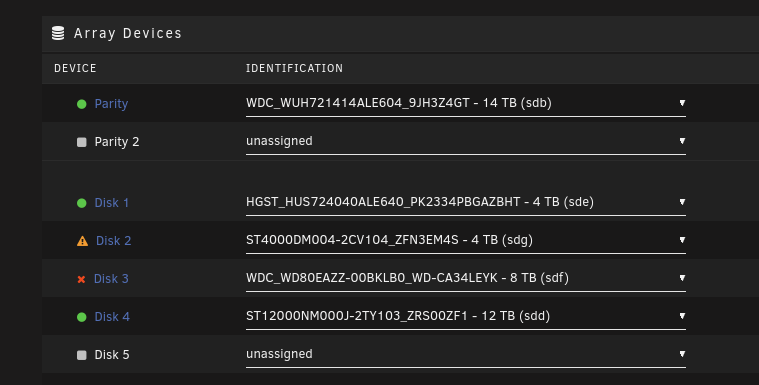
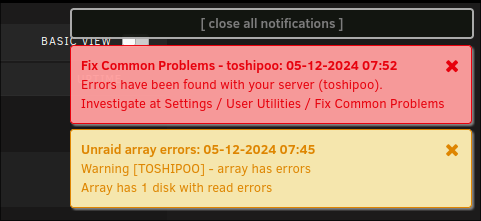
My Unraid Version is 6.12.11 I'm having an issue where my server will be working fine but then I'll randomly get an error notification saying a disk in my array is having read errors. When this happens, I'll stop the array and the configuration will tell me I have a drive missing. Only when I reboot will all the drives appear to be there. Then after a while, be it 10 minutes of several hours, it will have read errors again then rinse and repeat. Sometimes I have to open my server and fiddle with the cords before the drive shows up again. It's done this with both Disk 1 and Disk 3. Although after gutting my computer and replacing all the SATA cables, it seems to be only disk 1 now. It should be noted that none of these drives were in an error state. They are simply having random read errors that sometimes cause my shares to disappear until a reboot. A few days prior to this, my Parity drive was in an error state and making odd noises so I removed it from the array and attempted to preclear it but it failed during the pre-read step. I assumed it failed mechanically but then I moved the drive to my personal desktop and it is curently being zeroed out and formatting just fine so far so who knows if the drive was actually bad. Right now I feel like I can't trust SMART because of how weird the situation is. As of right now, my server is unprotected due to the lack of a parity drive and this read error situation has me stressing out that I might lose 4 - 8 TB of data. All of my drives currently have a Healthy SMART status but there is an extended self-test running on Disk 1 currently just to be safe. I have also attempted a read check on my array which runs fine until the read errors how up again and the errors flood in. I have also started the Array in Maintenance mode and done a file system check which always comes out fine. At this point, I'm ready to chalk all of this up to my SATA slots or entire motherboard being defective but figured I'd see if my diagnostics reveal anything peculiar. It should also be noted that I am using a PCIe 4xSata slot expansion card in addition to my other SATA slots on my motherboard. In short, I feel like my server is gaslighting me something fierce and any input would be greatly appreciated. Thank you in advance! toshipoo-diagnostics-20241204-2125.zip toshipoo-syslog-20241205-0453.zip
-
xfs_repair went good so I remounted Disk 2 and it's rebuilding data as we speak. As far as I can tell (I'll post diagnostics just in case), everything is functional again! toshipoo-diagnostics-20240506-1128.zip

-
Done. Looks like Disk 3 is back (for now) and disk 4 is back at the usual unmountable status. toshipoo-diagnostics-20240506-1044.zip

-
Not sure if this was a good idea but I also mixed and matched all the other cables on the other drives to see if there was any change whatsoever. There was not.
-
Hooked up disk 4 with a new power connector and sata cable. toshipoo-diagnostics-20240506-1009.zip
-
I am using Unraid 6.12.8. Without warning, I began noticing weird bugs with my docker containers ( i couldn't access the console and some containers would randomly stop). I rebooted only to discover my Disk 2 was in an error state (it wasn't previous to the reboot) and my Disk 4 was still valid but it said it was unmountable due to a bad or missing file system. I used xfs_repair to fix the Disk 4 and it does work after that but rebooting puts it right back at that state. As for disk 2, I did a preclear on it and it completed with no errors, so I assumed it was just some weird data corruption or something. I re-added the newly precleared disk to the disk 2 slot and it seemed to work fine and begin the data-rebuild process. However, once I started the array, disk 3 got put in an error state. So it seems like something is keeping all my drives from working at once. My first thought was perhaps this is a power supply issue because I had recently added a new drive to the array but this was over a month ago and everything ran flawlessly up until now. I also opened up the case and made sure all the connections were secure and they were. Any help will be appreciated. I'm somewhat of a noob and haven't been doing this very long so forgive me if I made any amatuer mistakes during the troubleshooting of this. I'll attach my syslog and diagnostics toshipoo-syslog-20240506-0405.zip toshipoo-diagnostics-20240505-2115.zip