zacrag
Members
-
Joined
-
Last visited
-
I found a solution for my ASROCK b550 Taichi setup. If i used one of the back panel USB2 ports, the system would not boot. Same error you mentioned. If I swapped to one of the USB3 ports, the system booted just fine.
-
I'm running into an issue with Tailscale taking the same port NGINX is using for the web interface. I've made sure that the tailscale1 interface is in the "listening interfaces" section of Network Settings. This started happening around the same time that I enabled HTTPS on my tailscale, but I'm not sure if that's the issue. I was able to run a script on startup that took tailscale down, started NGINX, and the brought back up tailscale -- not that stopped working. Now tailscale is now stealing the port over and over again. Any ideas? Running the plugin, not the docker.
-
I'm an idiot... Tried to passthrough a sound card as a pcie device. There's a "sound card" section and everything.....
-
I know many of us have had issues with GPU passthrough being difficult, but things were working well for me in the past. I'm working something weird right now. My passed-through audio device is showing as being attached to vfio, but it's not showing in the "other PCI devices" for attaching to the VM. I'm running 6.12.13 and have attached my diagnostics. Background: I have a lightweight Debian VM that I've used as an Airplay server for the past year or so. I pass through the audio card on my mobo and use it to output to my amplifier. It was working flawlessly for a year or so, but I've broken it. Here's my passthrough setup, and the missing pcie device in the VM manager. I did some upgrades to my server and moved around some pcie devices -- the passthrough vfio didn't line up anymore. I reset the vfio config (uncheck and recheck) and successfully passed the audio device to vfio at boot. What i've checked: Is vfio grabbing the device? It looks to be. The logs show the device is grabbed. Here's the weird one... Libvirt seems to be having trouble with the device. I've never seen anything like this before. Any ideas? ragsserver-diagnostics-20241001-0149.zip
-
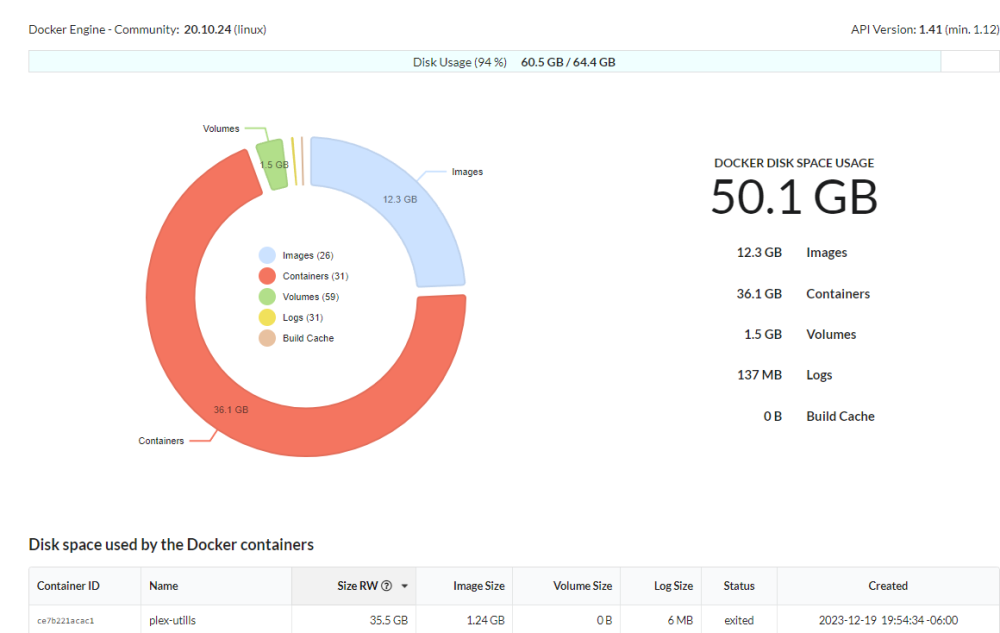
Anyone else BLOWING UP their docker image with this container? When I run a script, I'm getting over 30GB written. I have to shut it down before it takes everything else down with it. Can we get a share mapping to prevent this? Maybe some garbage collection?