






AlastorX50
Members
-
Joined
-
Last visited
Everything posted by AlastorX50
-
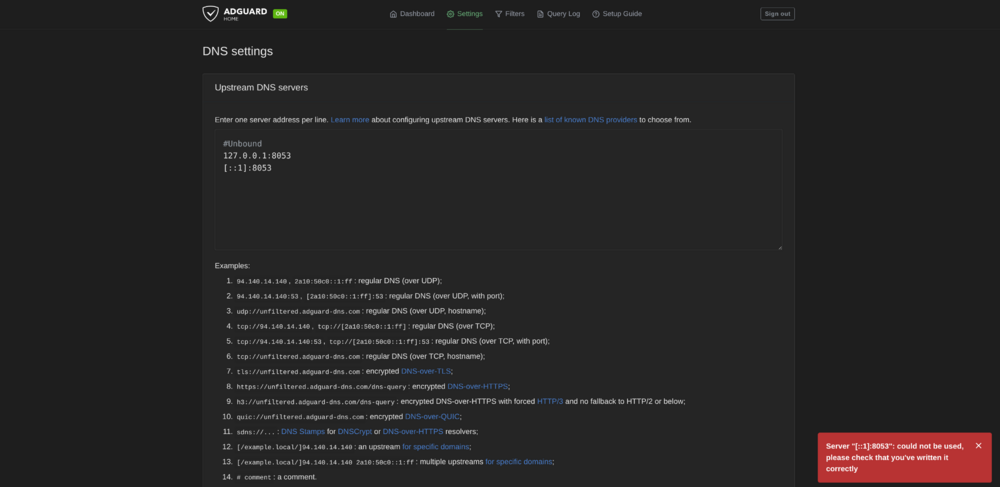
I followed the instructions in the docker container and am having issues with the assigning server IP address in DNS settings. I tried to put in [::1]:8053 but it errors saying it could not be used. But when I try ::1 it will assign on the dashboard [::1]:53
-
Yes, @SpencerJ updated the original post with my suggestion from kanguru and they can be purchased from staples and amazon in the USA. They make their own the entire manufacturing line and have Unique identifiers that Unraid requires. If you are international they have a store on Kanguru's website.
-
@SpencerJAny chance to update the main post to include Kanguru drives as an option. Mine have been working flawless.
-
Just put the server up and the Kanguru blue USB that I purchased worked and has a unique GUID.
-
Since this post was in the announcement section, I’ll cross post it here: These drives are very reliable, inexpensive, controlled inventory, and they have signed firmware versions of their USB devices.
-
If you make them we will buy them! I found one of the dead Blue Kanguru USB drives I was talking about. I used “Uniqueid disk” in CMD and it put out 8 characters and numbers is that enough or do I need something like this {8-4-4-4-12}? (the numbers signify number of characters and numbers) Edit: I found it in device properties for the Kanguru USB. Looks like it has a full unique GUID.
-
@SpencerJ Just got an email back from them. ”Our products have dedicated Vendor ID, Product ID, and Serial number. We also have a custom option to add a Unique ID at chip level in place of the Product Name for about $3/unit. And we do custom engraving.” The USB I ordered from staples should be here the beginning of next week. Will update again.
-
They were all 3.0. USB devices. Devices that they plugged into were ranged from 2.0 usb to 3.0.
-
I will be building my unraid server sometime this week. I will update once I have all the materials. when we used these to update our software, it used a program that would only work with these USB devices which I believe used GUID for verification.
-
When I worked for a very large WINDOW company, we used these USB drives to handle 60-70 customers a day. OS reinstalls, Malware/Spyware/Virus scans, Paragon Backups, etc. Out of our 27 drives we had 3 fail in the span of 4 years. Very reliable USB drives. https://www.kanguru.com/products/kanguru-flashblu30-usb3-flash-drive https://www.kanguru.com/products/kanguru-ss3 https://www.kanguru.com/products/kanguru-flashtrust-secure-firmware-usb-3-0-flash-drive Looks like Staples has the cheapest prices for these drives, free shipping to store: https://www.staples.com/kanguru-flashblu30-16gb-superspeed-usb-3-0-flash-drive-with-physical-write-protect-switch/product_IM18TN713



