




-
This is a support topic a future wine cellar app called cellarly
-
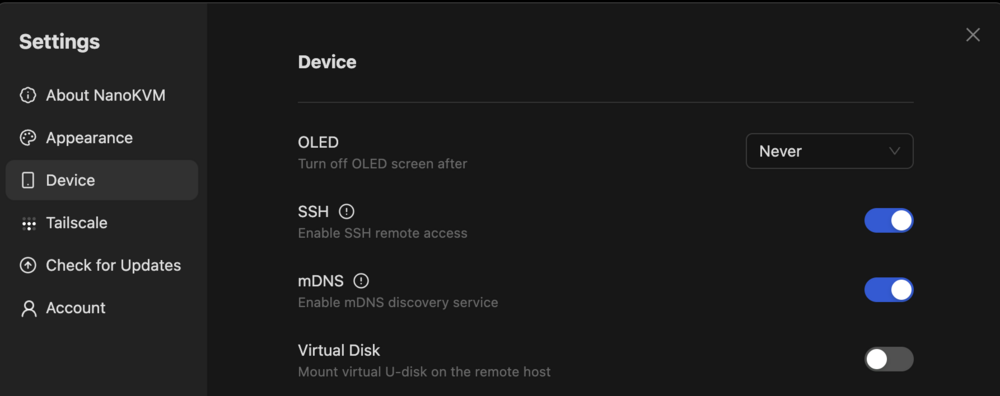
That's exactly what the problem was. Awesome. Didn't know what this error message means. Good to know now. If anyone else is having the same problem. You can disable the virtual disk in the settings Thanks for the help, it works now
-
Hi Gyus, I installed a NanoKVM to my server and after booting it again the array doesn't start. It get the following error message in my log May 12 08:21:56 Tower emhttpd: cmdStart: too many devices May 12 08:21:56 Tower smbd[2278]: [2025/05/12 08:21:56.468680, 0] ../../source3/smbd/smb2_service.c:746(make_connection_snum) May 12 08:21:56 Tower smbd[2278]: make_connection_snum: canonicalize_connect_path failed for service ZFSBIG, path /mnt/zfbigdata May 12 08:21:58 Tower smbd[2278]: [2025/05/12 08:21:58.485161, 0] ../../source3/smbd/smb2_service.c:746(make_connection_snum) May 12 08:21:58 Tower smbd[2278]: make_connection_snum: canonicalize_connect_path failed for service ZFSBIG, path /mnt/zfbigdata May 12 08:22:00 Tower smbd[2278]: [2025/05/12 08:22:00.501151, 0] ../../source3/smbd/smb2_service.c:746(make_connection_snum) May 12 08:22:00 Tower smbd[2278]: make_connection_snum: canonicalize_connect_path failed for service ZFSBIG, path /mnt/zfbigdata May 12 08:22:02 Tower smbd[2278]: [2025/05/12 08:22:02.517175, 0] ../../source3/smbd/smb2_service.c:746(make_connection_snum) May 12 08:22:02 Tower smbd[2278]: make_connection_snum: canonicalize_connect_path failed for service ZFSBIG, path /mnt/zfbigdata May 12 08:22:04 Tower smbd[2278]: [2025/05/12 08:22:04.533039, 0] ../../source3/smbd/smb2_service.c:746(make_connection_snum) May 12 08:22:04 Tower smbd[2278]: make_connection_snum: canonicalize_connect_path failed for service ZFSBIG, path /mnt/zfbigdata May 12 08:22:06 Tower smbd[2278]: [2025/05/12 08:22:06.549076, 0] ../../source3/smbd/smb2_service.c:746(make_connection_snum) May 12 08:22:06 Tower smbd[2278]: make_connection_snum: canonicalize_connect_path failed for service ZFSBIG, path /mnt/zfbigdata May 12 08:22:08 Tower smbd[2278]: [2025/05/12 08:22:08.565074, 0] ../../source3/smbd/smb2_service.c:746(make_connection_snum) May 12 08:22:08 Tower smbd[2278]: make_connection_snum: canonicalize_connect_path failed for service ZFSBIG, path /mnt/zfbigdata May 12 08:22:10 Tower smbd[2278]: [2025/05/12 08:22:10.581072, 0] ../../source3/smbd/smb2_service.c:746(make_connection_snum) May 12 08:22:10 Tower smbd[2278]: make_connection_snum: canonicalize_connect_path failed for service ZFSBIG, path /mnt/zfbigdata May 12 08:22:12 Tower smbd[2278]: [2025/05/12 08:22:12.596981, 0] ../../source3/smbd/smb2_service.c:746(make_connection_snum) May 12 08:22:12 Tower smbd[2278]: make_connection_snum: canonicalize_connect_path failed for service ZFSBIG, path /mnt/zfbigdata All drives are recognized and I changed nothing else that adding the NanoKVM to USB. And when removing the NanoKVM again it works. Can someone please help me? Greetings Solidus0815
-
Thanks a lot that worked perfectly. Didn't think it was this easy. Was already scared it was gone. Thanks again Solidus0815
-
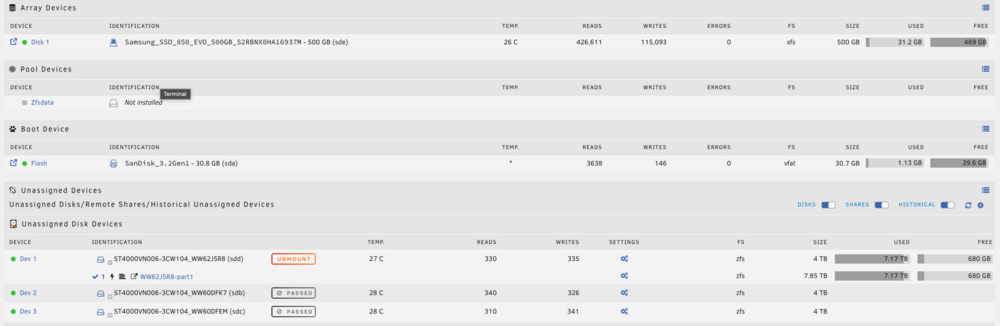
Thanks for the fast reply. By "reassign all pool devices to the pool" you mean in the unraid ui of the "grey" zfsdata pool?
-
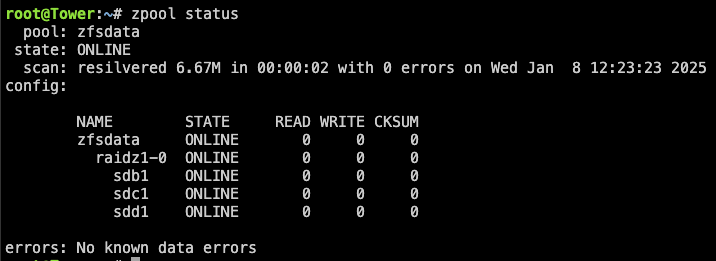
Hi Guys, After a drive connector broke on my server I had to move one drive to another slot. And after that my zfs pool was missing in unraid. I imported it with zpool import zfsdata now everything looks fine in the terminal Bu some data is missing now and the zpool is not visible in unraid but the drives are listed as unassigned devices. Can someone please help me fix this. I also attached my diagnostics Regards Solidus0815 tower-diagnostics-20250108-1307.zip
-
Ok, I will run it an see if it is worth the price. Thanks for the amazing help.
-
That's pretty expensive. Do you how high the changes are that it will work? Would be really bad to pay that high price for nothing. And is there a cheaper alternative?
-
Same result, unfortunately

-
Ok, it wouldn't be that bad if I loose some data, as long as not all of it is gone. But this options only give me this

-
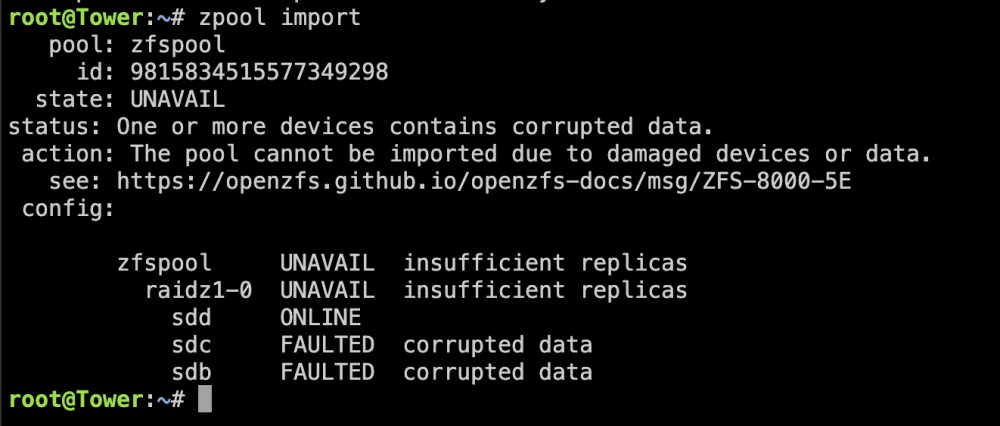
Ok, that's what I feared. But I don't understand what happend. sdd is the faulty one and sdb and sdc should be fine. Why do sdb and sdc now have corrupted data. Did I destroy the data when I tried to fix it? And can I try to recover the data somehow?
-
I'm pretty sure it was raidz. I have 3 4TB drives and the total capacity was slightly below 8TB if I recover correctly.
-
Ok something happened at least. I'm slightly positiv now 😃 Although it reports sdb and sdc as "FAULTY" and sdd as "ONLINE" even though sdd should be the broken on
-
I'm not 100% sure. I had a pool before 6.12. But I think I recreated the pool with unraid after the update. Does unraid automatically import pools created in the terminal with 6.11 after the update? If not, I'm pretty sure I created a new one.
-
Still the same result. Should I now also try /dev/sdb? Wanna be sure this time.

View in the app
A better way to browse. Learn more.




