






Vyktrii
Members
-
Joined
-
Last visited
Everything posted by Vyktrii
-
I have having similar issues, but i solved it by deleting docker image and reinstalling all apps
-
Im unabke to replicate the issue as i fixed it by nuking docker image, but will try uninstalling nvidia driver, i also forgot to mention that when this issue occurs, it sometimes kills even my new router but it sometimes doesnt (last issue consistently killed my router) Also this post has similar symptoms as me, https://forums.unraid.net/topic/135151-docker-unresponsive-unraid-at-100-cpu-eventual-system-crash/
-
Few days ago i was encountering major crashing issues I managed to temporarily solve it by using a usb eth adapter. but i kind of solved it by buying a new router and changing the USB stick of unraid, these kind of crashes stopped for me but other kind of crashes have started But over few days, sometimes my unraid crashes and its mostly after i do some activity on docker like uninstalling or stopping a container, once it crashes, before crashing few cpu threads get stuck at 100% for around 3-4mins and then it crashes, then my unraid keeps crashing every time array is started, the only workaround is to delete docker image and reinstall all plugins/containers. Yesterday, my unraid crashed after i stopped a docker container and it kept crashing, i updated from 6.11.5 to 6.12 but it still kept crashing, but deleteing docker image fixed it, i have had this issue couple of times where i need to delete the docker image, about troubleshooting hardware (my motherboard has been replaced and its new, my ram passes memtest for 12hours and swapping my ram sticks from my main pc doesnt help with the crashes, also i tested my CPU my running prime 95 for 1 hour and then running cinebench 3 times, i dont know how i can test cpu on unraid so i just transcoded 3 4k streams to 1080p using plex to test CPU [it pushes the cpu to constant 94-98%]), the only thing that fixes this is deleting and reinstalling docker image syslog-192.168.1.10.log kassandra-diagnostics-20230621-1317.zip
-
kassandra-diagnostics-20230530-2146 (array stopped).zip kassandra-diagnostics-20230530-2149 (array started).zip
-
I think it was the onboard realtek 8125BG lan chipset, disabling it(in bios,i earlier forgot to disable it in bios) and using a usb3 to eth adapter is working fine for past 18hours
-
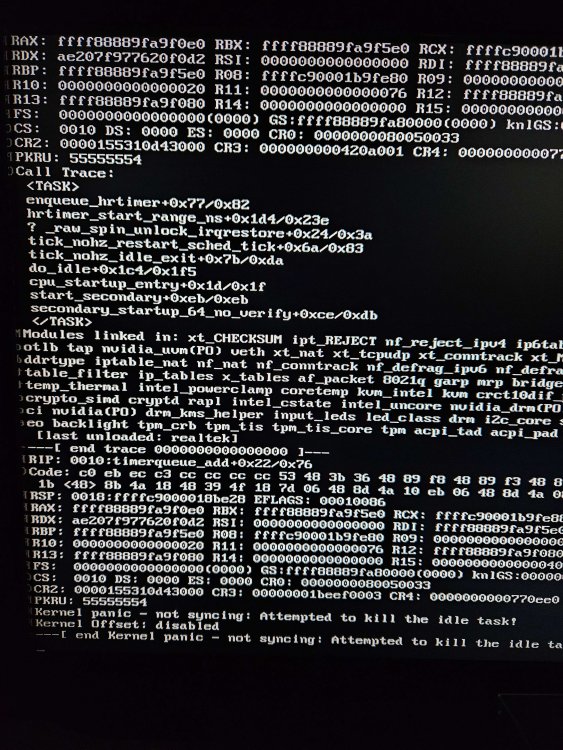
I replaced my motherboard as it was new, unraid still crashes, i swapped ram sticks between my gaming PC and nas, unraid still crashes, also i tried using a USB3 NIC instead of onboard ethernet, unraid still crashes, also i found a user on reddit with similar crashes as me and he is on similar setup, an asrock 760 mobo (i have gigabyte 760), i5 13500K (I have 12400F), to test CPU i ran prime95 for 1 hour and left windows 11 open for 12hours, did not crash
-
I know this sounds weird but i want to test my CPU, how do i test my CPU ?, also could it be due to PSU ?
-
Sadly, it crashed again after 3 days of uptime, can anyone please tell me why is it crashing, is it still releated to ram ? syslog-192.168.1.2.log
-
UPDATE 1 : It was releated to RAM, i checked 4 different sticks of ram, and they all gave errors, i just cleaned the slots with Isopropyl alchol and compressed air, now its working fine for past 16 hours, even tested under various loads, i transcoded 3 videos from 4k to 1080p on gpu and 1 video from 4k to 1080p on CPU (s/w) transcode, so thge system was under stress for around 20min interval for 4-5 times, it was probably some speck of dust or sedimentation on new motherboard
-
Thanks, will run in safemode for few days after the next crash, just to doublecheck the ram, i used RAM from my gaming rig in unraid setup, if it still crashes, i would be sure that ram isnt the issue. Do you think PSU could be an issue, a member on reddit pointed out that it might be, since i dont have many HDDs, adding up peak total power consumption of Unraid comes to about 250w, but since my PSU is a 450w (With single 12v rail output of 450w), i dont think that could be a problem
-
This is my first unraid build and i,m running unraid on partly new system (i5-12400F,32gb DDR5 4800mhz Ram, B760M Mobo), Reused Components Include ( GTX 1650, 450w PSU, Cabinet) This logs dont include the errors i get on screen 20230520_153939.heic20230521_200126.heic20230521_200423.heic It was crashing very frequently (every hour) so nuked the server as it was new and rolled back to stable release, from 6.12rc6 to 6.11.5, but it didnt help, uninstalling photoprism did help as it bought down frequency of crashes to once every 8 hours or so, but didnt stop it My Problem is very similar to, But i ran memtest for 16hours and 4 passes and got no error, also as my server is connected to an access point and not directly to the router, it doesnt crash the router it only crashes acces point, however if i connect it to the router, it crashes the router too... Here is my log file that contains few errors but not all as i get on my screen syslog-192.168.1.2.log

