






Vyktrii
Members
-
Joined
-
Last visited
Everything posted by Vyktrii
-
It was the PSU, i replaced it and i am now getting no errors even after running the system on full load for past 24hours
-
I changed the HDD and now the data was fully recovered, but it seems that i have just shifted and delayed the problem as a unassigned drive is now experiencing the read fpdma errors, but atleast my array is working, but i think this issue could come back to my array disks, can a a faulty PSU be the reason for these errors ? Im currently using a silverstone ES230 PSU, which is an 80+ PSU but has fairly powerful 5V output (110w) for HDDs (im using 8 of them)
-
I was writing directly to the disk and the minimum share space setting is well below the free space
-
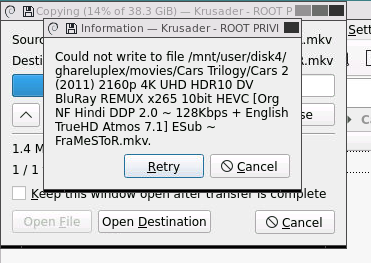
So I finally finally restored data from my failed HDD to Disk 4 in my array (using btrfs restore), but now im encountering another problem, out of all of 14.5 TB of data, everything was recovered almost, except around 140gb of data, and the reason being unraid doesnt let me write anymore files to disk 4, as soon as i start to write anything it slows down to mere 400kbps after 5gb, it just writes exactly 5.6GB (tried with different files) and then says space unavailble, tried in both Krusader and MC, i think brfs restore was also stopped due to this issue, Since i ran preclear on the disk and everything was ok, but why isnt the disk letting me write anything even though there is 360gb free ?, does this issue havev to do anything with the parity drive?, maybe the parity drive isnt letting me write data or something ? also can i recover partly using the BTRFS recover command from my old disk, ik exactly whats missing as i tallied my data manually Also i tried using new permissions thing, didnt help kassandra-diagnostics-20241207-0121.zip
-
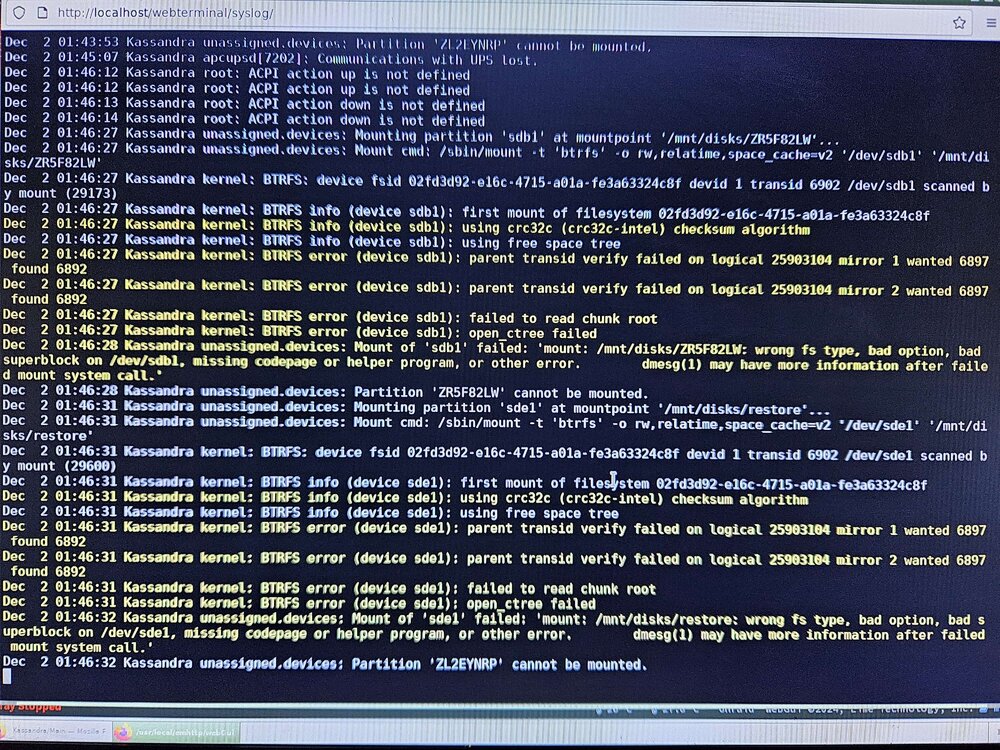
my problem is that using the guide indeed restores my data to a new 16Tb drive, but then after a reboot, the drive to which the data was restored gives the similar error to the point where both drives say wanted “6897 found 6892”, like in the screenshot where both sdb1 and sde1 are giving the same error
-
kassandra-diagnostics-20241202-1854.zip
-
I tried that didnt help, but for some reason swapping the sata cables from the problematic HDDs to the sata SSDs solved the issue of comreset and read fpdma errors, but my issue of unmountable disk still remains, i doubt if my parity disk is ok after so many sata errors, so shall i recover my data by rebuilding the drive, or shall i again use btrfs recover (but that did give me mounting errors on the drive it was recovered to (screenshot in original post)
-
It all started when i was recieving very slow copy speeds on my array (around 200kbps) so i then rebooted the server only to find one of my drives had parents transid error, then i then attached another 16tb drive and followed the official data recovery guide and recovered all my data to new drive using btrfs rescue but now both the drives are unmountable with the exact same parent transid verify failed error (screenshot attached) apart from this one of my other drives constantly gives me READ FPDMA QUEUED and disabling NCQ just changed the error given to READ DMA EXT thus making the data rebuilding process impossible as it runs at speeds of less than a MBps I changed ports and swapped all the cables to new ones, still didnt help I sometimes also get READ FPDMA QUEUED on other drives but a restart fixes it, i have exhausted all my possible fixes i have total 8 sata devices, 4 on my mobo and 4 on a nvme to 5 port sata with a JSM controller as recommended by unraid, also READ FPDMA Errors can come on both mobo and card sata ports PS. sometimes i also get COMRESET failed (errno=-16), but it usually dissappears within seconds Also the drives giving the READ FPDMA QUEUED Errors is fine as it passed the smart tests and if i copy data from it using Midnight commander, im not getting any errors and getting very stable speeds kassandra-diagnostics-20241202-0215.zip
-
Its working fine for almost 2 weeks, I still dont know the reason for the crash
-
My server crashed unexpectedly (around 8.10am 12th may as i woke up and found out that its not working), RGB lights were still running but nothing was available and system didnt even respond to power button, had to press and hold to force shutdown kassandra-diagnostics-20240512-1843.zip
-
Would love to Wordpress CA Template back, would also like to request for CA Template for chatwoot
-
Im on latest Unraid 6.12.4 and i have an external HDD mounted and passed to a plex library, only one plex library is mounted, no other docker etc is mounted, it has been like this for months and never did my HDD spin up randomly only when someone was playing soemthing from library, from few weeks, my hdd seems to be contstantly running, nothing seems to pop up in both open files or file activity plugin even unmounting the drive doesnt help as it still spins up
-
Im on latest Unraid 6.12.4 and i have an external HDD mounted and passed to a plex library, only one plex library is mounted, no other docker etc is mounted, it has been like this for months and never did my HDD spin up randomly only when someone was playing soemthing from library, from few weeks, my hdd seems to be contstantly running, nothing seems to pop up in both open files or file activity plugin even unmounting the drive doesnt help as it still spins up
-
My container runs perfectly fine but i have noticed errors in my unraid log due to the container, should i be worried, can i stop them ? These errors keep on repeating endlessly... Oct 21 11:28:42 Kassandra kernel: nvidia-modeset: WARNING: GPU:0: Unable to read EDID for display device DVI-D-0 Oct 21 11:28:45 Kassandra kernel: nvidia-modeset: WARNING: GPU:0: Unable to read EDID for display device DVI-D-0 Oct 21 11:29:36 Kassandra kernel: nvidia-modeset: WARNING: GPU:0: Unable to read EDID for display device DVI-D-0 Oct 21 11:29:36 Kassandra kernel: traps: light-locker[28607] trap int3 ip:14be754387d7 sp:7ffe12288210 error:0 in libglib-2.0.so.0.7400.6[14be753fa000+8d000] Oct 21 11:29:36 Kassandra kernel: nvidia-modeset: WARNING: GPU:0: Unable to read EDID for display device DVI-D-0 Oct 21 11:29:36 Kassandra kernel: input: Logitech Wireless Mouse PID:4038 as /devices/virtual/input/input4 Oct 21 11:29:36 Kassandra kernel: input: Touchscreen passthrough as /devices/virtual/input/input5 Oct 21 11:29:36 Kassandra kernel: input: Keyboard passthrough as /devices/virtual/input/input6 Oct 21 11:31:20 Kassandra kernel: nvidia-modeset: WARNING: GPU:0: Unable to read EDID for display device DVI-D-0 Oct 21 11:31:20 Kassandra kernel: nvidia-modeset: WARNING: GPU:0: Unable to read EDID for display device DVI-D-0 Oct 21 11:31:22 Kassandra kernel: x86/split lock detection: #AC: CNet Encrypt:0/8059 took a split_lock trap at address: 0x2296549f Oct 21 11:31:22 Kassandra kernel: x86/split lock detection: #AC: CJobMgr::m_Work/8090 took a split_lock trap at address: 0x2296549f Oct 21 11:34:22 Kassandra kernel: x86/split lock detection: #AC: CNet Encrypt:0/18681 took a split_lock trap at address: 0x566372cf Oct 21 11:35:56 Kassandra emhttpd: spinning down /dev/sde Oct 21 11:36:59 Kassandra emhttpd: read SMART /dev/sde Oct 21 11:40:38 Kassandra kernel: nvidia-modeset: WARNING: GPU:0: Unable to read EDID for display device DVI-D-0 Oct 21 11:40:48 Kassandra kernel: x86/split lock detection: #AC: CGameStreamVide/9066 took a split_lock trap at address: 0x60252c32 Oct 21 11:40:49 Kassandra kernel: input: Microsoft X-Box 360 pad 0 as /devices/virtual/input/input7 Oct 21 11:40:56 Kassandra emhttpd: spinning down /dev/sdd Oct 21 11:42:00 Kassandra emhttpd: read SMART /dev/sdd Oct 21 11:42:45 Kassandra kernel: x86/split lock detection: #AC: steam/7501 took a split_lock trap at address: 0x229654da Oct 21 11:42:45 Kassandra kernel: x86/split lock detection: #AC: CGameStreamVide/16154 took a split_lock trap at address: 0x229654da Oct 21 11:42:46 Kassandra kernel: input: Microsoft X-Box 360 pad 0 as /devices/virtual/input/input8 Oct 21 11:48:21 Kassandra acpid: input device has been disconnected, fd 10 Oct 21 11:48:23 Kassandra monitor: Stop running nchan processes Oct 21 11:48:46 Kassandra kernel: nvidia-modeset: WARNING: GPU:0: Unable to read EDID for display device DVI-D-0 Oct 21 11:48:49 Kassandra kernel: nvidia-modeset: WARNING: GPU:0: Unable to read EDID for display device DVI-D-0 Oct 21 11:48:52 Kassandra kernel: nvidia-modeset: WARNING: GPU:0: Unable to read EDID for display device DVI-D-0 Oct 21 11:48:52 Kassandra kernel: traps: light-locker[6690] trap int3 ip:145d468c87d7 sp:7fffea48d4f0 error:0 in libglib-2.0.so.0.7400.6[145d4688a000+8d000] Oct 21 11:48:53 Kassandra kernel: nvidia-modeset: WARNING: GPU:0: Unable to read EDID for display device DVI-D-0 Oct 21 11:48:53 Kassandra kernel: input: Logitech Wireless Mouse PID:4038 as /devices/virtual/input/input9 Oct 21 11:48:53 Kassandra kernel: input: Touchscreen passthrough as /devices/virtual/input/input10 Oct 21 11:48:53 Kassandra kernel: input: Keyboard passthrough as /devices/virtual/input/input11 Oct 21 11:48:57 Kassandra kernel: nvidia-modeset: WARNING: GPU:0: Unable to read EDID for display device DVI-D-0 Oct 21 11:48:57 Kassandra kernel: nvidia-modeset: WARNING: GPU:0: Unable to read EDID for display device DVI-D-0
-
Solved it, it was a brand new faulty nvme drive, my new ssd also sometimes doesnt do a clean shutdown but it doesnt get corrupted atleast
-
im trying to install it for the first time, the container is running but im getting these errors in logs traps: xdg-desktop-por[24357] trap int3 ip:1508e6521ca7 sp:7fff7426c500 error:0 in libglib-2.0.so.0.6600.8[1508e64e5000+88000] trap int3 ip:153b0fb4cca7 sp:7ffea0bfef20 error:0 in libglib-2.0.so.0.6600.8[153b0fb10000+88000]
-
I made some progress, nuking and rebuilding the cache drive solves it but its a temporary workaround, it works fine but when i try shutting down unraid, its unable to unmount it and gives me errors like these /mnt/cache Jun 30 12:21:07 Kassandra root: umount: /mnt/cache: target is busy. Jun 30 12:21:07 Kassandra emhttpd: shcmd (68357): exit status: 32 Jun 30 12:21:07 Kassandra emhttpd: Retry unmounting disk share(s)... Jun 30 12:21:12 Kassandra emhttpd: Unmounting disks... Jun 30 12:21:12 Kassandra emhttpd: shcmd (68358): umount after the next few reboots i start getting call trace errors after some time, i tried 2 ssds, still same issue, also running fuser -v /mnt/cache gives me "USER PID ACCESS COMMAND /mnt/cache: root kernel mount /mnt/cache" this result, i think my crashes have something to do with my cache drive getting corrupted after few reboots, im unable to find ouit reason why my cache drive wont unmount properly, my timout is also 300secs instead of default 90 also unraid api plugin was giving me GPF errors, i uninstalled it, i think it helped a bit, unraid api gave me this error kernel: traps: unraid-api[5954] general protection fault ip:1bf921c sp:7ffcd57f2548 error:0 in unraid-api[91c000+167b000] so as long as i dont reboot or shutdown its working fine lol kassandra-diagnostics-20230630-1232.zip
-
at this point its basically a new pc lol, since the start i chaged cpu,gpu,mobo,psu and even swapped ram sticks, anyways i found a temporary fix, I copied appdata, nuked the cache drive (precleared it), and rebuilt docker and copied back the appdata. My rig has been stable for quite some hours and only unraid api is giving me errors, lets see how long will it hold up
-
since i have swapped/replaced everything, is it a possibility that linux is not compatible with my mobo (B760), are their any essential settings in bios that can possibly cause these crashes ?, i have XMP disabled, i did not change any other setting
-
i now have a new mobo, new cpu and i also swapped ram sticks from my main rig to unraid rig, its basically new hardware, which other component can result in call traces ?
-
I replaced both the CPU and GPU (also the PSU), i still get crashes within ~10mins starting the array on 6.12.1, however the errors are now different, rolling back to 6.11.5 makes my system much more stable but i still get crashes after few hours(sometimes it crashes as soon as array starts, sometimes it doesnt crash for hours), however it crashes so bad that im unable to find crash details on log files, but its still call trace errors, the crashes are very unpredictable but they occur mostly when docker containers start, (sometimes a specific docker container crashes it, sometimes it doesnt) error.txt syslog-192.168.1.10.log kassandra-diagnostics-20230629-0026.zip
-
Memtest didnt give any errors even after 6hours and also swapping ram sticks with ram sticks from my main rig didn't help
-
sounds good, but my rig is brand new sadly, i built it last month, im using i5-12400F,gtx1650,B760 mobo and 16x2 4800mhz ddr5 ram, im not gonna replace my rig as its still new
-
I encountered another crash, this time reinstalling docker did not help much as it crashed again after few minutes, uninstalling nvidia driver also did not help, i also removed the GPU and tested it on another PC by running benchmarks on it for an hour, it did not crash, so im guessing the only thing that i can now replace is CPU itself or could it still be GPU ?
-
I also have encountered a crash similar like yours after few hours of uptime, i was encountering similar crashes on 6.12 rc5 last month and replacing my mobo did not help, and swapping ram from my main PC also did not help, I think im gonna send CPU for replacement first and diagnose others components afterwards


