





FayeInMay
Members
-
Joined
-
Last visited
-
@Mainfrezzer Works just fine with the Ubiquiti Ultra router. Guess the TP-Link AX6000 just doesnt know how static routing works.
-
I just purchased another routing for testing purposes and will update here when I have results
-
I actually have that enabled. Honestly no clue. The weird part is that you could reach your router but nothing else but unraid was able to reach everything over the interface. thats just confusing hella confusing. The weird part is also that I was able to traceroute from client device to wirguard peer just fine and also from 10.253.0.1 to the client device, but just with the traceroute -s flag, pings with wg0 as Interface didn't go through. My assumption currently is that the router somehow blocks certain connections or doesn't proper routing across subsets. I want to try this with a different router, but I don't have one at hand. I don't really know where to go from here.
-
Interestingly enough, custom docker ips still work, even though they shouldn't according to the remarks on the wireguard configuration page.
-
FayeInMay changed their profile photo
-
Is it? My java developer mind doesn't compute haha. Am I right with the assumption that this means that the router doesn't do the static route properly?
-
Yea, that works.
-
Where is the config file even located so I can edit it directly?It doesn't. (Traceroute still stops at 10.253.0.1) Changed to NAT = Yes. Now config is:
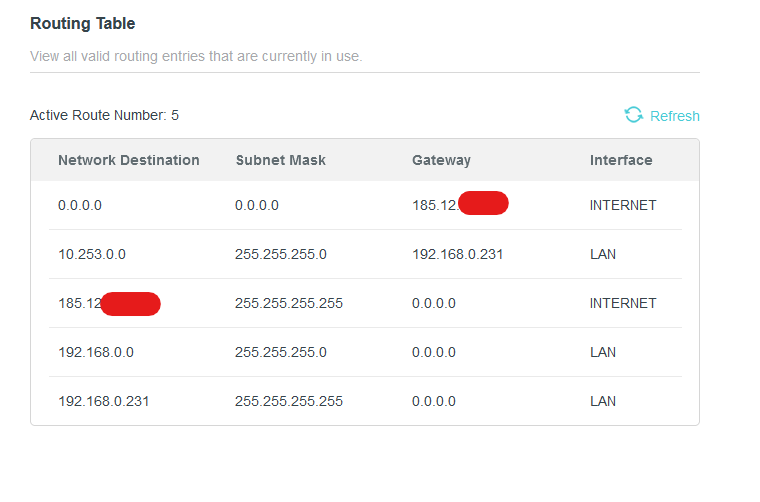
 All routes on router for completion sake:
 Oooh, we had some miscommunication. Treat 10.0.0.6 like 10.0.0.2. I just tested this from a different device as 10.0.0.2 is my phone. The same problem persists with that one.But why would wireguard set the route to the wireguard peer IP?Wireguard peer routing table (Edit: This is from another device. Imagine 10.0.0.6 was 10.0.0.2): IPv4 Route Table =========================================================================== Active Routes: Network Destination Netmask Gateway Interface Metric 0.0.0.0 0.0.0.0 192.168.248.226 192.168.248.159 55 10.253.0.1 255.255.255.255 On-link 10.253.0.6 5 10.253.0.6 255.255.255.255 On-link 10.253.0.6 261 127.0.0.0 255.0.0.0 On-link 127.0.0.1 331 127.0.0.1 255.255.255.255 On-link 127.0.0.1 331 127.255.255.255 255.255.255.255 On-link 127.0.0.1 331 192.168.0.0 255.255.255.0 On-link 10.253.0.6 5 192.168.0.255 255.255.255.255 On-link 10.253.0.6 261 192.168.248.0 255.255.255.0 On-link 192.168.248.159 311 192.168.248.159 255.255.255.255 On-link 192.168.248.159 311 192.168.248.255 255.255.255.255 On-link 192.168.248.159 311 224.0.0.0 240.0.0.0 On-link 127.0.0.1 331 224.0.0.0 240.0.0.0 On-link 192.168.248.159 311 255.255.255.255 255.255.255.255 On-link 127.0.0.1 331 255.255.255.255 255.255.255.255 On-link 192.168.248.159 311 ===========================================================================I found this interesting: Can't ping from wg0 to client device. Can ping just fine from shim-br0 to client device.
 routes on unraid host: default via 10.253.0.1 dev wg0 table 200 192.168.0.0/24 via 192.168.0.1 dev br0 table 200 default via 192.168.0.1 dev shim-br0 default via 192.168.0.1 dev br0 proto dhcp src 192.168.0.231 metric 1005 10.253.0.2 dev wg0 scope link 10.253.0.3 dev wg0 scope link 10.253.0.5 dev wg0 scope link 172.17.0.0/16 dev docker0 proto kernel scope link src 172.17.0.1 172.31.200.0/24 dev br-77d5195ff5fd proto kernel scope link src 172.31.200.1 linkdown 192.168.0.0/24 dev shim-br0 proto kernel scope link src 192.168.0.231 192.168.0.0/24 dev br0 proto dhcp scope link src 192.168.0.231 metric 1005 local 10.253.0.1 dev wg0 table local proto kernel scope host src 10.253.0.1 local 127.0.0.0/8 dev lo table local proto kernel scope host src 127.0.0.1 local 127.0.0.1 dev lo table local proto kernel scope host src 127.0.0.1 broadcast 127.255.255.255 dev lo table local proto kernel scope link src 127.0.0.1 local 172.17.0.1 dev docker0 table local proto kernel scope host src 172.17.0.1 broadcast 172.17.255.255 dev docker0 table local proto kernel scope link src 172.17.0.1 local 172.31.200.1 dev br-77d5195ff5fd table local proto kernel scope host src 172.31.200.1 broadcast 172.31.200.255 dev br-77d5195ff5fd table local proto kernel scope link src 172.31.200.1 linkdown local 192.168.0.231 dev br0 table local proto kernel scope host src 192.168.0.231 local 192.168.0.231 dev shim-br0 table local proto kernel scope host src 192.168.0.231 broadcast 192.168.0.255 dev br0 table local proto kernel scope link src 192.168.0.231 broadcast 192.168.0.255 dev shim-br0 table local proto kernel scope link src 192.168.0.231



