





DCox88
Members
-
Joined
-
Last visited
-
Thanks for the tip on that. I ran the mover and now the docker image is on cache, with libvert being on disk 1
-
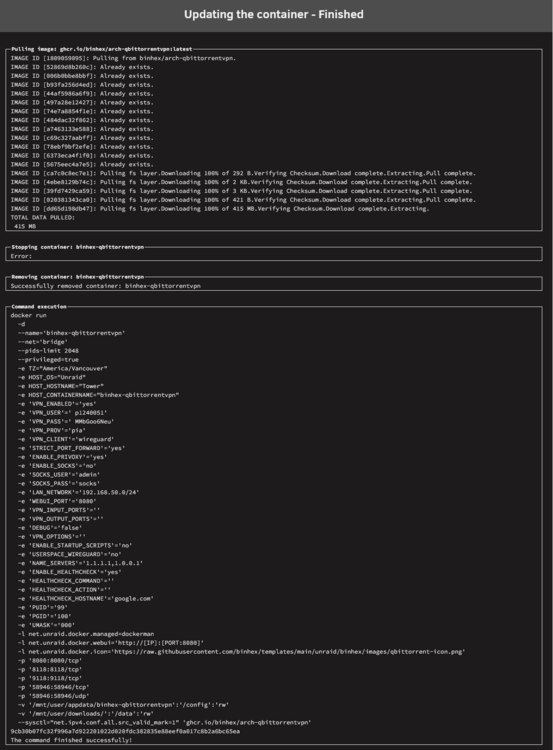
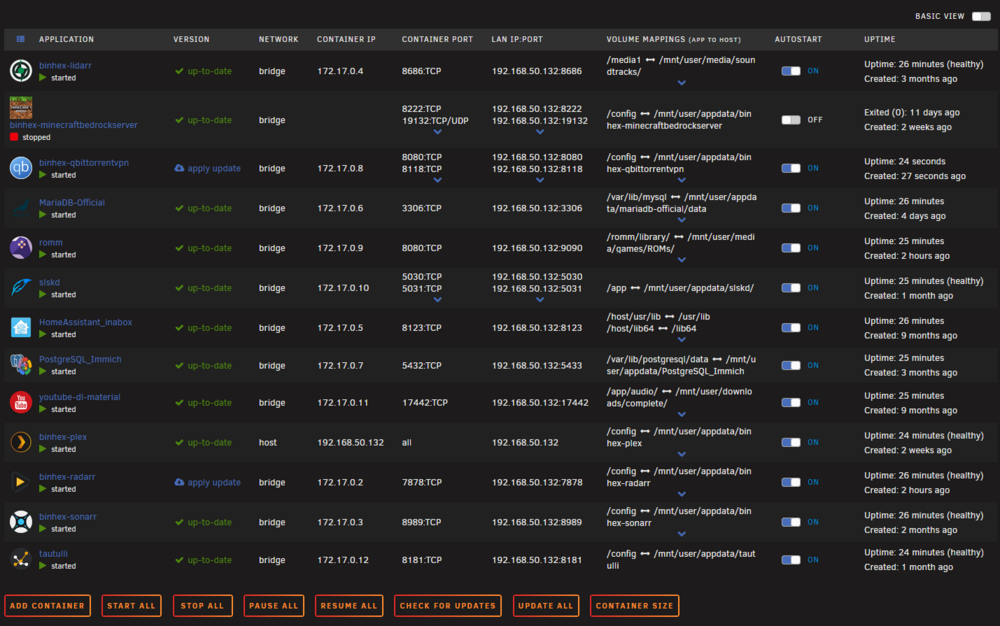
I have a few Docker containers that have pending updates, including Immich, Seerr, Prowlarr, Radarr. When I click Apply Update, it takes a long time to perform and will usually fail to stop the container. After running this process, the Apply Update button is still there. Additionally, Immich, Seerr and Prowlarr have disappeared from my list of containers. This has happened once before with Immich, so I reinstalled the container, and it still shows Apply Update after installation. I have attached logs, a screenshot of my containers and a screenshot of the update process. tower-diagnostics-20260613-1945.zip
-
Correct, this shows in Safe Mode. I have booted normally, and the issue with dynamix.s3.sleep no longer appears in the logs, but is replaced by this error code: [14-Sep-2025 03:07:33 America/Los_Angeles] PHP Warning: Undefined array key "shareUseCache" in /usr/local/emhttp/plugins/fix.common.problems/include/tests.php on line 78 [14-Sep-2025 03:07:33 America/Los_Angeles] PHP Warning: Undefined array key "shareUseCache" in /usr/local/emhttp/plugins/fix.common.problems/include/tests.php on line 143 [14-Sep-2025 03:07:41 America/Los_Angeles] PHP Warning: Undefined array key "shareUseCache" in /usr/local/emhttp/plugins/fix.common.problems/include/tests.php on line 114
-
The error has not appeared again when in Safe Mode. Would that then indicate an issue with the Dynamix System Temperature plugin? Interestingly, there is a different error message, though this one is reporting much less frequently. The previous issue reported every 5 seconds, but this error seems inconsistent with times between the error logs. [13-Sep-2025 22:53:26 America/Los_Angeles] PHP Warning: file_get_contents(plugins/dynamix.s3.sleep/Sleep.php): Failed to open stream: No such file or directory in /usr/local/emhttp/plugins/dynamix/include/Translations.php on line 69 tower-safemode-diagnostics-20250913-2253.zip
-
In the phplog.txt, the same error code keeps getting spammed: [09-Sep-2025 18:09:12 America/Los_Angeles] PHP Warning: Undefined array key 1 in /usr/local/emhttp/plugins/dynamix.system.temp/nchan/system_temp on line 78 Rebooting clears the log, but it will refill after 6 days. tower-diagnostics-20250912-2325.zip
-
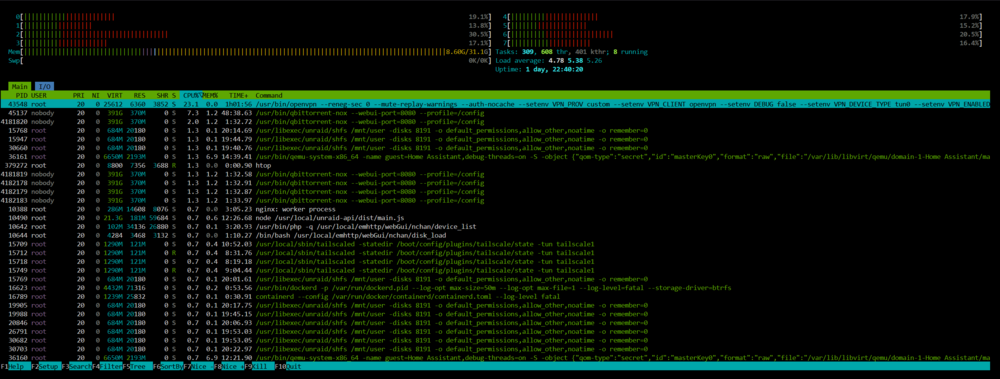
Based on htop, the top process is consuming a lot of CPU, but I'm consistently hovering around 50% usage. Killing the process causes download speed on qbittorrentVPN to drop, and the process opens a few seconds later. tower-diagnostics-20250908-1918.zip
-
I have attempted to uninstall the doctor container, including removing the image, but I cannot start the container after pulling it down again. How do I access the directory in order to clear the data from the folder?
-
Yes. The system had become unresponsive. After completing the reboot, the system seem to detect my files again. Everything seems to be accounted for in my -arr suite.
-
Thanks for that. ls /var/log/syslog* /var/log/syslog
-
ls: cannot access 'var/log/syslog*': No such file or directory
-
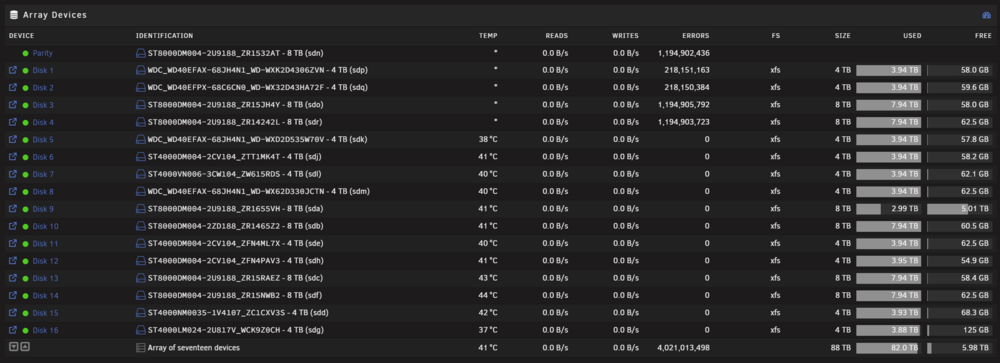
I just actually took a look at the connections, and I can confirm that the five drives that encountered errors were all plugged into that controller. I have another controller I'm going to try swapping in, and redoing the parity check with corrections turned off. Going off the last parity check, I guess I'll be back in about 20 hours.
-
Numerous errors like this - kernel: md: disk1 read error, sector=6074046160 Unraid is still reading the correct disk capacity, but Sonarr, Lidarr, Radarr and Immich are all reporting missing files. It can't be hardware related, as the odds of 4 drives all having physical issues is unlikely. What might have happened, and can I recover my data? tower-diagnostics-20250512-2022.zip
-
Much appreciated for the information. Yeah, I guess I can understand how you USB would be problematic and maintaining a constant connection, so I think SAS is going to be the way to go. To get a bit more information from you, I am mostly looking to store some drives externally because the size of my array is making it extremely difficult to work inside of the case. What would I need for a deployment of four 3.5 in hard disk drives to connect to my PC via sas?
-
Care to elaborate?
-
From what I understand, the primary connection methods are USB, eSATA, and SAS. I have read that USB can be unreliable. I'm planning to have 4x 8TB drives stored externally, and I'm needing advice on the best way to connect them. I am using a ASUS PRIME B660M-A D4, with a Fractal Node 804 case.


