



Skip to content
View in the app

A better way to browse. Learn more.

Unraid

A full-screen app on your home screen with push notifications, badges and more.

To install this app on iOS and iPadOS
  1. Tap the Share icon in Safari
  2. Scroll the menu and tap Add to Home Screen.
  3. Tap Add in the top-right corner.
To install this app on Android
  1. Tap the 3-dot menu (⋮) in the top-right corner of the browser.
  2. Tap Add to Home screen or Install app.
  3. Confirm by tapping Install.

richsm

Members
  • Joined

  • Last visited

Everything posted by richsm

  1. I'm a bit of a noob here, but I don't see any way to group containers in Unraid interface. I just assumed since one is assigned to use the network of the other that they would be "grouped". Any tips appreciated.
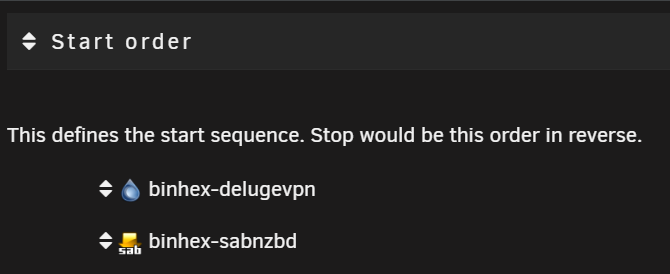
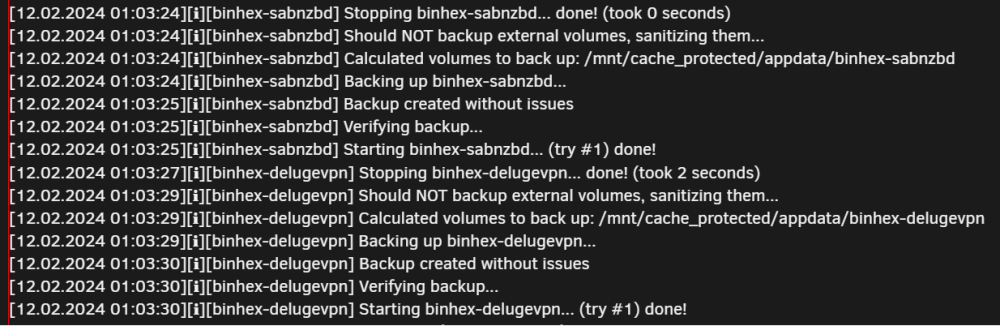
  2. I'm also noticing this behavior where my containers are not started in the proper order. For example, I have binhex-delugevpn set to start before binhex-sabnzbd (which uses the VPN network of Deluge), but Sabnzbd attempts to start up first but is missing the proper network (Deluge does not start until after Sabnzbd).
Account

Navigation

Search

Search

Configure browser push notifications

Chrome (Android)
  1. Tap the lock icon next to the address bar.
  2. Tap Permissions → Notifications.
  3. Adjust your preference.
Chrome (Desktop)
  1. Click the padlock icon in the address bar.
  2. Select Site settings.
  3. Find Notifications and adjust your preference.