Alansari
Members
-
Joined
-
Last visited
Everything posted by Alansari
-
I was able to boot into safemode with gui but without plugins Dose this mean there is a problem with a plugin?
-
hi I can log in to my server but after the log in I get white blank screen everything in the server is working fine but I can't accesses the GUI I tried from my laptop, phone, desktop nothing can accesses the GUI after the log in screen any help will be appreciated syslog-192.168.100.21.log
-
can it be from the usb stick? because after every crash the server won't boot it will keep going to bios page until i pull the usb out and then in again and restartso i tried new rams i still got the same problem the server crashed after few days is there anything i can check to see what is the problem and the problem started when i tried to delete the mover plugin the server crashed then i hard rebooted the server and the mover plugin was still there so i deleted it and from that day every few days the server will crash and i don't know why syslog-192.168.100.21.logI found these as well in the plugin page should I delete them?
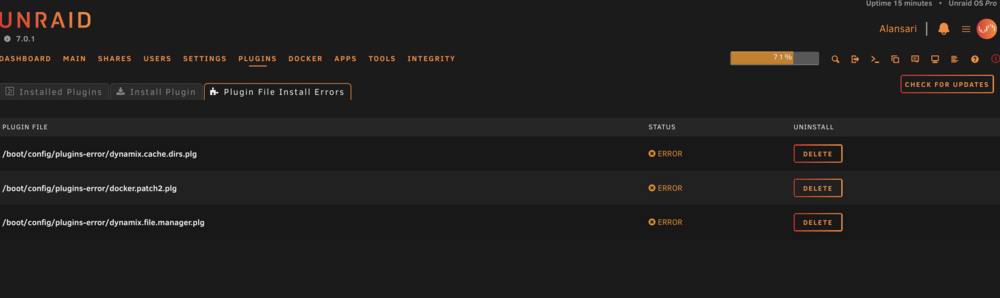 alright I will try that but is there anything in the syslog indicate I have a bad ram ? because I don't understand anything from it sorry if this stupid questionThe memtest passed anything else to check ?
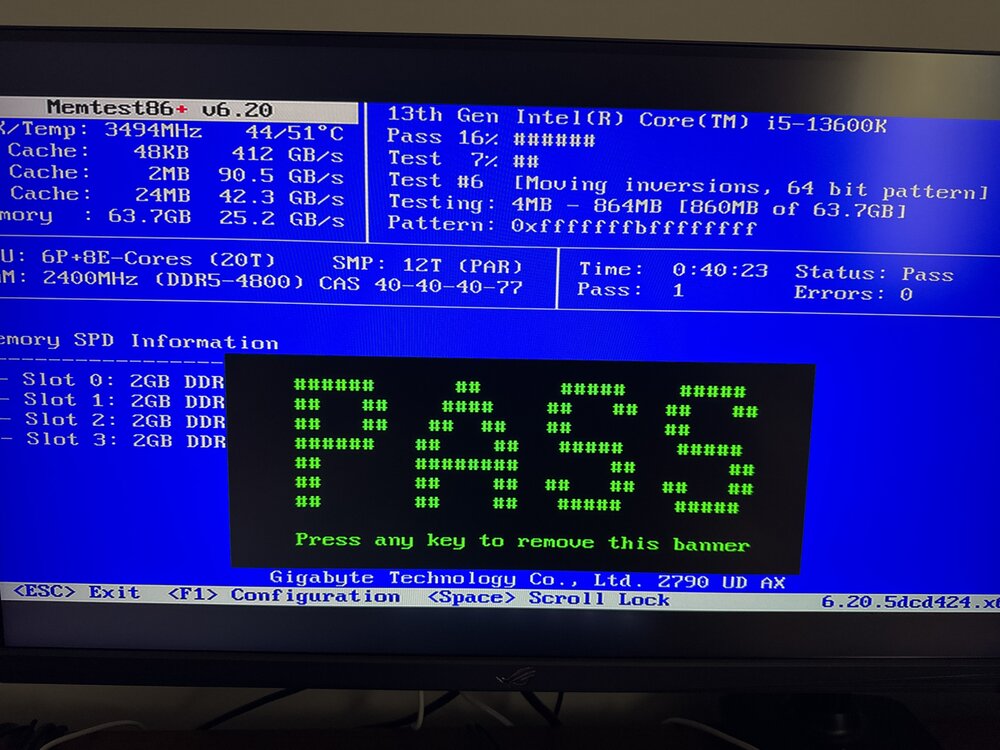 I did when i first built the server a year or so ago and everything was fine and never changed anything beside adding hhd should i run memtest again ?attached the file and i remember this problem started when i tried to remove the ca mover plugin the server became unresponsive and after that every few days i will get the same thing alansari-diagnostics-20250409-0052.ziphi so this is the third time within this week to have this problem the server is unreachable at all even from the server itself i only get black screen some dockers keep working like plex it is only media server no VM plex and arr apps i don't know what the issue is any help is appreciated attached the logs this is the only time i was able to get logs because i enabled the syslog server otherwise i can't get access to the server until a hard reboot syslog-192.168.100.21.logI don't have any updates for Unraid connect or my pluginsthis came up not sure what does it meanhi so i got this message today on fix common problems i don't know how it is getting full my mover logs is off as well my server is up for 20 days so it's not that long and it is media server only running plex and other arr apps alansari-diagnostics-20240114-1308.zipI mean when i tried the method on the link there were no errors all 0 but the log was filled with errors scrub didn't do anything was reporting no problems as wellI have check this post before posting and there was no errors if it happens again i will try again with what you told me thanks for the helpi moved everything manually from the cache to array then formatted the cache to zfs and now its working fine while the logs still giving me errors the cache pool was visible not offline but not sure what was the problemjust to add the mover dose not work as well i have around 700gb data on the cache but it will not move it to the array Sep 18 23:54:51 Alansari emhttpd: shcmd (167): /usr/local/sbin/mover &> /dev/null &tried to scrub the cache didn't fix anything and it says no errors found i don't have VM it is turned off i use the server for plex only alansari-syslog-20230918-2016.zipI have installed the latest update but still missing the globe icon for some apps and the globe icon for plex won't take me anywhereI turned off docker and vm and still going The only thing that stops it is disabling bridging in the network settings but if i do that i can't access the internet from my phone when I'm connected to my server through wireguard And the server basically running plex and arr apps but after turning the docker off i thought nothing from these app is causing it