DevanteWeary
Members
-
Joined
-
Last visited
Everything posted by DevanteWeary
-
Hey guys. I'd like to request the following feature: Ability to drag and reorder tabs when unlocking UI. I did search, so sorry if I missed it!
-
Hey just curious; how could you tell your IP was leaked? Setting up Wireguard for the first time so want to make sure I'm doing it right.
-
Hey did you ever figure this out? Trying to do more or less the same as you.
-
Hey I'll jump on github too but just curious, what's the typical amount of data these speedtests use? I set up Unraid a few weeks ago and I've had this speedtest container running a test every 30 minutes. I'm 975GB/1200GB of my data limit within 10 days! Trying to track down the problem and wondering if the speedtests could be it.
-
Yes this workeed 100%. Thanks for solving my issue! How did you come up with that? Something in the logs?
-
Done! Currently I have the array started with two 20 TB drives (one parity), one 1 TB nvme SSD (which is now saying unmountable when array is stopped), and one 1 TB SSD showing in Unassigned Devices. devante-nas-diagnostics-20230703-0926.zip
-
Hello, For... reasons... I temporarily removed one of my two SSD drives from the cache pool. Now when trying to re-add the drive, it's giving me the message all data will be wiped out on the drive when I start the array. If I start the array with just the single cache drive, none of my VM's or Docker containers show up. Another thing is that the remaining cache drive shows "Unmountable disk present: unsupported or no file system" I thought I did but I don't have any recent appdata backups that I can find. My question is, are all my containers gone? If I re-add this drive and start the array, does it all get wiped out? I'd hate to reconfigure all those containers again. My setup is Unraid with two 20 TB array drives (one being parity) and a 1 TB cache pool of two 1 TB SSD cache drives (one that I'm trying to re-add without losing data). One 2.5 SSD and one m.2 NVME drive. As for the SSD I removed, I can mount it in Unassigned Devices and see a bunch of folders (such as appdata). I'm trying to copy files off of it just as a backup and it's suuuuuuper slow. Thanks for any info/advice.
-
Hey man, did you ever figure it out? I'm on the same boat. Sonarr and Radarr both test successfully but when I select something in Jellyseer, it gets sent to Radaar/Sonarr but never ends up in binex-qbitorrentvpn. All on the same docker_network.
-
I found a workaround (or is it a full blown solution - are themes supposed to change the banner?). Go to Settings > Display > and there are three settings for the banner. background, text, and secondary text (which as far as I can tell is the license status and uptime in the upper right corner). Hope it helps!
-
I get the same issue.
-
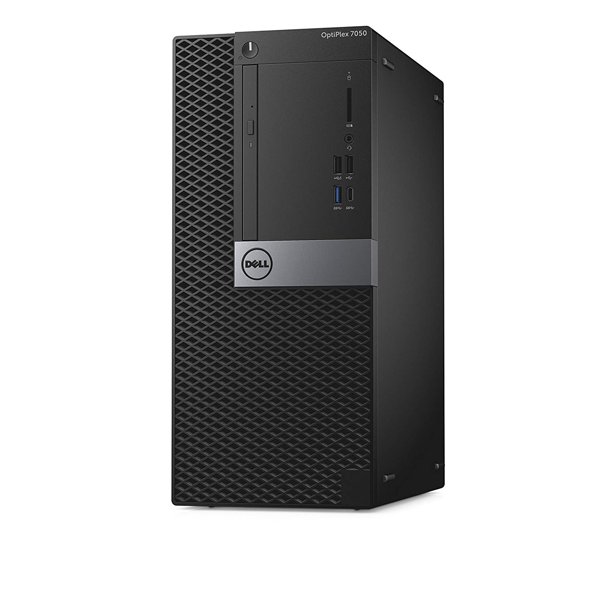
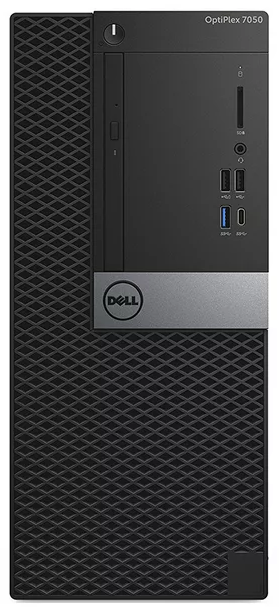
Hey everyone. Just got into Unraidwith my first 20 TB server! I'd like to request the Dell OptiPlex 7050 case. The thicker one Here's what it looks like: link to case Thank you guys. Love the community! edit: here's a front-on