sweber
Members
-
Joined
-
Last visited
-
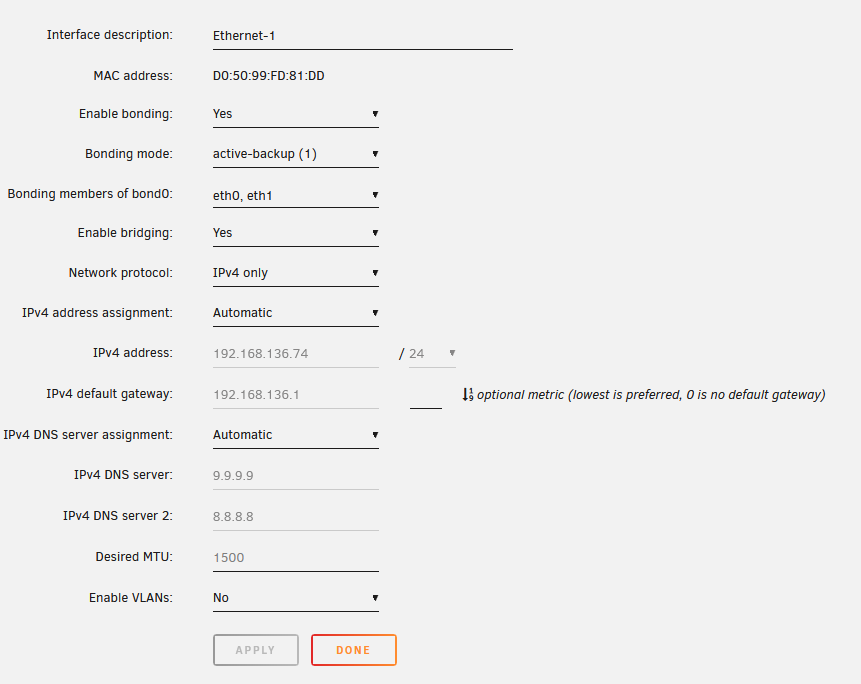
Worked like a charm, thank you. Semi-relatedly, do you recommend having the ethernet device as bonding enabled and bridging enabled? What would the consequence be of either or both being disabled?
-
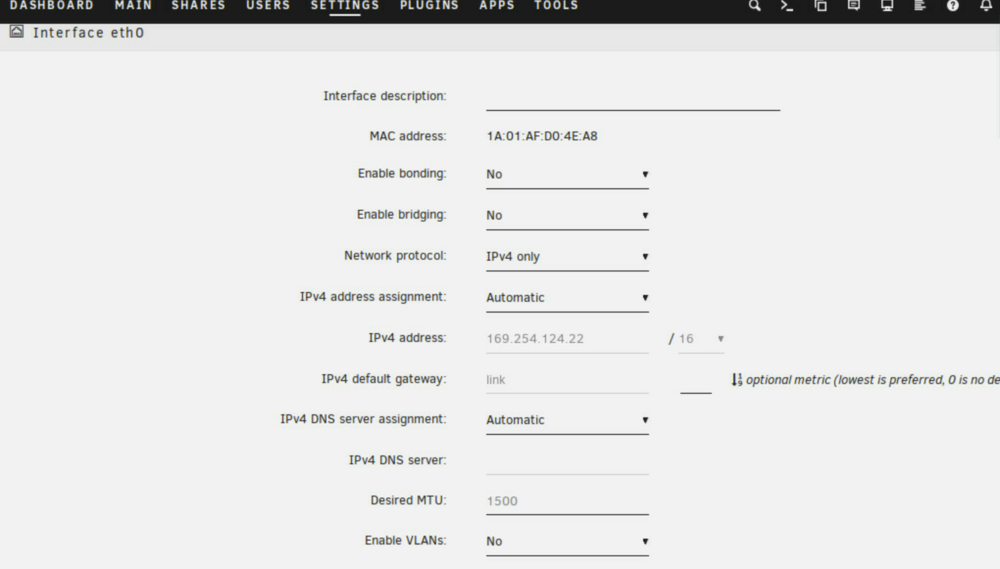
Hey everyone, I just installed a new motherboard and CPU in my Unraid machine. It is an Asrock X470D4U (see details here). From that moment on, I had issues accessing the Unraid web interface. Going through the Unraid networking settings, I found an unknown networking device with an IP adress that does not stem from my network. See attached screenshot. All my network's IPs are in 192.168.136.0/24. Yet device eth0 shows an IP address starting with 169. This is outside my network's IP range and also outside the range of available DHCP adresses. I have no idea how it got set. Also, I know that the port my ethernet cable is actually plugged into belongs to eth1, since that port acquires a valid IP through DHCP. So I wonder where the IP adress on device eth0 comes from, and also, what that device actually is? What is its purpose? Is it, as I suspect, some sort of virtual address for internal communications? Since at various places in unraid, that IP is shown as "THE" IP of the server, I would like to correct this. Essentially I want either to treat eth1 as the "main" device or at least to consider the IP adress coming from eth1 to be "the correct address" for this device. Finally, I played around a little bit with the settings, since originally I didn't have access to Unraid at all - I seem to recall having to activate automatic IP assignment for eth1. But I probably screwed up some settings while doing this. So I wonder, what are the correct settings for eth0? Specifically, should I either bridge or bon this device to eth1, or neither of those? Regards
-
Yeah, I actually liked the idea of doing everything "from scratch", since the hardware also changed significantly and I figured I'd actually avoid issues by also going for a completely new configuration. My setup was fairly simple and it was easy to get back to the way it was without data loss, save the docker containers. The music server seems to be doing just fine despite the templates missing, but apparently paperless ngx did not like it and is refusing the start up, which seems to be because it can't find the database dontainer. That's why a manual edit is necessary. Anyway; I will try to get the template files from the backup of the flash drive and see if that fixes it. Thanks for all the explanations.
-
Thank you for your explanations. I did indeed misunderstand - and yes, I made a copy of the boot flash drive before writing a "fresh" 7.0 installation on it. So you are saying it might be as simple as copying the files from this backup into the current flash drive? Are there any other files that might be important from the previous installation that you can think of?
-
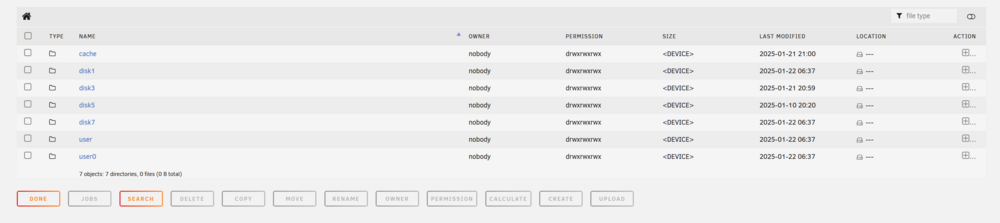
The cache drive is new; I moved files over there from the array disk they were on before. The process completed without errors using unbalanced; I can't say anything more about files being lost or not being lost. There is no backup of the cache (I guess in the future I will set something up), so perhaps the only option now is to go for a clean new start? Can I just delete the folders (appdata and system) to make Unraid generate new ones, or how would I go about this? PS, while browsing the file system, I found these two folder called user and user0, I'm not quite sure what these do - is there supposed to be only one? The contents seem similar though partially with different timestamps.
-
An empty folder:

-
I am not aware of having lost them, but then again, nor am I of them being there. I only introduced the cache SSD after the unraid upgrade and after the hardware changes to the system, and then moved the entire folders over using unbalanced. Based on the procedure alone I don't see where the templates might have been lost. I'm attaching the Diagnostics as requested. I am currently performing a parity sync, not sure if this affects the output. fractal-diagnostics-20250122-2342.zip
-
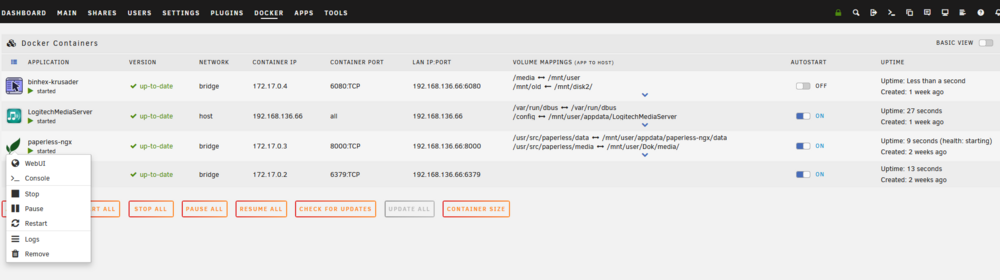
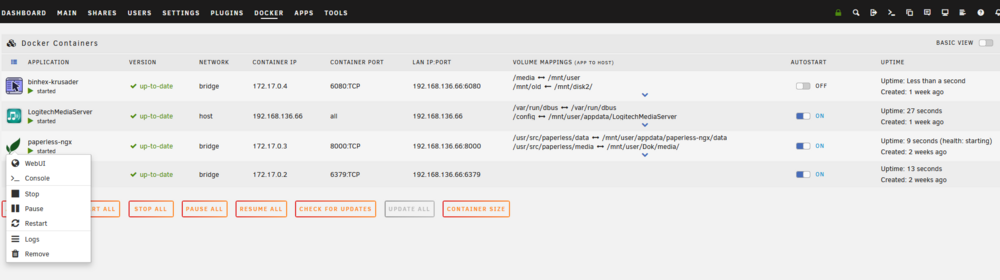
Hey everyone, While trying to fix another problem, I realized that the option to "edit" a docker container is not present in my unraid installation (see screenshot). In another thread I read that this might have to do with the system or appdata folders having issues or being corrupt. In my case, these folders stem from an older installation of Unraid (latest 6.X release) that I upgraded to 7.0, and then I also changed the mainboard and moved these folders from a disk on the array to a cache ssd. So, if corruption or similar issues are the cause for the docker problem, how do I best solve this? If I delete the folders, will Unraid simply rebuild them upon reboot? Is there a way to do this and maintain my paperless ngx data (the only docker app I care enough about to save rather than just reinstall).
-
I seem to recall doing that kind of thing in the past, but for whatever reason I can't seem to find the "edit" option.
-
Hi everyone, I'm trying to solve an issue with a particular docker app after making some hardware changes that also affected networking. Essentially, paperless ngx won't start properly because apparently it can't connect to the redis database running in a different docker container. In the log I've found that the IP address where the database is looked up is wrong, that is to say: it's an IP adress that was once assigned to the unraid server but isn't anymore. Redis ping #2 failed. Error: Error 113 connecting to 192.168.old.ip:6379. No route to host.. Failed to connect to redis using environment variable PAPERLESS_REDIS. The container won't start up properly so I can't change the setting in its own interface. I've searched the appdata folder for a configuration file but didn't find any. In order to solve the issue, it appears that I need to change a setting stored in some variable. The problem is that I really don't know how this is done. It seems that my fundamental problem is that I don't understand how Docker works (as opposed to, say, a VM). Generally speaking, where do I make configuration changes? And specifically to my issue, where do I set this environment variable?
-
Hey everyone, this question gets asked a lot, and after sifting through a bunch of posts my head is now just spinning so I'd appreciate any input. I am looking for hardware to run my unraid file server. I am running Unraid and plan to continue to do so. It is currently running on old consumer hardware: An Intel 4690K with 16 GB of RAM in a Fractal Define R6 case. However, I'm beginning to be a bit unhappy about this setup. I think its power efficiency is rather poor. Electricity is expensive in my country and I want to save as much of it as I can. The mainboard has "only" 6 SATA Ports and I would like two more (I know it's possible to expand using M.2 or PCIe expansion cards, but often this prevents more energy efficient C-States on the CPU) ECC RAM would be nice. 2,5 Gbit Ethernet would be nice, but could easily be added using a USB adapter. Price is an issue, I was thinking 100-200 bucks. I don't mind buying used and there is a fairly good used market in my country. I do have some reservations about cheap Aliexpress hardware. The following are not concerns: CPU performance beyond what's needed to comfortably run a file server. I have other hardware for dockers, VM, etc. Same goes for exorbitant amounts of RAM. No need for GPU transcoding. Video output without dedicated GPU would be nice though (I don't want to have to put in a video card). I'm fairly open on whether to buy a new mainboard and put it in the old system (The Define R6 is a nice case with plenty of HDD bays) or buy some used server from Dell, HP, Lenovo, etc. My ideas so far: New Mainboard with an Intel N100. Super low power (around 10W idle), however no ECC. Maybe there are other options? I have access to a used Dell T330 with an Intel E3 1220v5 and 32 GB of ECC RAM. 8 HDD bays, even accessible from the outside. Looks pretty good to me, but power consumption seems a bit high (I've heard around 40W idle) mostly due to the old CPU. Use other consumer MB+CPU, however I'm unsure what would give me ECC and low power draw. I appreciate any input, have a nice Sunday everyone!
-
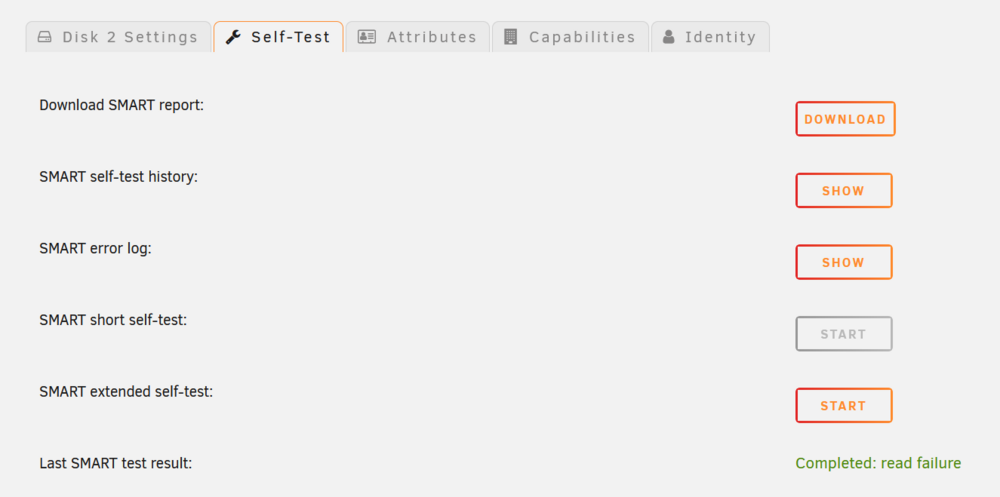
Thank you for the fast reply. I actually had a parity sync in progress (first time, the parity disk is brand new) which found 30 parity errors with the disk. I found this a little weird since the parity disk is brand new so I don't understand how there can be parity errors on the first parity sync? Anyway, I tried to run the extended self test and got the following error:
-
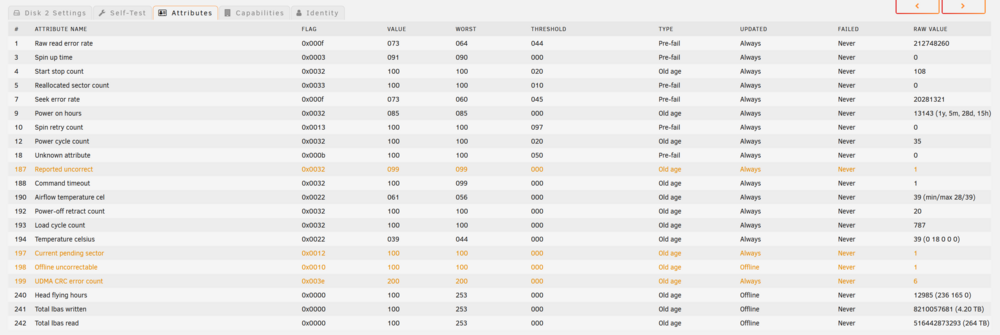
Hey everyone, one of my drives (Seagate Skyhawk) is showing some SMART errors. Since I have no idea how to interpret them, and it also seems like values have different meanings with different manufacturers, it seems very intimidating - but maybe it's not so bad after all? I'd appreciate any input on which values should be cause for concern, and if any, how close I should expect the drive to be to failing.
-
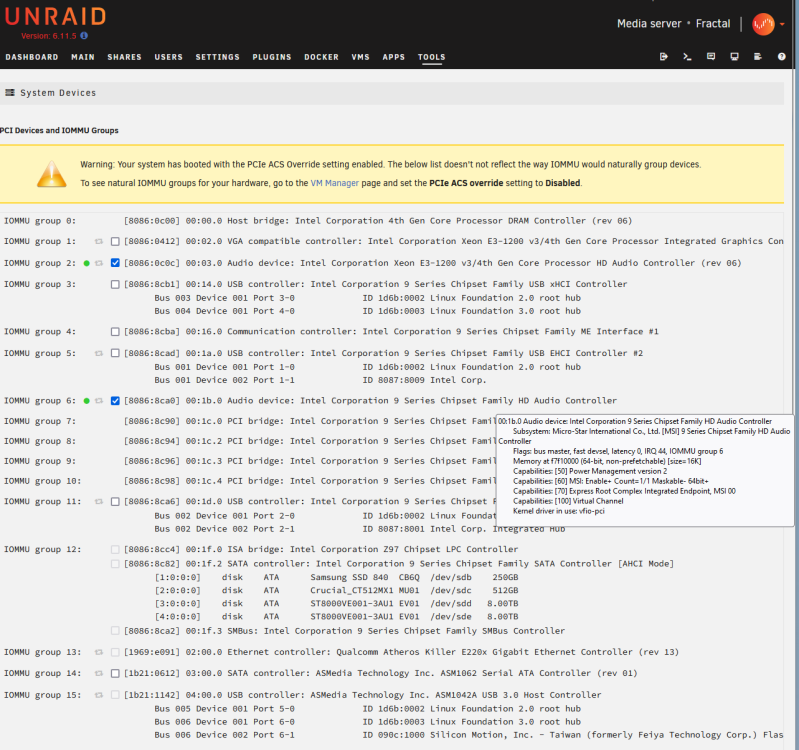
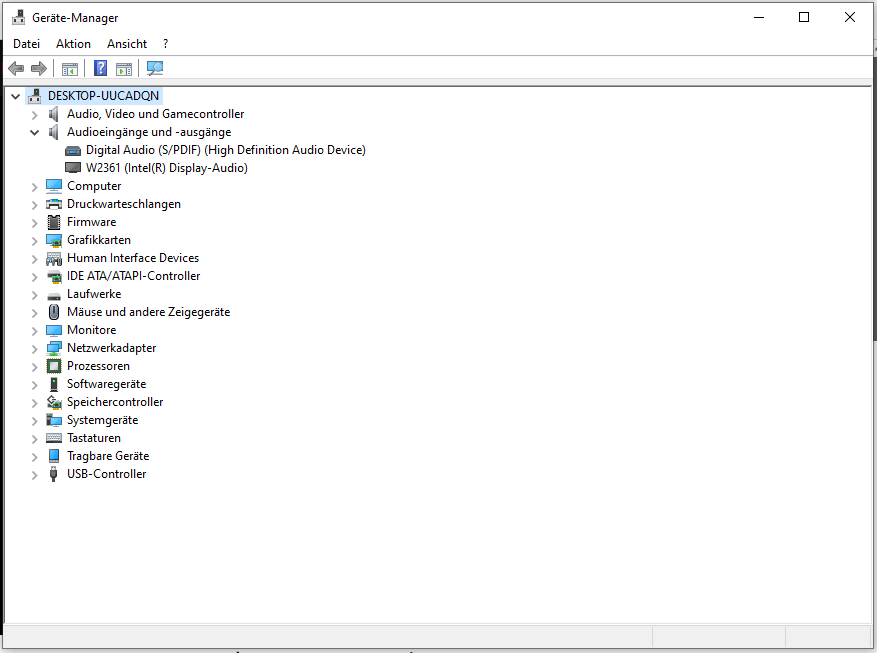
Ich habe mal bei gebootetem Windows in den Device Manager geschaut, da sieht es so aus (Audioausgabe funktioniert) - siehe Screenshot. Es scheint so, dass man unter Linux gelegentlich manuelle Einstellungen für die Toslink-Ausgabe machen muss. Allerdings stellt Volumio diese nicht zur Verfügung. Wäre es ggf. die einfachste Lösung, eine einfache Soundkarte mit Toslink-Ausgang einzubauen und diese per Passthrough durchzuschleifen?
-
Die VM ist eine Linux-VM. Ist dies ein Problem? Es wurde für Volumio so empfohlen. Gerätemanager hängt an.