





ChrisCross
Members
-
Joined
-
Last visited
Everything posted by ChrisCross
-
thank you, yes i will change the split level to automaticallz split any directory as required, but does this cause also the warning: server reached max_children setting: php-fpm[17682]: [WARNING] [pool www] server reached max_children setting (50), consider raising it and how can I solve that, if the split level is not the issue...
-
Hey everyone, recendly my unraid server had some strange behaviour. I've set up a share that first store file on the poolssd, then transfer the files via mover to the array. The share was set up to high water with a free space limit of 700gb. split level was set to: split only the top directory levels. If i run the mover I always got the error that there is no space on device. Then i changed the setting to fill-up, but still the same behaviour. Furthermore I've got the error, when mover is running, that the server reached max_children setting: php-fpm[17682]: [WARNING] [pool www] server reached max_children setting (50), consider raising it currently I'm copiing the files manually from ssd to array, but that is not how it should work... I've attached you the diagnostic files and I hope you can help me out homeservercs-diagnostics-20260426-1858.zip
-
thanks I will try that out after finishing clamAV. I do not think there is a virus or anything on my server, but just in case.
-
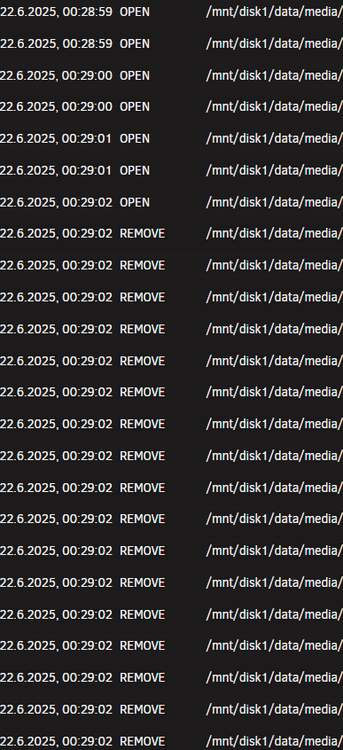
Hi Everyone, and it happened again. I've checked every docker container, which has access to this folder, like sonarr,radarr,plex, jellyfin, overseerr etc. but I couldn't find out anything in relates to move, remove, delete etc. Only file activity is showing that the files were removed, so my last guess that the HDD is dead is also wrong. There must be something, which activly delete these files. Is there any way to find out on unraid level, which process triggers the deletion?
-
Thank you I couln't find anything in the radarr,sonarr,plex, sabnz logs in regards to delete, move, etc. so this is super strange. First I thought it was in regards to activating Hard Links in sonarr / radarr, but I've deactivate it very quickly. An this shouldn't impact my already importing and existing files into sonarr/radarr (which are also all deleted). Plex do not has the right to delete files and I was not able to find anything in the logs. Do you think anything is cased by the unraid update 7.1.3? But then again. There are some files in the folder which where not deleted, so it was not the complete folder? So my guess is that there is any settings in sonarr/radarr/ overseer which is causing the issue... but I can't find out what is causing the behaviour. Even new reloaded files in sonarr where deleted, some not I also created an .bin folder for sonarr/radarr, but its empty. As by my research all files which where deleted by them should be moved to the bin folder
-
That should not be the case. NAS is not accassable over the Internet, there are only two ports open (one is Plex and one is Unraid Connects). In plex its not allowed to delete files. How can i check if there is a cleanup with deletion (which should not be the case) in plex and jellyfin? Strange is that its the same containers im running since years without issues. Only thing is, what I did recently I've installed/configured Sonnar and Radarr, but also this containers should not delete stuff by their own. Especially that the deleted files are still flagged existing in sonarr, unless i start an re-scan Other than that, the server is only accessable via tailscale and ive checked the logs, no access during the time, where files have been deleted
-
Hi everyone. In the last days I lost randomly lots of data, no critical one, but I can't figure out, what its causing the data loss. Mainly movies and tv shows were deleted randomly and I do know know, how ths happens. File Acitivity shows nothing. Potential Docker container which can cause this issues are, Sonarr, radarr, overseer, plex and jellyfin. I've checked every app, I couldn't find out what it is causing th issue. No hardlinkes were used (this was my first attempt, that I was deleting the hardfiles and all links will gone too, but that was not the case, no hardlinks used) attached the diagnostic files, (maybe there is an hardware issue). Its driving me nuts, that i've lost almost all my media content and I cannot replicate the issue homeservercs-diagnostics-20250615-1046.zip
-
@bmartino1 sorry but I need your knowledge again. Seems like the script is not working. After reboot, I've forgott to set the script to "at startup of array", so I let it run after the array started successfully. Unfortunately no shim network was created. This is the output of the script: Fixing Docker shim bridge... Device "shim-br0" does not exist. Cannot find device "shim-br0" Cannot find device "shim-br0" Docker shim interface configured. 1: lo: mtu 65536 qdisc noqueue state UNKNOWN group default qlen 1000 link/loopback 00:00:00:00:00:00 brd 00:00:00:00:00:00 inet 127.0.0.1/8 scope host lo valid_lft forever preferred_lft forever inet6 ::1/128 scope host valid_lft forever preferred_lft forever 2: tunl0@NONE: mtu 1480 qdisc noop state DOWN group default qlen 1000 link/ipip 0.0.0.0 brd 0.0.0.0 3: eth0: mtu 1500 qdisc mq master br0 state UP group default qlen 1000 link/ether d0:50:99:c1:2d:ed brd ff:ff:ff:ff:ff:ff 4: br0: mtu 1500 qdisc noqueue state UP group default qlen 1000 link/ether d0:50:99:c1:2d:ed brd ff:ff:ff:ff:ff:ff inet 10.55.0.14/16 metric 1004 scope global br0 valid_lft forever preferred_lft forever 6: tailscale1: mtu 1280 qdisc fq state UNKNOWN group default qlen 500 link/none inet 100.97.45.107/32 scope global tailscale1 valid_lft forever preferred_lft forever inet6 fd7a:115c:a1e0::f101:2d6b/128 scope global valid_lft forever preferred_lft forever inet6 fe80::ce30:e71f:eb91:6a0f/64 scope link stable-privacy proto kernel_ll valid_lft forever preferred_lft forever 7: br-7323c0806ede: mtu 1500 qdisc noqueue state UP group default link/ether 02:42:7f:62:ff:11 brd ff:ff:ff:ff:ff:ff inet 172.18.0.1/16 brd 172.18.255.255 scope global br-7323c0806ede valid_lft forever preferred_lft forever inet6 fe80::42:7fff:fe62:ff11/64 scope link proto kernel_ll valid_lft forever preferred_lft forever 8: docker0: mtu 1500 qdisc noqueue state UP group default link/ether 02:42:2e:b3:89:89 brd ff:ff:ff:ff:ff:ff inet 172.17.0.1/16 brd 172.17.255.255 scope global docker0 valid_lft forever preferred_lft forever inet6 fe80::42:2eff:feb3:8989/64 scope link proto kernel_ll valid_lft forever preferred_lft forever 10: virbr0: mtu 1500 qdisc noqueue state DOWN group default qlen 1000 link/ether 52:54:00:0b:41:90 brd ff:ff:ff:ff:ff:ff inet 192.168.122.1/24 brd 192.168.122.255 scope global virbr0 valid_lft forever preferred_lft forever 12: veth58e80e3@if11: mtu 1500 qdisc noqueue master br-7323c0806ede state UP group default link/ether a6:03:fa:e2:79:ad brd ff:ff:ff:ff:ff:ff link-netnsid 1 inet6 fe80::a403:faff:fee2:79ad/64 scope link proto kernel_ll valid_lft forever preferred_lft forever 14: veth71ca236@if13: mtu 1500 qdisc noqueue master docker0 state UP group default link/ether a2:0c:9e:82:cf:5d brd ff:ff:ff:ff:ff:ff link-netnsid 2 inet6 fe80::a00c:9eff:fe82:cf5d/64 scope link proto kernel_ll valid_lft forever preferred_lft forever 16: veth296a99e@if15: mtu 1500 qdisc noqueue master br-7323c0806ede state UP group default link/ether 52:fd:81:61:c5:00 brd ff:ff:ff:ff:ff:ff link-netnsid 3 inet6 fe80::50fd:81ff:fe61:c500/64 scope link proto kernel_ll valid_lft forever preferred_lft forever 17: vnet0: mtu 1500 qdisc noqueue master br0 state UNKNOWN group default qlen 1000 link/ether fe:54:00:da:ae:a4 brd ff:ff:ff:ff:ff:ff inet6 fe80::fc54:ff:feda:aea4/64 scope link proto kernel_ll valid_lft forever preferred_lft forever 19: veth70d4083@if18: mtu 1500 qdisc noqueue master br-7323c0806ede state UP group default link/ether ca:b1:3a:8a:ae:41 brd ff:ff:ff:ff:ff:ff link-netnsid 4 inet6 fe80::c8b1:3aff:fe8a:ae41/64 scope link proto kernel_ll valid_lft forever preferred_lft forever 21: vethb9d4dee@if20: mtu 1500 qdisc noqueue master br-7323c0806ede state UP group default link/ether 0e:db:33:b1:f1:b1 brd ff:ff:ff:ff:ff:ff link-netnsid 5 inet6 fe80::cdb:33ff:feb1:f1b1/64 scope link proto kernel_ll valid_lft forever preferred_lft forever 23: veth6d2f5d3@if22: mtu 1500 qdisc noqueue master br-7323c0806ede state UP group default link/ether 8e:3b:92:cf:dd:c2 brd ff:ff:ff:ff:ff:ff link-netnsid 6 inet6 fe80::8c3b:92ff:fecf:ddc2/64 scope link proto kernel_ll valid_lft forever preferred_lft forever 25: veth6d4dd2e@if24: mtu 1500 qdisc noqueue master br-7323c0806ede state UP group default link/ether ae:12:f8:a6:d4:53 brd ff:ff:ff:ff:ff:ff link-netnsid 7 inet6 fe80::ac12:f8ff:fea6:d453/64 scope link proto kernel_ll valid_lft forever preferred_lft forever 27: vetha30b4e2@if26: mtu 1500 qdisc noqueue master br-7323c0806ede state UP group default link/ether ba:7d:cc:9d:e8:98 brd ff:ff:ff:ff:ff:ff link-netnsid 8 inet6 fe80::b87d:ccff:fe9d:e898/64 scope link proto kernel_ll valid_lft forever preferred_lft forever 29: vethf5b82b5@if28: mtu 1500 qdisc noqueue master br-7323c0806ede state UP group default link/ether 36:2e:70:58:83:16 brd ff:ff:ff:ff:ff:ff link-netnsid 9 inet6 fe80::342e:70ff:fe58:8316/64 scope link proto kernel_ll valid_lft forever preferred_lft forever 31: veth9924c09@if30: mtu 1500 qdisc noqueue master br-7323c0806ede state UP group default link/ether 62:6f:64:e0:34:83 brd ff:ff:ff:ff:ff:ff link-netnsid 10 inet6 fe80::606f:64ff:fee0:3483/64 scope link proto kernel_ll valid_lft forever preferred_lft forever 33: veth979b273@if32: mtu 1500 qdisc noqueue master br-7323c0806ede state UP group default link/ether ae:bd:78:33:a9:ab brd ff:ff:ff:ff:ff:ff link-netnsid 11 inet6 fe80::acbd:78ff:fe33:a9ab/64 scope link proto kernel_ll valid_lft forever preferred_lft forever 35: vethc30fd94@if34: mtu 1500 qdisc noqueue master br-7323c0806ede state UP group default link/ether 52:97:17:1f:fd:12 brd ff:ff:ff:ff:ff:ff link-netnsid 12 inet6 fe80::5097:17ff:fe1f:fd12/64 scope link proto kernel_ll valid_lft forever preferred_lft forever 37: veth44148e1@if36: mtu 1500 qdisc noqueue master br-7323c0806ede state UP group default link/ether f2:9e:6f:eb:28:44 brd ff:ff:ff:ff:ff:ff link-netnsid 13 inet6 fe80::f09e:6fff:feeb:2844/64 scope link proto kernel_ll valid_lft forever preferred_lft forever 41: veth3a39927@if40: mtu 1500 qdisc noqueue master br-7323c0806ede state UP group default link/ether 32:6b:19:75:b7:1d brd ff:ff:ff:ff:ff:ff link-netnsid 15 inet6 fe80::306b:19ff:fe75:b71d/64 scope link proto kernel_ll valid_lft forever preferred_lft forever 46: veth4941e83@if45: mtu 1500 qdisc noqueue master docker0 state UP group default link/ether ae:b4:23:0e:7e:e8 brd ff:ff:ff:ff:ff:ff link-netnsid 17 inet6 fe80::acb4:23ff:fe0e:7ee8/64 scope link proto kernel_ll valid_lft forever preferred_lft forever Doneand this was the script for it: #!/bin/bash # Wait at boot sleep 30 echo "Fixing Docker shim bridge..." ifconfig shim-br0 down 2>/dev/null ip link set shim-br down 2>/dev/null ip addr flush dev shim-br0 ip addr add 10.55.0.189/24 dev shim-br0 ip link set shim-br0 up echo "Docker shim interface configured." ip aEven the temp fix I've followed by @KnightRdr23 is not working again (stopping docker, changing ipvlan to macvlan, saving then reverting and saving, and also changing host access to custom networks to disabled, saving then enabled, and saving again). Looks like it was just a random success.. damn that sucks. Do you have any idea how to adjust it correctly? Thanks in advance
-
I'm not an expert but you can us it as an starting point. And I have to mention, i do not know if it will work, as I haven't rebooted my system yet. My two cents on it, maybe bmarino1 jumps in and correct me: #!/bin/bash # Wait at boot sleep 30 echo "Fixing Docker shim bridge..." ifconfig shim-br0 down 2>/dev/null ip link set shim-br down 2>/dev/null ip addr flush dev shim-br0 ip addr add 10.55.0.189/24 dev shim-br0 ip link set shim-br0 up echo "Docker shim interface configured." ip acheck your standard network is, in my case br0 you have to manually insert an available IP adresse, in my case 10.55.0.189/24 , which will then be assigned for the shim-network and i think thats it. You can check if the shim network was sucessfully created by checking the network routing tabel or use the command ifconfig directly
-
Many thx, got it working for now, lets see if the script is working too, after rebooting the maschine. What was working temporarly, was the hint by @KnightRdr23 : I was able to resolve this by stopping docker, changing ipvlan to macvlan, saving then reverting and saving, and also changing host access to custom networks to disabled, saving then enabled, and saving again. Finally re-enabled docker and seem to be working again for now,
-
I'm not an network expert, but i will try to figure it out and sorry for the dump questions: does this mean, it's not recommended if I use ipvlan? Currently I'm not planning to switch to macvlan for my unraid server. Are there any potential issues, in case of the shim-network if the ipvlan is using the same mac address? sorry but i do not get it. Is it possible to describe the steps in more detail? step 1 bring down the active interface. => disable docker and vm ware? setp 2 clear and bring down any assigned ip address to teh interface => how? what do have to do in order to clear step 2 step 3 clear and flush the dev netowrk interface for cusom ip (some small fixes from step 2 if not all is cleared...) => how? step 3 assign a static ip to the vhost/shim bridge interface (I do this to remove the same ip assigned that it gets from the br0 at eth0 creation - as this make a duplicate mac taht can be flaged asa rouge dhcp as 2 ip are on 2 different mac address!... => how? step 4 with the device flusehed and or assinged static ip set we bring up the interface => how? general: when do i have to do the above steps? only one, before i initialy start the script, because in general the script will automatically startet on boot. btw. this is my current routing table: thank you for your help!

-
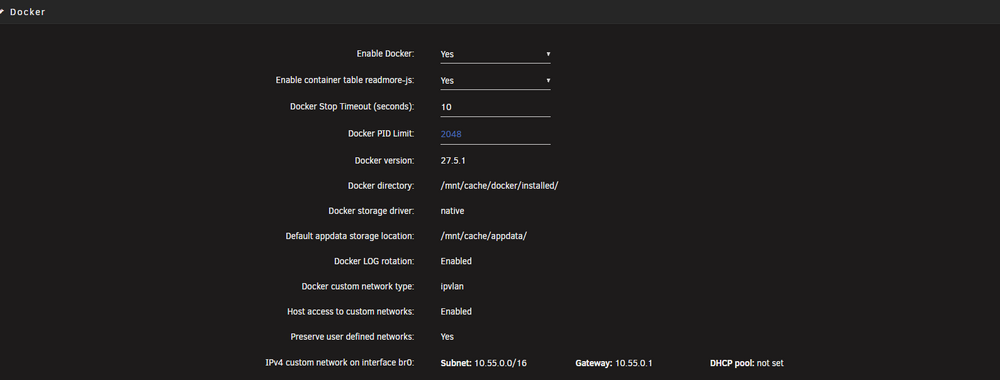
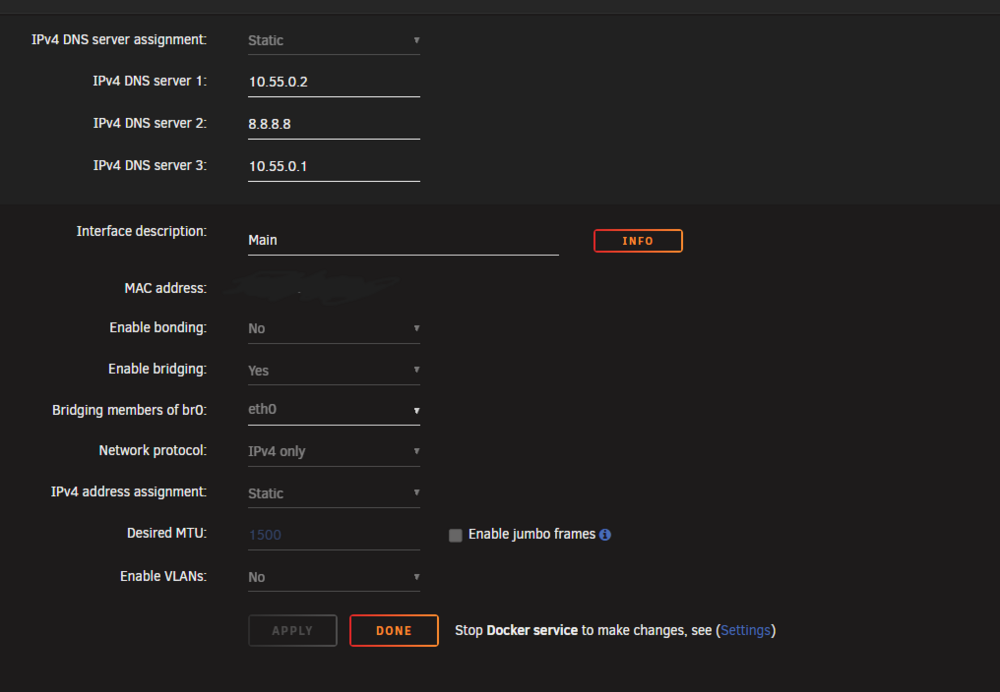
Thanks for getting back. Just to be clear, and I no not make another misstake. Does this mean in my case the following... - important, i'm on IPVLan NOT on MacLan, does this make any difference for your suggested script? the command I've postetd earlier was maclan, think this was one of my mistakes.... docker: VM Network-settings: Command I've adjusted: #!/bin/bash # Wait at boot sleep 30 echo "Fixing Docker shim bridge..." ifconfig shim-br0 down 2>/dev/null ip link set shim-br down 2>/dev/null ip addr flush dev shim-br0 ip addr add 10.55.0.189/24 dev shim-br0 ip link set shim-br0 up echo "Docker shim interface configured." ip a is this correct? I will use user scripts to add this script at starting the array, or is there a better way of doing it? Thx

-
Hi, i've recently detected another issue I have with unraid. I'm running Adguard (docker container) on a custom Network br:0 and wanted to ping it via the host console, with the result of: ;; communications error to 10.55.0.2#53: host unreachable Digging a bit deeper I've found a possible solution: activate "Host access to custom networks:", but it was already activated. then i found out that maye the shim network is not crated, which is the case. By diggging into this threat here and there ive recreated the shim by using the command: ip link add shim-br0 link br0 type macvlan mode bridge ip link set shim-br0 up all docker containers with the br0 custom network won't start. Only a restart solved the problem. I've attached the diagnosis, hope someone can help me to fix the issue. homeservercs-diagnostics-20250516-2337.zip
-
Thank you!
-
thank you for your help, I found a Sandisk Cruzer Blade in my inventory and transfer the license and boot stick. After everything boot up again, i created another diagnostic file. Would be great if someone can check again and finds anything left. Thanks in advance and for your help, great community homeservercs-diagnostics-20250506-0749.zip
-
Ok, that means I have to replace the unraid USB-stick? First I've created a flash drive Backup. Are there any recommendations for a "good" usb stick? Currently I have an 8gb Transcend
-
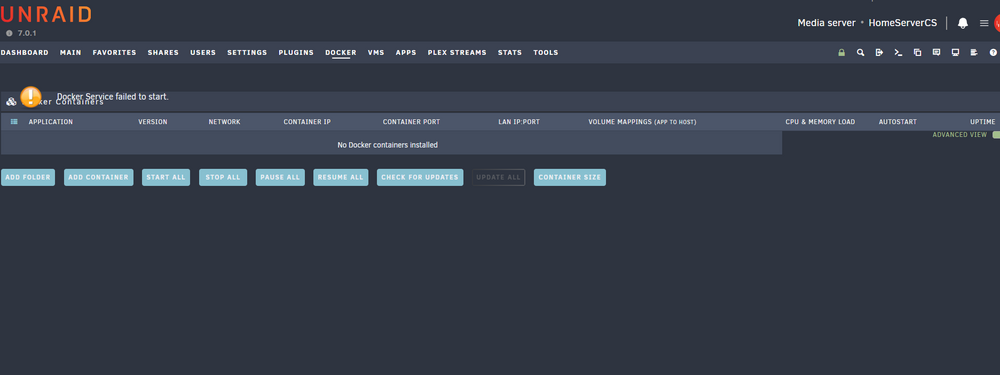
Hey, now it's time to open a threat, I have no further ideas and need help from some experts. Since some days unraid have some strange behaviours which are relativly random but maybe you guys can find something out based on the diagnostics. Behaviours: 1.Sometimes the GUI is not reachable, even restarting Nginx via putty does not work, got it up and running again after rebooting the server. Logs shows also some binding issues. Also found this error: [crit] 23580#23580: *18766 SSL_read() failed (SSL: error:0A000119:SSL routines::decryption failed or bad record mac error:0A000139:SSL routines::record layer failure) while processing HTTP/2 connection, client: 10.55.0.xx, server: 10.55.0.xx 2. Then I have some issues with docker, this is the third time it happened in the last 2 days, that my docker completly crashed. If I'm opening the docker tab it shows: Docker Service failed to start. - Logs shows something like: unexpected fault address 0x2759000 fatal error: fault [signal SIGBUS: bus error code=0x2 addr=0x2759000 pc=0x2759000] goroutine 121 [running]: panic during panic SIGBUS: bus error PC=0x2039cae m=11 sigcode=2 goroutine 0 [idle]: What was causing the issue today; I've edit a docker image and let it recreate, then docker services crashes. In the background there was Clam AV on 4 Threats out of 8 running with 100% CPU usage (for the 4 Threats) - In relates to docker, clamAV was the only docker which I could image is causing this behaviour. Some other "strange" output i got from the logs, which i do not understand: May 5 09:30:49 HomeServerCS kernel: docker0: port 9(veth1c8eadc) entered disabled state May 5 09:30:49 HomeServerCS kernel: veth1b77dda: renamed from eth0 May 5 09:30:50 HomeServerCS kernel: docker0: port 9(veth1c8eadc) entered disabled state May 5 09:30:50 HomeServerCS kernel: veth1c8eadc (unregistering): left allmulticast mode May 5 09:30:50 HomeServerCS kernel: veth1c8eadc (unregistering): left promiscuous mode May 5 09:30:50 HomeServerCS kernel: docker0: port 9(veth1c8eadc) entered disabled state May 5 09:30:50 HomeServerCS kernel: docker0: port 9(vethc619208) entered blocking state May 5 09:30:50 HomeServerCS kernel: docker0: port 9(vethc619208) entered disabled state 3. Slow Interface of Unraid in general - maye this is normal but since 7.x is really slow, especially, App Tab, Docker and Main tag Would be great if we can fix the issues and Unraid will be stable again. Thanks homeservercs-diagnostics-20250505-1155.zip
-
kann es ggf. auch an Powertop liegen? Ich habe gelesen, dass einige mit der Version 2.14 mit neueren Intel CPUs falsche werte bekommen. Erst mit der 2.15 wurden Alder Lake und Raptor Lake hinzugefügt. link zu den release notes: https://github.com/fenrus75/powertop/releases
-
Hab’s dir per pm geschickt, gehört hier weniger in den Faden
-
Top ich werde auch berichten
-
Danke dir! BIOS file meinst du dieses hier oder: https://drive.google.com/drive/mobile/folders/1a_t2ACHpWfYTWUW2vVwIbLm0aa_-YB87?usp=sharing ich bin auch gespannt ob das q670 an deinen Verbrauch rankommt, aber mir war vpro wichtig. aktuell gibts das q670 für knapp 190 und die H-Variante sogar für 160€, da bin ich mal das Risiko eingegangen. Wenn das alles gar nicht funktioniert, muss ich doch auf einen w680 wechseln, der braucht dann aber gut mehr im Idle. wäre toll, wenn du weiterhin deine Updates mit uns teilen kannst. Ich werde das auch tun, sobald Board und Komponenten da sind.
-
@nookie gibts schon was neues bzgl dem I5? Hab es jetzt auch gewagt und das Brett bestellt. Drauf soll entweder ein 14600 oder eben die t-Variante. Kann man im bios TDP einstellen, das wäre natürlich ideal für die non-t Variante
-
Ja ein Handbuch habe ich leider auch nicht gefunden, das wäre nochmal interessant gewesen. Auf jeden Fall schonmal gut zu sehen, dass das board doch ganz gut power effizient ist, trotz den beiden Intel nics die ja nicht in den ASPM mode gehen. Das die Satas direkt an den Chip angebunden sind, hilft sicherlich beim Energiesparen.. Jetzt wäre es nur noch gut wenn das board mit einem I5-12660/13600 oder 14600 stabil läuft ohne dass die VRMs auf 200 grad laufen oder das system instabil wird. Wäre super wenn du uns/mich am läufen halten könntest
-
@nookie mir ist das Board auch aufgefallen und könnte ein Kandidat für mein neues Nas sein. Was ich mich allerdings frage und dazu habe ich leider bis dato nix gefunden ist, welcher Sata Controller ist denn dort verbaut, ist es der JMB, welcher ja nicht so pro stromsparend ist oder ein ASMedia? Vielleicht kannst du das herausfinden. Auch habe ich gelesen, dass die Spannungsversorgung nicht für high TDP CPUs sein soll, ist irgendwo im DB mit 65 Watt TDP angegeben. Heißt das mann ist auf die T-serie oder kleinen prozessoren angewiesen, oder gehen auch 14600er und höher?
-
so habe das problem lösen können, indem ich den neusten offiziellen Portainer Container gezogen haben. Da hat sich wohl noch ein altes release eingeschlichen. Warum ich den Portianer Container auch noch benötige, da ich bis dato noch keine andere Lösung gefunden haben innerhalb unraid, ist, wenn ich mehrere Container netwerkseitig über einen dedizierten Docker Container laufen lassen möchte, diese beiden container aber standardmäßig den selben Port nutzen, bsp 8080, dann kommt es zu einem Konflikt, da der Netzwerkseitige, nach außen gehende Container (z.b. VPN) ja nicht weiß, welche datenpakete jetzt zu dem einen Docker Container mit 8080 gehen und welche zu dem anderen mit port 8080. In Portainer kann man das spezifische Doker Container File anpassen und eine neuen StandardPort hinterlegen. In Unraid direkt, kann ich meines wissen nach nur ein Portmapping betreiben. Da ich allerdings alle PortKonfigurationen löschen muss, da diese ja nur noch über den VPN Container geroutet werden kommt es zu einem Konflikt, außer der initiale Port wird bei deployment des containers geändert und das geht meines Wissens nach mit den community images nicht. Oder gibts da einen einfachen Workaround?


