




Skip to content
View in the app

A better way to browse. Learn more.

Unraid

A full-screen app on your home screen with push notifications, badges and more.

To install this app on iOS and iPadOS
  1. Tap the Share icon in Safari
  2. Scroll the menu and tap Add to Home Screen.
  3. Tap Add in the top-right corner.
To install this app on Android
  1. Tap the 3-dot menu (⋮) in the top-right corner of the browser.
  2. Tap Add to Home screen or Install app.
  3. Confirm by tapping Install.

Nutt

Members
  • Joined

Everything posted by Nutt

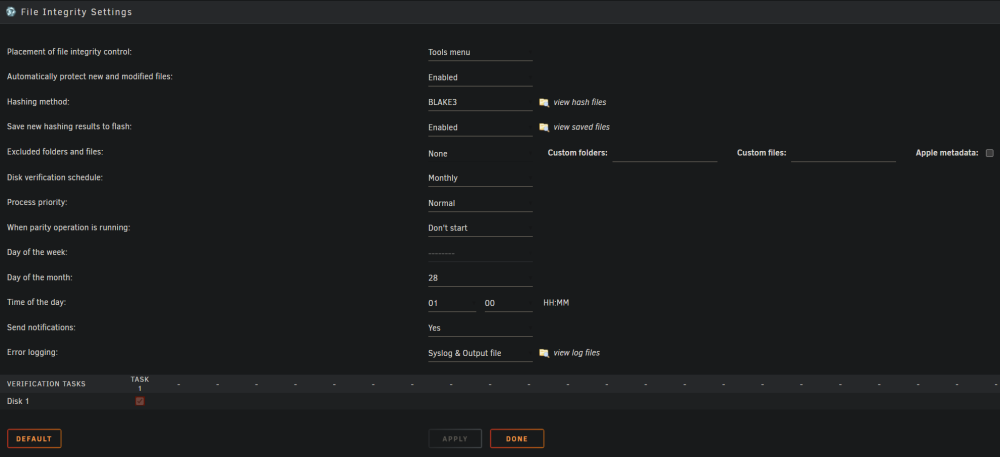
  1. Hello, I have 3 issues with this plugin and I cannot find any answers. 1. Build and verification progress (and ETA) are calculated only for part of files. After that, progress is 100%, but build and verification continue for the rest of the files (screen attached). 2. Automatically protect new and modified files is not working. When I add or modify a file, "Export up-to-date" status changes from "completed operation" to "open operation," but the file has no extended attributes generated or updated hash. I have to run build manually to generate missing hashes. 3. I think as a consequence of 2., a new hashing result daily file is not generated. My configuration: I wonder if rsnapshots and multiple links to the same file can be sources of problems.

Account

Navigation

Search

Search

Configure browser push notifications

Chrome (Android)
  1. Tap the lock icon next to the address bar.
  2. Tap Permissions → Notifications.
  3. Adjust your preference.
Chrome (Desktop)
  1. Click the padlock icon in the address bar.
  2. Select Site settings.
  3. Find Notifications and adjust your preference.
