Odur
Members
-
Joined
-
Last visited
-
I personally wouldn't mind this, if its something you'd be willing to do. It's been a big thing that I've wanted for a long time not sure about others. Thank you for the other info 😃
-
Any chance we can get an option to turn off auto updating on container start please? It's very important because mod development lags behind game build releases and some of us would rather have working servers than the most current update. If at all possible the ability to pick specific builds would be even better.
-
Couldn't figure out why I was having an issue with the API connecting till I looked deeper at Chrome, they changed something. go to chrome://settings/performance if like me you have memory saver turned on try adding https://connect.myunraid.net/ to the "Always keep these sites active" list. hope this helps someone.
-
Sorry where might I find your discord link?
-
This is actually the guide I was following initially, I think I have some kind of issue preventing it from working normally. My issue is the server won't start and the few times I thought it did which I had no way of actually telling for sure it didn't show up in the server list. I can't connect via direct IP either. if you need more information let me know please. Sorry I thought I should have been more clear about my issue before.
-
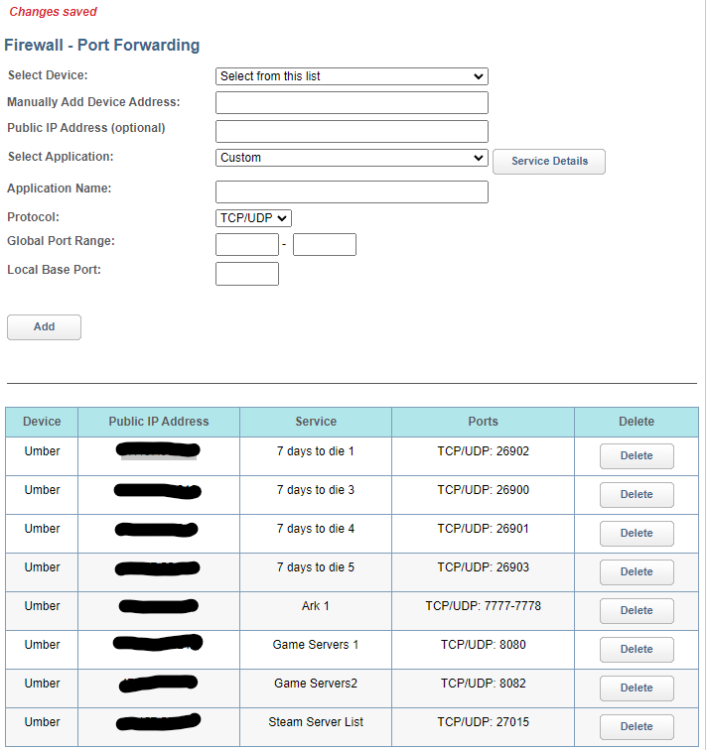
This is about the 7 Days Game Server Docker. I'd like to start by saying I'm very new to unraid and Linux based OS's in general so my issue is very likely a PEBKAC or ID10T error. I very much appreciate that anyone who might help me here is doing so at the expense of their own time and effort. Thank you ahead of time for even reading this. I've been struggling with this issue for about 3 days so far. I've run the fix common problems plugin, thanks for that btw. I don't think the server ever gets to a running state. I've tried searching through this thread and google looking for a way to fix this myself, I'm honestly not sure what to search for however. After trying various things like reinstalling the docker many times, running as default and forwarding ports or even disabling the firewall totally. I've also tried force updating the docker. I've changed folder locations to see if it might have been a permissions issue. I don't even see that it's created any new save games. I've also tried editing the server config to something much more personal with different ports a custom map, disabled EAC, server password and other options. I'm not sure what else to include here, I'm really trying to make to give as much info as possible. Thank you again for your time and effort. Pulling image: ich777/steamcmd:7dtd IMAGE ID [7dtd]: Pulling from ich777/steamcmd. Status: Image is up to date for ich777/steamcmd:7dtd TOTAL DATA PULLED: 0 B Stopping container: 7DaysToDie Successfully stopped container: 7DaysToDie Removing container: 7DaysToDie Successfully removed container: 7DaysToDie Command execution docker run -d --name='7DaysToDie' --net='bridge' --cpuset-cpus='1,2,3,4,5,6,7' -e TZ="America/Los_Angeles" -e HOST_OS="Unraid" -e HOST_HOSTNAME="Umber" -e HOST_CONTAINERNAME="7DaysToDie" -e 'GAME_ID'='294420 -batchmode -nographics' -e 'SERVERCONFIG'='serverconfig.xml' -e 'GAME_PARAMS'='-logfile 7DaysToDie_Data/output_log.txt $@' -e 'VALIDATE'='false' -e 'ENABLE_BEPINEX'='false' -e 'USERNAME'='' -e 'PASSWRD'='' -e 'UID'='99' -e 'GID'='100' -l net.unraid.docker.managed=dockerman -l net.unraid.docker.icon='https://raw.githubusercontent.com/ich777/docker-templates/master/ich777/images/7dtd.png' -p '26900:26900/tcp' -p '26900:26900/udp' -p '26901:26901/udp' -p '26902:26902/udp' -p '26903:26903/udp' -p '8080:8080/tcp' -p '8082:8082/tcp' -p '27015:27015/udp' -v '/mnt/user/games/steamcmd':'/serverdata/steamcmd':'rw' -v '/mnt/cache/games/7dtd':'/serverdata/serverfiles':'rw' --restart=unless-stopped 'ich777/steamcmd:7dtd' cc81c90909a92825efe534330e63200918471a1c382639c6b15d4539b935f0b0 The command finished successfully! <?xml version="1.0"?> <ServerSettings> <!-- GENERAL SERVER SETTINGS --> <!-- Server representation --> <property name="ServerName" value="My Game Host"/> <!-- Whatever you want the name of the server to be. --> <property name="ServerDescription" value="A 7 Days to Die server"/> <!-- Whatever you want the server description to be, will be shown in the server browser. --> <property name="ServerWebsiteURL" value=""/> <!-- Website URL for the server, will be shown in the serverbrowser as a clickable link --> <property name="ServerPassword" value=""/> <!-- Password to gain entry to the server --> <property name="ServerLoginConfirmationText" value="" /> <!-- If set the user will see the message during joining the server and has to confirm it before continuing. For more complex changes to this window you can change the "serverjoinrulesdialog" window in XUi --> <property name="Region" value="NorthAmericaEast" /> <!-- The region this server is in. Values: NorthAmericaEast, NorthAmericaWest, CentralAmerica, SouthAmerica, Europe, Russia, Asia, MiddleEast, Africa, Oceania --> <property name="Language" value="English" /> <!-- Primary language for players on this server. Values: Use any language name that you would users expect to search for. Should be the English name of the language, e.g. not "Deutsch" but "German" --> <!-- Networking --> <property name="ServerPort" value="26900"/> <!-- Port you want the server to listen on. Keep it in the ranges 26900 to 26905 or 27015 to 27020 if you want PCs on the same LAN to find it as a LAN server. --> <property name="ServerVisibility" value="2"/> <!-- Visibility of this server: 2 = public, 1 = only shown to friends, 0 = not listed. As you are never friend of a dedicated server setting this to "1" will only work when the first player connects manually by IP. --> <property name="ServerDisabledNetworkProtocols" value="SteamNetworking"/> <!-- Networking protocols that should not be used. Separated by comma. Possible values: LiteNetLib, SteamNetworking. Dedicated servers should disable SteamNetworking if there is no NAT router in between your users and the server or when port-forwarding is set up correctly --> <property name="ServerMaxWorldTransferSpeedKiBs" value="512"/> <!-- Maximum (!) speed in kiB/s the world is transferred at to a client on first connect if it does not have the world yet. Maximum is about 1300 kiB/s, even if you set a higher value. --> <!-- Slots --> <property name="ServerMaxPlayerCount" value="8"/> <!-- Maximum Concurrent Players --> <property name="ServerReservedSlots" value="0"/> <!-- Out of the MaxPlayerCount this many slots can only be used by players with a specific permission level --> <property name="ServerReservedSlotsPermission" value="100"/> <!-- Required permission level to use reserved slots above --> <property name="ServerAdminSlots" value="0"/> <!-- This many admins can still join even if the server has reached MaxPlayerCount --> <property name="ServerAdminSlotsPermission" value="0"/> <!-- Required permission level to use the admin slots above --> <!-- Admin interfaces --> <property name="WebDashboardEnabled" value="false"/> <!-- Enable/disable the web dashboard --> <property name="WebDashboardPort" value="8080"/> <!-- Port of the web dashboard --> <property name="WebDashboardUrl" value=""/> <!-- External URL to the web dashboard if not just using the public IP of the server, e.g. if the web dashboard is behind a reverse proxy. Needs to be the full URL, like "https://domainOfReverseProxy.tld:1234/". Can be left empty if directly using the public IP and dashboard port --> <property name="EnableMapRendering" value="false"/> <!-- Enable/disable rendering of the map to tile images while exploring it. This is used e.g. by the web dashboard to display a view of the map. --> <property name="TelnetEnabled" value="true"/> <!-- Enable/Disable the telnet --> <property name="TelnetPort" value="8081"/> <!-- Port of the telnet server --> <property name="TelnetPassword" value=""/> <!-- Password to gain entry to telnet interface. If no password is set the server will only listen on the local loopback interface --> <property name="TelnetFailedLoginLimit" value="10"/> <!-- After this many wrong passwords from a single remote client the client will be blocked from connecting to the Telnet interface --> <property name="TelnetFailedLoginsBlocktime" value="10"/> <!-- How long will the block persist (in seconds) --> <property name="TerminalWindowEnabled" value="true"/> <!-- Show a terminal window for log output / command input (Windows only) --> <!-- Folder and file locations --> <property name="AdminFileName" value="serveradmin.xml"/> <!-- Server admin file name. Path relative to the SaveGameFolder --> <property name="UserDataFolder" value="/serverdata/serverfiles/User" /> <property name="SaveGameFolder" value="/serverdata/serverfiles/Saves" /> <!-- Other technical settings --> <property name="EACEnabled" value="true"/> <!-- Enables/Disables EasyAntiCheat --> <property name="HideCommandExecutionLog" value="0"/> <!-- Hide logging of command execution. 0 = show everything, 1 = hide only from Telnet/ControlPanel, 2 = also hide from remote game clients, 3 = hide everything --> <property name="MaxUncoveredMapChunksPerPlayer" value="131072"/> <!-- Override how many chunks can be uncovered on the ingame map by each player. Resulting max map file size limit per player is (x * 512 Bytes), uncovered area is (x * 256 m²). Default 131072 means max 32 km² can be uncovered at any time --> <property name="PersistentPlayerProfiles" value="false" /> <!-- If disabled a player can join with any selected profile. If true they will join with the last profile they joined with --> <!-- GAMEPLAY --> <!-- World --> <property name="GameWorld" value="Navezgane"/> <!-- "RWG" (see WorldGenSeed and WorldGenSize options below) or any already existing world name in the Worlds folder (currently shipping with e.g. "Navezgane", "PREGEN01", ...) --> <property name="WorldGenSeed" value="asdf"/> <!-- If RWG this is the seed for the generation of the new world. If a world with the resulting name already exists it will simply load it --> <property name="WorldGenSize" value="6144"/> <!-- If RWG, this controls the width and height of the created world. Officially supported sizes are between 6144 and 10240 and must be a multiple of 2048, e.g. 6144, 8192, 10240. --> <property name="GameName" value="My Game"/> <!-- Whatever you want the game name to be. This affects the save game name as well as the seed used when placing decoration (trees etc) in the world. It does not control the generic layout of the world if creating an RWG world --> <property name="GameMode" value="GameModeSurvival"/> <!-- GameModeSurvival --> <!-- Difficulty --> <property name="GameDifficulty" value="1"/> <!-- 0 - 5, 0=easiest, 5=hardest --> <property name="BlockDamagePlayer" value="100" /> <!-- How much damage do players to blocks (percentage in whole numbers) --> <property name="BlockDamageAI" value="100" /> <!-- How much damage do AIs to blocks (percentage in whole numbers) --> <property name="BlockDamageAIBM" value="100" /> <!-- How much damage do AIs during blood moons to blocks (percentage in whole numbers) --> <property name="XPMultiplier" value="100" /> <!-- XP gain multiplier (percentage in whole numbers) --> <property name="PlayerSafeZoneLevel" value="5" /> <!-- If a player is less or equal this level he will create a safe zone (no enemies) when spawned --> <property name="PlayerSafeZoneHours" value="5" /> <!-- Hours in world time this safe zone exists --> <!-- --> <property name="BuildCreate" value="false" /> <!-- cheat mode on/off --> <property name="DayNightLength" value="60" /> <!-- real time minutes per in game day: 60 minutes --> <property name="DayLightLength" value="18" /> <!-- in game hours the sun shines per day: 18 hours day light per in game day --> <property name="DropOnDeath" value="1" /> <!-- 0 = nothing, 1 = everything, 2 = toolbelt only, 3 = backpack only, 4 = delete all --> <property name="DropOnQuit" value="0" /> <!-- 0 = nothing, 1 = everything, 2 = toolbelt only, 3 = backpack only --> <property name="BedrollDeadZoneSize" value="15" /> <!-- Size (box "radius", so a box with 2 times the given value for each side's length) of bedroll deadzone, no zombies will spawn inside this area, and any cleared sleeper volumes that touch a bedroll deadzone will not spawn after they've been cleared. --> <property name="BedrollExpiryTime" value="45" /> <!-- Number of real world days a bedroll stays active after owner was last online --> <!-- Performance related --> <property name="MaxSpawnedZombies" value="64" /> <!-- This setting covers the entire map. There can only be this many zombies on the entire map at one time. Changing this setting has a huge impact on performance. --> <property name="MaxSpawnedAnimals" value="50" /> <!-- If your server has a large number of players you can increase this limit to add more wildlife. Animals don't consume as much CPU as zombies. NOTE: That this doesn't cause more animals to spawn arbitrarily: The biome spawning system only spawns a certain number of animals in a given area, but if you have lots of players that are all spread out then you may be hitting the limit and can increase it. --> <property name="ServerMaxAllowedViewDistance" value="12" /> <!-- Max viewdistance a client may request (6 - 12). High impact on memory usage and performance. --> <property name="MaxQueuedMeshLayers" value="1000" /> <!-- Maximum amount of Chunk mesh layers that can be enqueued during mesh generation. Reducing this will improve memory usage but may increase Chunk generation time --> <!-- Zombie settings --> <property name="EnemySpawnMode" value="true" /> <!-- Enable/Disable enemy spawning --> <property name="EnemyDifficulty" value="0" /> <!-- 0 = Normal, 1 = Feral --> <property name="ZombieFeralSense" value="0" /> <!-- 0-3 (Off, Day, Night, All) --> <property name="ZombieMove" value="0" /> <!-- 0-4 (walk, jog, run, sprint, nightmare) --> <property name="ZombieMoveNight" value="3" /> <!-- 0-4 (walk, jog, run, sprint, nightmare) --> <property name="ZombieFeralMove" value="3" /> <!-- 0-4 (walk, jog, run, sprint, nightmare) --> <property name="ZombieBMMove" value="3" /> <!-- 0-4 (walk, jog, run, sprint, nightmare) --> <property name="BloodMoonFrequency" value="7" /> <!-- What frequency (in days) should a blood moon take place. Set to "0" for no blood moons --> <property name="BloodMoonRange" value="0" /> <!-- How many days can the actual blood moon day randomly deviate from the above setting. Setting this to 0 makes blood moons happen exactly each Nth day as specified in BloodMoonFrequency --> <property name="BloodMoonWarning" value="8" /> <!-- The Hour number that the red day number begins on a blood moon day. Setting this to -1 makes the red never show. --> <property name="BloodMoonEnemyCount" value="8" /> <!-- This is the number of zombies that can be alive (spawned at the same time) at any time PER PLAYER during a blood moon horde, however, MaxSpawnedZombies overrides this number in multiplayer games. Also note that your game stage sets the max number of zombies PER PARTY. Low game stage values can result in lower number of zombies than the BloodMoonEnemyCount setting. Changing this setting has a huge impact on performance. --> <!-- Loot --> <property name="LootAbundance" value="100" /> <!-- percentage in whole numbers --> <property name="LootRespawnDays" value="7" /> <!-- days in whole numbers --> <property name="AirDropFrequency" value="72"/> <!-- How often airdrop occur in game-hours, 0 == never --> <property name="AirDropMarker" value="true"/> <!-- Sets if a marker is added to map/compass for air drops. --> <!-- Multiplayer --> <property name="PartySharedKillRange" value="100"/> <!-- The distance you must be within to receive party shared kill xp and quest party kill objective credit. --> <property name="PlayerKillingMode" value="3" /> <!-- Player Killing Settings (0 = No Killing, 1 = Kill Allies Only, 2 = Kill Strangers Only, 3 = Kill Everyone) --> <!-- Land claim options --> <property name="LandClaimCount" value="3"/> <!-- Maximum allowed land claims per player. --> <property name="LandClaimSize" value="41"/> <!-- Size in blocks that is protected by a keystone --> <property name="LandClaimDeadZone" value="30"/> <!-- Keystones must be this many blocks apart (unless you are friends with the other player) --> <property name="LandClaimExpiryTime" value="7"/> <!-- The number of real world days a player can be offline before their claims expire and are no longer protected --> <property name="LandClaimDecayMode" value="0"/> <!-- Controls how offline players land claims decay. 0=Slow (Linear) , 1=Fast (Exponential), 2=None (Full protection until claim is expired). --> <property name="LandClaimOnlineDurabilityModifier" value="4"/> <!-- How much protected claim area block hardness is increased when a player is online. 0 means infinite (no damage will ever be taken). Default is 4x --> <property name="LandClaimOfflineDurabilityModifier" value="4"/> <!-- How much protected claim area block hardness is increased when a player is offline. 0 means infinite (no damage will ever be taken). Default is 4x --> <property name="LandClaimOfflineDelay" value="0"/> <!-- The number of minutes after a player logs out that the land claim area hardness transitions from online to offline. Default is 0 --> <property name="DynamicMeshEnabled" value="true"/> <!-- Is Dynamic Mesh system enabled --> <property name="DynamicMeshLandClaimOnly" value="true"/> <!-- Is Dynamic Mesh system only active in player LCB areas --> <property name="DynamicMeshLandClaimBuffer" value="3"/> <!-- Dynamic Mesh LCB chunk radius --> <property name="DynamicMeshMaxItemCache" value="3"/> <!-- How many items can be processed concurrently, higher values use more RAM --> <property name="TwitchServerPermission" value="90"/> <!-- Required permission level to use twitch integration on the server --> <property name="TwitchBloodMoonAllowed" value="false"/> <!-- If the server allows twitch actions during a blood moon. This could cause server lag with extra zombies being spawned during blood moon. --> <property name="MaxChunkAge" value="-1"/> <!-- The number of in-game days which must pass since visiting a chunk before it will reset to its original state if not revisited or protected (e.g. by a land claim or bedroll being in close proximity). --> <property name="SaveDataLimit" value="-1"/> <!-- The maximum disk space allowance for each saved game in megabytes (MB). Saved chunks may be forceably reset to their original states to free up space when this limit is reached. Negative values disable the limit. --> <!-- There are several game settings that you cannot change when starting a new game. You can use console commands to change at least some of them ingame. setgamepref BedrollDeadZoneSize 30 --> </ServerSettings> text error warn system array login ---Ensuring UID: 99 matches user--- ---Ensuring GID: 100 matches user--- ---Setting umask to 000--- ---Checking for optional scripts--- ---No optional script found, continuing--- ---Taking ownership of data...--- ---Starting...--- ---Update SteamCMD--- Redirecting stderr to '/serverdata/Steam/logs/stderr.txt' [ 0%] Checking for available updates... [----] Verifying installation... Steam Console Client (c) Valve Corporation - version 1689020152 -- type 'quit' to exit -- Loading Steam API...dlmopen steamservice.so failed: steamservice.so: cannot open shared object file: No such file or directory OK Connecting anonymously to Steam Public...OK Waiting for client config...OK Waiting for user info...OK ---Update Server--- Redirecting stderr to '/serverdata/Steam/logs/stderr.txt' [ 0%] Checking for available updates... [----] Verifying installation... Steam Console Client (c) Valve Corporation - version 1689020152 -- type 'quit' to exit -- Loading Steam API...dlmopen steamservice.so failed: steamservice.so: cannot open shared object file: No such file or directory OK Connecting anonymously to Steam Public...OK Waiting for client config...OK Waiting for user info...OK Success! App '294420' already up to date. ---Prepare Server--- ---SaveGameFolder location correct--- ---Savegame location found--- ---UserDataFolder location correct--- ---UserDataFolder location found--- ---Server ready--- ---Start Server--- [UnityMemory] Configuration Parameters - Can be set up in boot.config "memorysetup-bucket-allocator-granularity=16" "memorysetup-bucket-allocator-bucket-count=8" "memorysetup-bucket-allocator-block-size=4194304" "memorysetup-bucket-allocator-block-count=1" "memorysetup-main-allocator-block-size=16777216" "memorysetup-thread-allocator-block-size=16777216" "memorysetup-gfx-main-allocator-block-size=16777216" "memorysetup-gfx-thread-allocator-block-size=16777216" "memorysetup-cache-allocator-block-size=4194304" "memorysetup-typetree-allocator-block-size=2097152" "memorysetup-profiler-bucket-allocator-granularity=16" "memorysetup-profiler-bucket-allocator-bucket-count=8" "memorysetup-profiler-bucket-allocator-block-size=4194304" "memorysetup-profiler-bucket-allocator-block-count=1" "memorysetup-profiler-allocator-block-size=16777216" "memorysetup-profiler-editor-allocator-block-size=1048576" "memorysetup-temp-allocator-size-main=4194304" "memorysetup-job-temp-allocator-block-size=2097152" "memorysetup-job-temp-allocator-block-size-background=1048576" "memorysetup-job-temp-allocator-reduction-small-platforms=262144" "memorysetup-temp-allocator-size-background-worker=32768" "memorysetup-temp-allocator-size-job-worker=262144" "memorysetup-temp-allocator-size-preload-manager=262144" "memorysetup-temp-allocator-size-nav-mesh-worker=65536" "memorysetup-temp-allocator-size-audio-worker=65536" "memorysetup-temp-allocator-size-cloud-worker=32768" "memorysetup-temp-allocator-size-gfx=262144" Mono path[0] = '/serverdata/serverfiles/7DaysToDieServer_Data/Managed' Mono config path = '/serverdata/serverfiles/7DaysToDieServer_Data/MonoBleedingEdge/etc' Preloaded 'libEOSSDK-Linux-Shipping.so' Preloaded 'libMagick.so' Preloaded 'lib_burst_generated.so' Preloaded 'libgetrss.so' Preloaded 'libsteam_api.so' Preloaded 'steamclient.so' Unable to preload the following plugins: libMouseLib.so Loading player data from /serverdata/serverfiles/7DaysToDieServer_Data/data.unity3d PlayerPrefs - Creating folder: /serverdata/.config/unity3d/The Fun Pimps PlayerPrefs - Creating folder: /serverdata/.config/unity3d/The Fun Pimps/7 Days To Die - Dedicated Unable to load player prefs Desktop is 0 x 0 @ 0 Hz