




Skip to content
View in the app

A better way to browse. Learn more.

Unraid

A full-screen app on your home screen with push notifications, badges and more.

To install this app on iOS and iPadOS
  1. Tap the Share icon in Safari
  2. Scroll the menu and tap Add to Home Screen.
  3. Tap Add in the top-right corner.
To install this app on Android
  1. Tap the 3-dot menu (⋮) in the top-right corner of the browser.
  2. Tap Add to Home screen or Install app.
  3. Confirm by tapping Install.

Jodo

Members
  • Joined

  • Last visited

Everything posted by Jodo

  1. Not quite sure what I did, if anything, but it's working now. Oddly it only connects on the 2456 port. Regardless, it's working so I'm good to go, thanks!
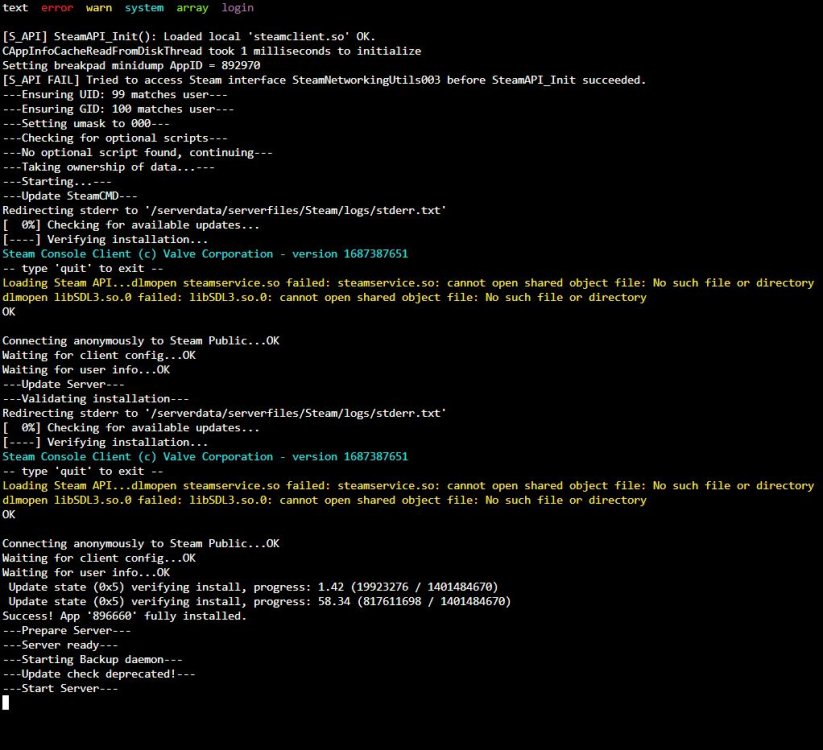
  2. Hello, having trouble with the valheim server in unRAID. I installed the container using the default settings (no valheim+ or bepinex, no port changes) and I cannot connect at all. I've never hosted a valehim server so I'm not sure how the log should look, but to my layman eyes it seems to be hanging for some reason or another. I have tried connecting to the server using IP:PORT (I tried all three available ports 2456-2458) with no luck. I'm sure I just did something wrong but any help would be appreciated! Image of logs attached.

Account

Navigation

Search

Search

Configure browser push notifications

Chrome (Android)
  1. Tap the lock icon next to the address bar.
  2. Tap Permissions → Notifications.
  3. Adjust your preference.
Chrome (Desktop)
  1. Click the padlock icon in the address bar.
  2. Select Site settings.
  3. Find Notifications and adjust your preference.